

Chronock: Calendar & Booking
Pluralworks LLC Productivity iPhoneiPadiPod touch
Chronock: Calendar & Booking is a free Productivity app for iPhone and iPad by Pluralworks LLC. Requires iOS 16.4. Updated November 11, 2026.
- Price
- Free
- on the App Store
- Size
- 72 MB
- Age 4+
- Updated
- Nov 11
- 2026 · v26.11.0
Screenshots
Save to Pinterest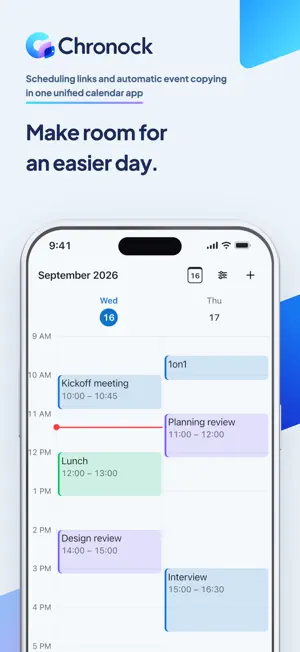


About Chronock: Calendar & Booking
Chronock is a unified calendar app with scheduling links and automatic event copying built in. Manage your work, personal, and side-business calendars, share scheduling links, and block time across accounts in one place. See and edit events from multiple Google Calendars and Microsoft Outlook calendars (Microsoft 365) on a single screen—without switching apps or copying busy blocks by hand. THREE CORE FEATURES • Manage multiple calendars together (Unified calendar) View events from separate work, personal, and side-business accounts in one calendar. Choose a color and visibility setting for each calendar, switch between 1-day, 2-day, 3-day, week, and month views, and adjust text size. Create and edit events directly in Google Calendar or Outlook from the app. • Share a link to schedule meetings (Scheduling links & booking slots) Set the weekdays, hours, and meeting duration for each booking slot to generate a shareable scheduling link. Chronock checks your availability across every connected calendar so invitees only see times when you are truly free. Send the link by email or chat to skip back-and-forth messages, and confirmed bookings are added to your calendar automatically. • Copy events between calendars automatically (Calendar sync) Create a sync rule to copy events from one calendar to another automatically. Copy personal events to your work calendar as “Busy” so the time is blocked without revealing private event titles or details. Reduce manual copy mistakes and double bookings, and keep your availability accurate across Google Calendars, across Outlook calendars, or between Google Calendar and Outlook. BUILT FOR MOBILE • Check today’s schedule from the home screen widget See today’s agenda on your home screen widget without opening the app. • View and edit events offline Events you have already loaded stay visible offline. Any events you create or edit offline are saved on your device and synced when you are back online. MADE FOR • Individuals managing separate Google Calendars for work, personal life, and side projects • People who use Microsoft 365 Outlook at work and Google Calendar for personal or side-business schedules • Anyone who wants to stop sending candidate times back and forth by email or chat • Anyone who wants to block time across calendars without exposing private event details SUPPORTED CALENDARS • Google Calendar • Microsoft Outlook calendars (Microsoft 365 work or school accounts) iCloud Calendar and personal Microsoft accounts (such as Outlook.com) are not supported. PLANS & PRICING Start on the Free plan: • Free plan: Up to 2 connected calendars across Google Calendar and Outlook, 1 booking slot, and 1 one-way sync rule that copies events as “Busy” only. • Individual Pro plan: Available as a monthly or annual auto-renewing subscription in the app. Includes unlimited calendar connections, unlimited booking slots, multiple and two-way sync rules for automatic event copying, and the option to copy event titles and details. Localized pricing and any applicable free-trial eligibility are displayed in the app before you confirm your subscription. ABOUT Developed and operated by Pluralworks LLC, Tokyo. Privacy Policy: https://www.chronock.ai/privacy Terms of Service: https://www.chronock.ai/terms Contact: https://www.chronock.ai/contact
What’s new
Version 26.11.0 · Updated November 11, 2026
- Edit sync rule settings in the app, including reminders for copied events. On paid plans, Resync applies new settings to existing copies. - Added landscape support. On tablets and foldables, tabs appear in a sidebar. - Workspace setup asks for your name, prefilled if you signed up with Google or another account. - Bug fixes and stability improvements.
App privacy
The developer, Pluralworks LLC, reported these privacy practices to Apple.
Data Linked to You
The following data, which may be collected and linked to your identity, may be used for the following purposes:
- Contact Info: Email Address, Name
- User Content: Photos or Videos, Other User Content
- Identifiers: User ID, Device ID
- Diagnostics: Crash Data
- Other Data: Other Data Types
Used for: App Functionality
Alternatives to Chronock: Calendar & Booking
Looking for apps like Chronock: Calendar & Booking? Here are 6 similar apps on the App Store. The highest rated is AI Planner: Daily Planner (5.0/5), and all 6 are free to download.
-
 PATI: Calendar & Tasks
-
 AI Planner: Daily Planner
5.0
-
 Calendoc: Parallel Calendars
-
 Recordo: ADHD Planner & Focus
4.5
-
 Video Summarize AI for YouTube
3.9
-
 IROGAMI: Beautiful Sticky Note
4.8
| App | Rating | Price | Last updated | Compare |
|---|---|---|---|---|
| Chronock: Calendar & Booking | – | Free | November 11, 2026 | |
| PATI: Calendar & Tasks | – | Free | Nov 22, 2026 | Compare |
| AI Planner: Daily Planner | 5.0 / 5 (1) | Free | May 13, 2026 | Compare |
| Calendoc: Parallel Calendars | – | Free | Nov 26, 2026 | Compare |
| Recordo: ADHD Planner & Focus | 4.5 / 5 (10) | Free | Nov 25, 2026 | Compare |
| Video Summarize AI for YouTube | 3.9 / 5 (7) | Free | Aug 1, 2026 | Compare |
| IROGAMI: Beautiful Sticky Note | 4.8 / 5 (483) | Free | Apr 17, 2026 | Compare |