

Wakemark Tasks
Bob Joziasse Productivity iPhoneiPadiPod touch
Wakemark Tasks is a free Productivity app for iPhone and iPad by Bob Joziasse. Requires iOS 26.0. Updated October 22, 2026.
- Price
- Free
- on the App Store
- Size
- 4 MB
- Age 4+
- Updated
- Oct 22
- 2026 · v1.0.1
Screenshots


About Wakemark Tasks
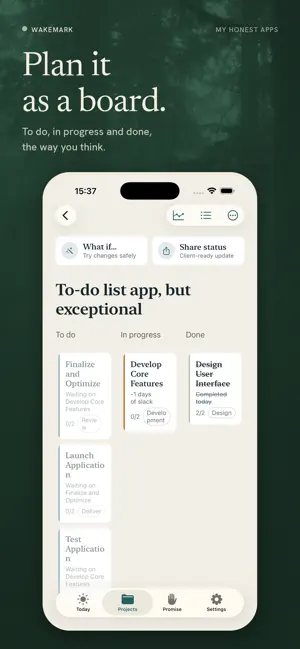
Most to-do apps treat every task the same until you manually sort them. Wakemark does the opposite: it shows you what actually threatens your deadline, and lets everything else fade into the background. Every task you add gets a slack number, literally, how many days of buffer it has before it starts putting your deadline at risk. No manual prioritizing, no drag-to-reorder guesswork. Tap "Why?" on any task and see the exact math behind it, not a black-box score. DESIGNED FOR DEADLINE-CRITICAL WORK Wakemark isn't a general habit tracker or a team project board. It's built for the specific shape of work where a real date is coming: client deliverables, launches, submissions, filings. See your project as a simple list or a lightweight board, switch anytime, both are just two views of the same underlying critical path. SWIPE TO DONE, AND FEEL IT Setting a task's status is a single, satisfying swipe, no menus, no taps through a picker. Finishing the last task standing between you and your deadline is the biggest moment in the app, and it's built to feel like one. BREAK WORK DOWN WITHOUT LOSING THE BIG PICTURE Every task can carry its own simple checklist. Group related tasks into sections within a project, or group whole projects together when you're juggling several for the same client. Nothing here changes how urgency is calculated, organization is just a lens on the same honest numbers underneath. SEE HOW YOU'RE ACTUALLY PACING A burndown chart shows your real progress against an ideal pace, no red flags, no guilt, just the honest shape of where you stand. Wakemark also learns, entirely on your device, how your own estimates tend to compare to reality over time, and uses that to make future suggestions sharper. ON-DEVICE AI THAT SHOWS ITS WORK Describe a project in plain language and get a suggested task breakdown. Type a messy note and have it turned into a structured task. Ask "why" a task is urgent and get a real explanation grounded in your actual numbers, not a guess. Every suggestion is yours to accept, edit, or ignore, nothing is ever applied without you. A WIDGET, NOT A NOTIFICATION Wakemark never pings you. Add a home screen widget to see what's most urgent when you glance at your phone, on your schedule, not the app's. BUILT DIFFERENTLY, ON PURPOSE Wakemark is part of My Honest Apps, a personal promise, not a corporate policy. No accounts. No ads. No analytics SDKs. No data collection of any kind. Everything lives on your device; if you want it synced across your own devices, that's an opt-in choice using your own private iCloud, never anything else. The only way Wakemark makes money is an entirely optional tip jar. Nothing is ever locked behind it. If that sounds like the kind of app you wish more of your apps were, you'll feel at home here.
What’s new
Version 1.0.1 · Updated October 22, 2026
Updated app screenshots
App privacy
The developer, Bob Joziasse, reported these privacy practices to Apple.
Data Not Collected
The developer does not collect any data from this app.
Alternatives to Wakemark Tasks
Looking for apps like Wakemark Tasks? Here are 6 similar apps on the App Store. The highest rated is snipdoo HOME (5.0/5), and all 6 are free to download.
-
 MyDay: AI Planner & Reminders
-
 Client Contact - Time Since
-
 MyClawn: AI Agent & Computer
-
 Long-term goals
1.0
Long-term goals
1.0
-
 Social Curator
4.3
Social Curator
4.3
-
 snipdoo HOME
5.0
snipdoo HOME
5.0
| App | Rating | Price | Last updated | Compare |
|---|---|---|---|---|
| Wakemark Tasks | – | Free | October 22, 2026 | |
| MyDay: AI Planner & Reminders | – | Free | Oct 27, 2026 | Compare |
| Client Contact - Time Since | – | Free | Oct 1, 2026 | Compare |
| MyClawn: AI Agent & Computer | – | Free | Sep 26, 2026 | Compare |
| Long-term goals | 1.0 / 5 (1) | Free | Dec 6, 2023 | Compare |
| Social Curator | 4.3 / 5 (15) | Free | Jul 10, 2026 | Compare |
| snipdoo HOME | 5.0 / 5 (3) | Free | Oct 16, 2025 | Compare |
Compare Wakemark Tasks with the top alternatives: ratings, updates, ASO score and keyword gaps →