

Spentato
Vladimir Karailiev Finance iPhoneiPadiPod touch
Spentato is a free Finance app for iPhone and iPad by Vladimir Karailiev. Requires iOS 16.4. Updated September 24, 2026.
- Price
- Free
- on the App Store
- Size
- 63 MB
- Age 4+
- Updated
- Sep 24
- 2026 · v0.1.1
Screenshots


About Spentato
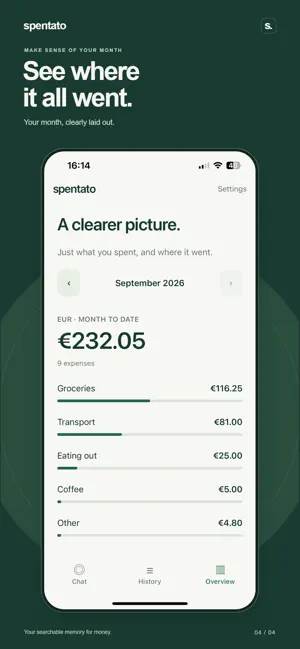
Your searchable memory for money. Spentato makes it easy to remember what you spent. Type a short message like “5 euro at Lidl” or “12.50 lunch yesterday”, then ask where your money went. LOG SPENDING IN SECONDS Record expenses using supported short messages or a simple manual form. Browse your history, edit details, and confirm before deleting a purchase. FIND WHAT YOU SPENT Check monthly totals, look up a merchant, and explore categories such as groceries, eating out and coffee. The app calculates totals from your saved expenses. SEE THE MONTH CLEARLY Get a simple monthly overview of your spending by category. Choose EUR, USD or GBP as your default currency. Different currencies stay separate; Spentato never converts or combines them. LOCAL FIRST Your saved expenses stay on your device. Simple entries, history and supported spending queries work offline. Optional smart understanding helps with messages the offline parser cannot interpret. With your permission, the current message and necessary context are sent to OpenAI through Spentato’s service. Your saved transaction history is not sent. Spentato currently supports English input. There is no cloud sync or dedicated recovery service. Uninstalling the app or losing your device can mean losing your diary. FREE DIARY, OPTIONAL PLUS Local diary features are free. Free smart understanding includes 30 online attempts per calendar month, resetting on the 1st in UTC. Failed or cancelled online attempts may count. Spentato Plus is an optional monthly auto-renewing subscription with no fixed personal monthly request quota. Rate limits, service availability and abuse safeguards still apply. The current subscription price is shown before purchase. Payment is charged to your Apple Account at confirmation. Your subscription renews automatically unless cancelled at least 24 hours before the current period ends. Manage or cancel it in your Apple Account subscription settings. Privacy: https://spentato-info.spendlog-protected-intent.workers.dev/privacy Terms: https://www.apple.com/legal/internet-services/itunes/dev/stdeula/
What’s new
Version 0.1.1 · Updated September 24, 2026
Logging spending is easier, with broader purchase recognition, decimal commas, amount-only entries, and improved handling of common spelling mistakes.
App privacy
The developer, Vladimir Karailiev, reported these privacy practices to Apple.
Data Linked to You
The following data, which may be collected and linked to your identity, may be used for the following purposes:
- Purchases: Purchase History
- Identifiers: User ID
- Financial Info: Other Financial Info
- User Content: Other User Content
- Search History: Search History
- Usage Data: Other Usage Data
- Other Data: Other Data Types
Used for: Analytics, App Functionality
Alternatives to Spentato
Looking for apps like Spentato? Here are 6 similar apps on the App Store. The highest rated is Holistic Money (5.0/5), and all 6 are free to download.
-
 Holistic Money
5.0
-
 Just Money Expense Diary
4.9
-
 Ecoints Wallet by Econt
-
 ePay.bg
1.8
-
 Postbank
4.9
-
 My Fibank
4.7
| App | Rating | Price | Last updated | Compare |
|---|---|---|---|---|
| Spentato | – | Free | September 24, 2026 | |
| Holistic Money | 5.0 / 5 (3) | Free | Oct 9, 2026 | Compare |
| Just Money Expense Diary | 4.9 / 5 (15) | Free | Oct 24, 2026 | Compare |
| Ecoints Wallet by Econt | – | Free | Aug 24, 2026 | Compare |
| ePay.bg | 1.8 / 5 (12) | Free | Oct 15, 2026 | Compare |
| Postbank | 4.9 / 5 (162) | Free | Oct 17, 2026 | Compare |
| My Fibank | 4.7 / 5 (472) | Free | Oct 28, 2026 | Compare |
Compare Spentato with the top alternatives: ratings, updates, ASO score and keyword gaps →