

Water Eject & Dust: Sploosh
Cloud Motion Lab LLC Utilities iPhoneiPadiPod touch
Water Eject & Dust: Sploosh is a free Utilities app for iPhone and iPad by Cloud Motion Lab LLC. Requires iOS 17.0. Updated September 29, 2026.
- Price
- Free
- on the App Store
- Size
- 12 MB
- Age 4+
- Updated
- Sep 29
- 2026 · v1.1.1
Screenshots


About Water Eject & Dust: Sploosh
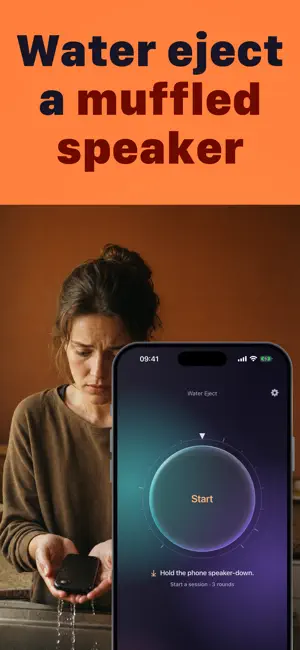
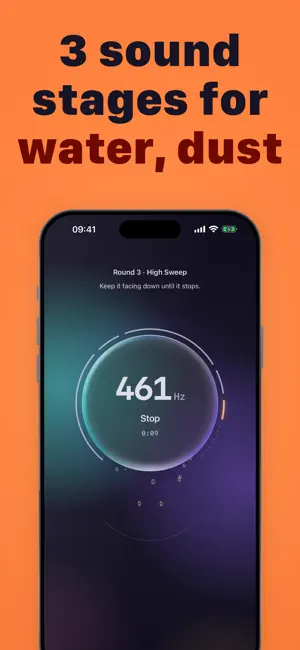
Water Eject plays three rounds at the bottom speaker grille to shake water droplets loose: the pulsed low tone Apple Watch uses after a swim, then a short broadband pulse, then a higher band. It works on the bottom speaker, not on the earpiece, the microphone or the charging port. Hold the phone speaker-down and press Start. Round 1, Low Sweep, 21 seconds. A sweep around the centre you set on the dial, anywhere from 120 to 260 Hz. Then the tap step. Tap the phone gently against your palm, speaker down, until it chimes. That is Apple's own advice for a wet iPhone, and the app counts the taps and moves on by itself. Round 2, Pulse Shots, 18 seconds. Short broadband pulses. The tap step again. Round 3, High Sweep, 12 seconds. A sweep from 400 to 1,000 Hz. Session complete. Let it dry before charging. The tone runs 51 seconds across the three rounds, and the two tap steps sit between them. Drops shake out of the disc on screen while the tone plays, and the phone pulses in your hand with it. The dial sets the centre of the first round's sweep, from 120 to 260 Hz. Rounds 2 and 3 are fixed. How do you check the result? With microphone access and the volume all the way up, the app plays a short chime through the speaker before the session and again after it, then compares the two levels. It tells you whether the speaker came back louder, about the same, or quieter. It never shows a percentage. Play it through the iPhone's own speaker. Disconnect headphones, AirPods or a Bluetooth speaker first, and turn the volume all the way up. It cannot dry the inside of a phone. If the speaker still sounds muffled after a session, let it dry and come back to it. Made for anyone whose iPhone just came out of a pool, the rain, the shower or the sink. Your first session is included. After that, one purchase unlocks unlimited sessions for good: nothing renews, and there are no ads. No account is needed, and the tone is made on the iPhone itself. You can start a session with Siri: say "Start a run in Water Eject" and the app opens and plays the tone. Hold the phone speaker-down and press Start. Terms of Use: https://cmlapps.github.io/watereject/terms.html Privacy Policy: https://cmlapps.github.io/watereject/privacy.html
What’s new
Version 1.1.1 · Updated September 29, 2026
Our App Store page now speaks more languages.
App privacy
The developer, Cloud Motion Lab LLC, reported these privacy practices to Apple.
Data Not Linked to You
The following data, which may be collected but is not linked to your identity, may be used for the following purposes:
- Identifiers: Device ID
- Usage Data: Product Interaction, Other Usage Data
Used for: Analytics
Alternatives to Water Eject & Dust: Sploosh
Looking for apps like Water Eject & Dust: Sploosh? Here are 6 similar apps on the App Store.
-
 Water Eject Pro: Speaker Fix
-
 Speaker Cleaner: Guided Eject
-
 Vivenza For Men Barber Club
-
 Apex Connect+
-
 Water Eject: Clean Wave
-
 Clear Wave-Water Remover Pro
| App | Rating | Price | Last updated | Compare |
|---|---|---|---|---|
| Water Eject & Dust: Sploosh | – | Free | September 29, 2026 | |
| Water Eject Pro: Speaker Fix | – | Free | Jun 10, 2026 | Compare |
| Speaker Cleaner: Guided Eject | – | Free | Oct 22, 2026 | Compare |
| Vivenza For Men Barber Club | – | Free | Apr 20, 2026 | Compare |
| Apex Connect+ | – | Free | Aug 4, 2025 | Compare |
| Water Eject: Clean Wave | – | Free | Jun 9, 2026 | Compare |
| Clear Wave-Water Remover Pro | – | Free | Aug 23, 2026 | Compare |