

Kerog: Tibetan Offline
Ramon Blanquer Ruiz Reference iPhoneiPadiPod touchMac
Kerog: Tibetan Offline is a free Reference app for iPhone and iPad by Ramon Blanquer Ruiz. Requires iOS 17.0. Updated October 6, 2026.
- Price
- Free
- on the App Store
- Size
- 1018 MB
- Age 4+
- Updated
- Oct 6
- 2026 · v1.6
Screenshots


About Kerog: Tibetan Offline
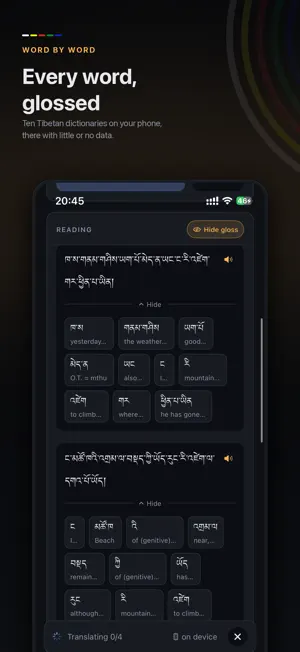
KEROG (Tibetan: skad sgyur rogs pa) — the translator's companion, not the translator. Kerog helps you read and understand Tibetan. Give it a voice note, a photograph of a page, typed text or someone speaking, and it divides each sentence into its words and shows each word's meanings from ten Tibetan dictionaries. Everything runs on the phone, so it works without a connection. Online translators handle whole sentences better, and with a good connection they are worth using. Kerog is for the times they cannot be reached: travelling with little or no data, in a conversation, or when a voice note has just arrived. THE GLOSS Each word shows its meanings from Rangjung Yeshe, Jim Valby, Ives Waldo, Dan Martin, Tsepak Rigdzin and others — 265,000 entries in all. Tap a word for its full entry, each dictionary named, including where they disagree. Gloss looks up every word and stops there, for working through a passage yourself. Translate adds a rough English translation; when a sentence comes out wrong, the gloss shows you why. GLOSSARIES Decide a word's meaning once: keep it in My glossary for every reading, or in a glossary for one text or teacher, and the word opens on it from then on. With iCloud Drive they are the same on all your devices, as spreadsheets in a Kerog folder in Files. WHY IT EXISTS I made Kerog to understand my Lama's messages. He sends voice notes and photographs of texts on WhatsApp, and I had nothing on the phone to help me with them. So Kerog starts from the share sheet: hold a voice note or a photo, choose Share, and pick Kerog. It is for people who know some Tibetan or are learning it: not a way around the language, but a support while you learn it. EVERYTHING HAPPENS ON THIS PHONE Listening, reading pages, translating, speaking and the dictionary all run on the device. There is no account and no server. Nothing you record, type or photograph leaves the phone, and all of it works in aeroplane mode. EXPECT THE TRANSLATION TO GET THINGS WRONG The models are chosen to fit on a phone, and it shows. Names, rare spellings and long sentences are where they fail. Read the English as a rough first pass, and check it against the gloss. THE MODES Audio — record, or share in a voice note from WhatsApp, Messages or Files. Play it back and the sentence being spoken is highlighted. Listen — transcribes and translates while someone is speaking. Each line keeps its audio, so any sentence can be replayed alone. Photo — photograph a page, or share one in. Kerog straightens it and suggests a crop, both adjustable, then reads it line by line. Text — type or paste Tibetan, or English. Look up — the dictionary on its own. Search in Tibetan script, Wylie or phonetics, or say the word aloud. Audio, Listen and Text work both ways: Tibetan to English, and English to Tibetan. CORRECTIONS Every transcript can be corrected: change a syllable, and that sentence is translated and glossed again. SPEAKING Any line of Tibetan can be read aloud, and what is spoken can be shared as an audio file. Type English and hear it in Tibetan, for the person in front of you. MORE ACCURATE WITH THE CLOUD (MONLAM AI) When you have a connection, cloud models are far larger than anything that fits on a phone. In Settings, choose which tasks go to the Cloud — audio, translation, pages — and leave the rest on the phone. It uses monlam.ai's public service, with no key or account. When it is busy or unavailable, the phone takes the task back. Every switch is off until you turn it on, and what is sent is explained before you do. The gloss and the dictionary never leave the phone, whatever the switches say. MADE BY ONE PERSON No advertising, no analytics, no accounts, nothing measured and nothing sold. Kerog is made by one person for a small community, to help people learn Tibetan and understand what their teachers are saying. The models on the phone are about two years old. Newer ones from the Monlam AI team will come in updates.
What’s new
Version 1.6 · Updated October 6, 2026
Glossaries: decide a word's meaning once. Pick the meaning that fits, and Remember on the word's card keeps it, in My glossary for every reading or in a project glossary for one text, course or teacher. From then on the word opens on that meaning, in the gloss and in what Copy gives you. A meaning no dictionary has can be kept in your own words. Choose the glossary in use from the top of the reading, and manage them under Settings, Glossaries. The (?) beside them opens a guide to how they work. Export a glossary as a spreadsheet to edit in Numbers, Excel or Google Sheets, or to send to someone, and import it back, or import a term list your teacher keeps, in Tibetan or Wylie. With iCloud Drive on, your glossaries are the same on all your devices, one spreadsheet each in a Kerog folder you can open in Files. Switch it off under Settings, Glossaries. A dictionary that repeats a meaning now says how many, beside its name. Tap the count to see them.
App privacy
The developer, Ramon Blanquer Ruiz, reported these privacy practices to Apple.
Data Not Linked to You
The following data, which may be collected but is not linked to your identity, may be used for the following purposes:
- User Content: Photos or Videos, Audio Data, Other User Content
Used for: App Functionality
Alternatives to Kerog: Tibetan Offline
Looking for apps like Kerog: Tibetan Offline? Here are 6 similar apps on the App Store. The highest rated is Tibetan Visual Dictionary (5.0/5), and 5 of the 6 are free to download.
-
 Coptic Grammar & Vocab Premium
-
 Kunsel
-
 senge learn
-
 Tibetan Visual Dictionary
5.0
Tibetan Visual Dictionary
5.0
-
 Tibetan Breathology
-
 Gangkar: Learn Tibetan
5.0
Gangkar: Learn Tibetan
5.0
| App | Rating | Price | Last updated | Compare |
|---|---|---|---|---|
| Kerog: Tibetan Offline | – | Free | October 6, 2026 | |
| Coptic Grammar & Vocab Premium | – | 0.99 USD | Dec 16, 2023 | Compare |
| Kunsel | – | Free | Jan 12, 2026 | Compare |
| senge learn | – | Free | Jul 3, 2026 | Compare |
| Tibetan Visual Dictionary | 5.0 / 5 (3) | Free | Oct 13, 2026 | Compare |
| Tibetan Breathology | – | Free | Oct 19, 2025 | Compare |
| Gangkar: Learn Tibetan | 5.0 / 5 (11) | Free | May 14, 2026 | Compare |