

tinwidget: Cute Widget Maker
KERNBASE.STUDIO Photo & Video iPhoneiPadiPod touch
tinwidget: Cute Widget Maker is a free Photo & Video app for iPhone and iPad by KERNBASE.STUDIO. Requires iOS 17.0. Updated October 21, 2026.
- Price
- Free
- on the App Store
- Size
- 148 MB
- Age 4+
- Updated
- Oct 21
- 2026 · v1.2.1
Screenshots



About tinwidget: Cute Widget Maker
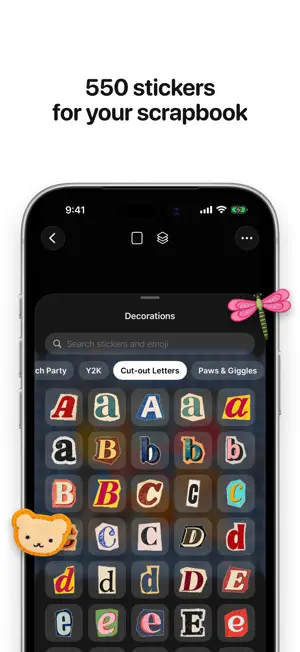
Fill a little tin with photos and stickers, then put it on your Home Screen. tinwidget is a tiny scrapbook. Add your photos as framed prints or cut the people, pets and things out of them, type words in cut-out magazine letters, add stickers from fourteen packs, and arrange it all inside an open tin on a cloth backdrop. Your tin becomes a Home Screen widget in three sizes. • Auto decorate: pick a few photos and tinwidget lays out a finished tin for you, with matching stickers, a title and a backdrop. Tap Shuffle for another look. • Photo frames: add a photo as an instant print, a postage stamp, a film frame, a taped or torn print, a round or black-and-white photo. Change the frame any time. • Photo cutouts: pick a photo and tinwidget lifts the subject out for you. Every cutout is kept, so you can use it again in another tin. • Words three ways: cut-out magazine letters, a flowing script, or a paper label, in the colour you choose. • Fourteen sticker packs, 550 stickers: wax seals, postcards, postage stamps, a grocery run, sunwashed souvenirs, binder clips, glossy trinkets, little everyday things, a little bakery and its coffees, embroidered patches, Y2K desktop icons, a full alphabet of cut-out letters, party pets and gym cats, and retro halftone prints. Plus every emoji. • 62 backdrops: gingham, denim, linen, knits, paper and more, or your own photo. • Easy to arrange: drag, pinch and turn with your fingers. Bring a sticker to the front, tuck it behind the tin, give it a border, flip it or copy it. • Widgets: small, medium and large, and a different tin for each one. • Share it: post your tin to your Instagram Story in one tap, save it to Photos, or send it anywhere. • Decorate together: invite one person through iCloud and fill a tin together, each on your own half. • Private by design: no account, no sign-up, no tracking. Your tins live only on your iPhone and in your own iCloud. tinwidget is free with two tins, six backdrops and five sticker packs. One purchase unlocks everything, forever. No subscription.
What’s new
Version 1.2.1 · Updated October 21, 2026
A fresh start, and a few things you asked for: • A new welcome: knock on your first tin to open it, pick a backdrop, drop in stickers • Snap two things at once and each becomes its own sticker • Add a white border to cutouts and photos again • Four new sticker packs, including Cutout Phrases and Fall • Your tin stays colourful on tinted and clear Home Screens • Smoother swiping and lots of small polish
App privacy
The developer, KERNBASE.STUDIO, reported these privacy practices to Apple.
Data Not Collected
The developer does not collect any data from this app.
Alternatives to tinwidget: Cute Widget Maker
Looking for apps like tinwidget: Cute Widget Maker? Here are 6 similar apps on the App Store. The highest rated is Mat: Photo Widget Maker (5.0/5), and all 6 are free to download.
-
 DiscCam: CD & Vinyl Camera
4.6
DiscCam: CD & Vinyl Camera
4.6
-
 Photoest:ColorPop
-
 Mat: Photo Widget Maker
5.0
Mat: Photo Widget Maker
5.0
-
 ColorWander: Photo Color Cards
4.7
ColorWander: Photo Color Cards
4.7
-
 Keeuc
5.0
Keeuc
5.0
-
 Pixie+ — Y2K Digicam
4.5
Pixie+ — Y2K Digicam
4.5
| App | Rating | Price | Last updated | Compare |
|---|---|---|---|---|
| tinwidget: Cute Widget Maker | – | Free | October 21, 2026 | |
| DiscCam: CD & Vinyl Camera | 4.6 / 5 (9) | Free | Oct 27, 2026 | Compare |
| Photoest:ColorPop | – | Free | Oct 30, 2026 | Compare |
| Mat: Photo Widget Maker | 5.0 / 5 (13) | Free | Oct 30, 2026 | Compare |
| ColorWander: Photo Color Cards | 4.7 / 5 (15) | Free | Sep 27, 2026 | Compare |
| Keeuc | 5.0 / 5 (10) | Free | Oct 30, 2026 | Compare |
| Pixie+ — Y2K Digicam | 4.5 / 5 (35) | Free | Sep 29, 2026 | Compare |