

Penvio: Art Learning & Drawing
Rut Malamud Lifestyle iPhoneiPadiPod touch
Penvio: Art Learning & Drawing is a free Lifestyle app for iPhone and iPad by Rut Malamud. Requires iOS 15.0. Updated September 27, 2026.
- Price
- Free
- on the App Store
- Size
- 32 MB
- Age 4+
- Updated
- Sep 27
- 2026 · v1.0.2
Screenshots
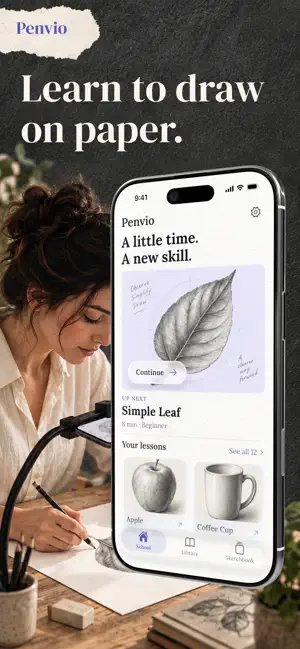
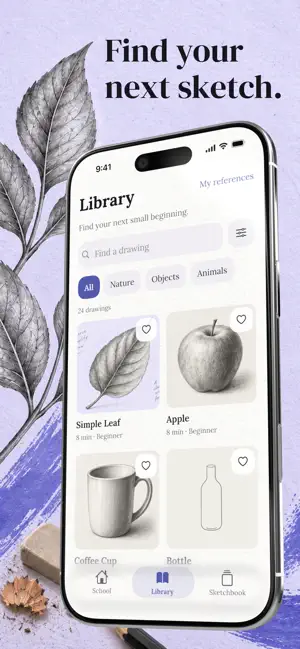


About Penvio: Art Learning & Drawing
Penvio helps you learn to draw on paper through short pencil lessons. Start with a simple leaf or an apple, work through the construction, then try the subject with fewer guides. Bring your own paper and pencil; your iPhone holds the reference while you make the marks. A school you can explore at your pace The School offers lessons in Shapes & Lines, Proportion & Structure, Space & Perspective, and Light & Volume. Practice curved contours, compare proportions, build a small box in perspective, or study the shadows on a sphere. Every lesson is open from the start, so you can follow the suggested next drawing or choose a subject that interests you. See how a drawing is built Each bundled drawing has a sequence of construction steps with practical instructions. Guided mode shows the construction, Hints leaves fewer visual cues, and Freehand lets you work from the final reference. Zoom in for a closer look, move back to an earlier step, and use the common-mistake guidance to decide what to try next. You can leave an unfinished practice and return to it later. Keep the phone beside your paper Desk Mode works without camera access. Place the phone where you can see it, follow the reference and draw at your own pace. For a camera view of your paper, use a stable phone holder and choose Camera Guide. Move, resize and rotate the overlay, adjust its opacity, then lock it to prevent accidental gestures. The guide stays on the screen; it does not track the paper or project an image onto it. If the phone or paper moves, align the guide again. Find your next subject Browse bundled drawings, including flowers, household objects and simple animals. Search by drawing or skill, filter by subject and difficulty, and save favorites for later. The Library includes the School lessons plus additional subjects, such as a shell, teapot and butterfly. Practice from an image you choose Import a still image from Photos or Files, or take a photo, and use it as a personal reference. Adjust its visibility and opacity while you draw. Personal images support practice at your own pace; they do not receive automatically generated lesson steps or count toward School completion. Keep a record of your practice After a lesson, use the optional self-checks to record what you noticed. Add a note or a photo of your paper if you want to. Your Sketchbook keeps saved attempts so you can revisit a subject and compare two result photos from the same drawing. The practiced count records saved lessons, not a skill score, and the app does not automatically grade your drawing. Your saved practices and imported images stay on this device. The bundled drawing lessons are available offline, and you can save a practice without adding a photo. Start with a shape you recognize and give yourself time to draw it again.
What’s new
Version 1.0.2 · Updated September 27, 2026
Bug fixes.
App privacy
The developer, Rut Malamud, reported these privacy practices to Apple.
Data Not Collected
The developer does not collect any data from this app.
Alternatives to Penvio: Art Learning & Drawing
Looking for apps like Penvio: Art Learning & Drawing? Here are 6 similar apps on the App Store. The highest rated is Dear Me. (5.0/5), and all 6 are free to download.
-
 Dear Me.
5.0
Dear Me.
5.0
-
 Aperta & Solta 2.0
-
 Pátio Batel
3.0
Pátio Batel
3.0
-
 TIM BETA
4.6
TIM BETA
4.6
-
 Group Com
1.8
Group Com
1.8
-
 LUN: sale and rent apartments
4.9
LUN: sale and rent apartments
4.9
| App | Rating | Price | Last updated | Compare |
|---|---|---|---|---|
| Penvio: Art Learning & Drawing | – | Free | September 27, 2026 | |
| Dear Me. | 5.0 / 5 (9) | Free | Aug 4, 2025 | Compare |
| Aperta & Solta 2.0 | – | Free | Oct 14, 2026 | Compare |
| Pátio Batel | 3.0 / 5 (2) | Free | Aug 4, 2026 | Compare |
| TIM BETA | 4.6 / 5 (186) | Free | Sep 30, 2026 | Compare |
| Group Com | 1.8 / 5 (5) | Free | Oct 21, 2026 | Compare |
| LUN: sale and rent apartments | 4.9 / 5 (15) | Free | Oct 20, 2026 | Compare |