

Content Maxer: Video Editor
Missar Baeaetjer Photo & Video iPhoneiPadiPod touch
Content Maxer: Video Editor is a free Photo & Video app for iPhone and iPad by Missar Baeaetjer. Rated 5.0/5 from 1 ratings. Requires iOS 16.4.
- Rating
- 5.0
- 1 ratings
- Price
- Free
- on the App Store
- Size
- 146 MB
- Age 4+
- Updated
- Oct 16
- 2026 · v1.0.2
Screenshots
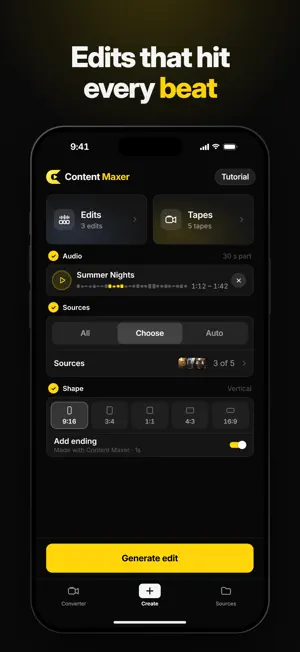
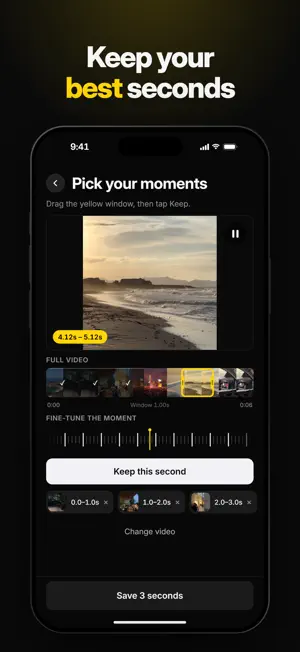


About Content Maxer: Video Editor
Content Maxer is a video editor that cuts your own clips to the beat of a song, then gives any video an authentic camcorder look. Keep the best second of each clip, pick a song and tap Generate. Content Maxer finds the beats and cuts your moments to the music. Not quite right? Tap Generate again for a fresh edit from the same moments. BEAT-SYNCED EDITS • Group clips into Sources like "Summer trip" or "Night out" • Drag a one-second window to the exact moment and tap Keep • Add a song from your files, or use the sound of one of your own videos, and choose the part you want • Export in 9:16, 3:4, 1:1, 4:3 or 16:9 • Optional "Made with Content Maxer" ending • Import a Source that a friend exported and sent you CAMCORDER & VHS LOOK • Converter: softer detail, subtle grain, warm lifted tones and a gentle vignette, rendered into every frame • Film mode: shoot camcorder-style clips with flash and zoom • Converted and filmed videos collect in Tapes • Fine-tune the look in Settings SAVE & SHARE • Save to Photos or share to any app from the share sheet PRIVATE BY DESIGN Beat detection, editing and the camcorder render all run on your iPhone. No account, no uploads, no ads. A short tutorial walks you from an empty library to your first edit. Please only post music you have the rights to use. SUBSCRIPTION Content Maxer is free to download. Using the app requires a Content Maxer Pro subscription: • Pro Yearly: 7-day free trial, then $49.99 per year • Pro Monthly: $9.99 per month Prices vary by region (for example €49.99 per year and €9.99 per month in Germany); the app shows your local price before you subscribe. Payment is charged to your Apple Account when you confirm the purchase or, with the free trial, when the trial ends. Subscriptions renew automatically at the same price and period unless cancelled at least 24 hours before the end of the current period; your account is charged for renewal within the 24 hours before the period ends. Manage or cancel anytime in Settings › [your name] › Subscriptions. Any unused part of a free trial is forfeited when you purchase a subscription. Terms of Use (EULA): https://content-maxer.com/terms/ Privacy Policy: https://content-maxer.com/privacy/
What’s new
Version 1.0.2 · Updated October 16, 2026
Plans are now all visible on the paywall, so you can pick the one that suits you. Plus general improvements and bug fixes.
App privacy
The developer, Missar Baeaetjer, reported these privacy practices to Apple.
Data Linked to You
The following data, which may be collected and linked to your identity, may be used for the following purposes:
- Purchases: Purchase History
- Identifiers: User ID
Used for: App Functionality
Alternatives to Content Maxer: Video Editor
Looking for apps like Content Maxer: Video Editor? Here are 6 similar apps on the App Store. The highest rated is 视频剪辑器 (5.0/5), and all 6 are free to download.
-
 Video Editor: Smart AI Tools
3.0
-
 Pixify - Reel Maker With Beats
-
 Crayo: AI Video Editor
4.4
-
 视频剪辑器
5.0
-
 0 LUX: VHS Night Vision Camera
5.0
-
 Kassette: VHS & Retro Camera
| App | Rating | Price | Last updated | Compare |
|---|---|---|---|---|
| Content Maxer: Video Editor | 5.0 / 5 (1 rating) | Free | October 16, 2026 | |
| Video Editor: Smart AI Tools | 3.0 / 5 (2) | Free | Feb 18, 2026 | Compare |
| Pixify - Reel Maker With Beats | – | Free | Oct 31, 2026 | Compare |
| Crayo: AI Video Editor | 4.4 / 5 (13) | Free | Oct 27, 2026 | Compare |
| 视频剪辑器 | 5.0 / 5 (1) | Free | Apr 19, 2026 | Compare |
| 0 LUX: VHS Night Vision Camera | 5.0 / 5 (1) | Free | Oct 30, 2026 | Compare |
| Kassette: VHS & Retro Camera | – | Free | Oct 28, 2026 | Compare |