

OpenShare: QR File Transfer
Vu Bach Utilities iPhoneiPadiPod touch
OpenShare: QR File Transfer is a free Utilities app for iPhone and iPad by Vu Bach. Requires iOS 16.0. Updated September 22, 2026.
- Price
- Free
- on the App Store
- Size
- 4 MB
- Age 4+
- Updated
- Sep 22
- 2026 · v26.09.18
Screenshots


About OpenShare: QR File Transfer
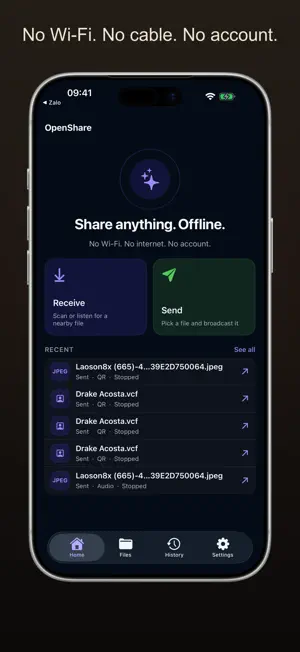
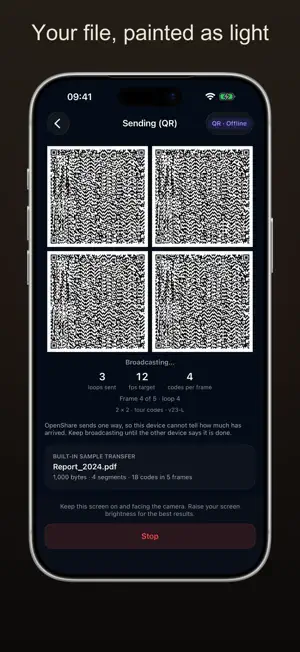
OpenShare moves a file from one device to another using nothing but a screen, a camera, a speaker and a microphone. No Wi-Fi. No internet. No Bluetooth. No cable. No account. Nothing is uploaded, because there is nowhere to upload it to. HOW IT WORKS Point a camera, or just listen. • By camera — the sending device paints the file as animated QR codes. The receiving device reads them through its camera. • By sound — the sending device plays the file as audio. The receiving device listens through its microphone. Slower than the camera, and it needs no line of sight. PHONE TO PHONE, OR COMPUTER TO PHONE Send from another iPhone or iPad, or open send.vuba.one in any browser on a computer and send from there. Nothing to install on the computer, and the two devices never join the same network — because they never join a network at all. EVERY FILE IS CHECKED BEFORE YOU SEE IT A received file appears only after its whole-file SHA-256 digest matches the sender's exactly. A file that did not match is discarded, not shown. Nothing is opened or run automatically. WHAT IT IS GOOD FOR A document to a colleague's phone across a table. A photo to a friend whose phone is a different brand. Getting a file off a computer with no cable to hand. Anywhere a network is missing, locked down, or simply not worth joining. HONEST LIMITS — please read these before buying anything • Files up to 5 MB. This is a light-and-sound channel, not a cable; a large file would take an unreasonable amount of time. • Transfers are one way. The sending device cannot tell how much has arrived, so it repeats until you stop it, and you check the receiving device to be sure. • Both devices must stay awake with OpenShare in front. There is no background transfer. • Sending by camera needs the screens facing each other; sending by sound needs the devices close and the volume up. • Transfers are not encrypted. Anyone who can see the screen or hear the speaker can capture the same data. Treat it like handing someone a printed page. PRIVACY Files stay on your device. There is no account, no cloud, no advertising identifier and no analytics. The camera is used only to receive by QR and the microphone only to receive by sound; both are asked for at the moment a transfer starts, and neither is recorded or stored. LANGUAGES English, Tiếng Việt, 简体中文 and Español, switchable inside the app. OPTIONAL TIP There is a "buy me a coffee" tip in Settings. It unlocks nothing. OpenShare is complete and offline whether or not you ever buy it.
App privacy
The developer, Vu Bach, reported these privacy practices to Apple.
Data Not Collected
The developer does not collect any data from this app.
Alternatives to OpenShare: QR File Transfer
Looking for apps like OpenShare: QR File Transfer? Here are 6 similar apps on the App Store. The highest rated is LanSend: Wi‑Fi File Transfer (5.0/5), and all 6 are free to download.


| App | Rating | Price | Last updated | Compare |
|---|---|---|---|---|
| OpenShare: QR File Transfer | – | Free | September 22, 2026 | |
| LanSend: Wi‑Fi File Transfer | 5.0 / 5 (1) | Free | Oct 5, 2026 | Compare |
| 云布智联老板助手 | – | Free | Jul 15, 2026 | Compare |
| 布淘淘ERP | – | Free | Sep 24, 2025 | Compare |
| 布小生 | – | Free | Sep 30, 2026 | Compare |
| 云布业 | – | Free | May 3, 2026 | Compare |
| SmartgridOne | – | Free | Sep 17, 2026 | Compare |