

Point Cloud & BIM Viewer
Sew Grader by Virtalia Utilities iPhoneiPadiPod touchMac
Point Cloud & BIM Viewer is a free Utilities app for iPhone and iPad by Sew Grader by Virtalia. Requires iOS 17.0. Updated October 21, 2026.
- Price
- Free
- on the App Store
- Size
- 40 MB
- Age 4+
- Updated
- Oct 21
- 2026 · v1.9
Screenshots



About Point Cloud & BIM Viewer
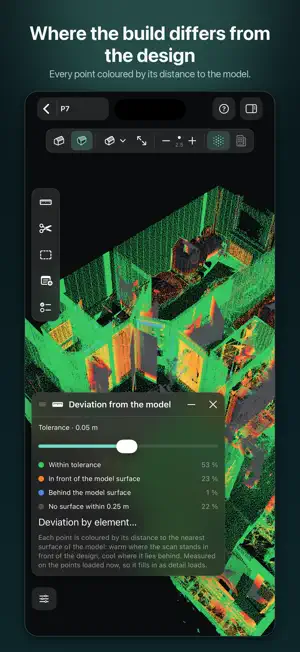
Point Cloud & BIM Viewer opens laser scans and BIM models on your Mac, iPad and iPhone — measure them, cut sections, see where the building differs from the design, and export the results. Everything stays on the device: no account, no upload. A sample project with a guide shows where everything is. FORMATS • E57 with registered scan setups, colour, intensity and spherical photographs • LAS and LAZ 1.0 to 1.4 with colour, intensity and classification, and COPC • PLY, PTS, PTX, and XYZ or TXT with intensity or RGB columns • IFC models, also zipped or gzipped; USDZ, USD, OBJ, STL, glTF and GLB • DXF plans under the scan, with layers to switch off • Several files, a folder or a zip as one project Import never modifies the original, and a hundred million points take tens of megabytes. EVERYTHING IN ONE PROJECT The side panel lists the cloud and each of its scans, every model file, floor plan and saved cut. Show, hide, colour or look at each on its own; colour the scan setups to check the registration. Add scans later, send a project by AirDrop. THE SCAN AGAINST THE MODEL • Every point coloured by its distance to the model, with a tolerance you set • Which elements are built, which are missing, and where the scan never went • The elements built out of tolerance, listed • Place a model by pairs of corners, by the walls in the scan, by matching the floor plans, or where its georeference says • Measure from the scan to a surface of the model SCAN WITH LIDAR On an iPhone or iPad with LiDAR, scan a room into a project, fit it to the other scans, and continue later. For orientation, not millimetres. FLOOR PLAN RoomPlan draws the walls, doors and windows as you scan and divides the floor into rooms with their areas; walls found in any scan make a draft. Correct the plan, then export IFC, DXF, SVG or a PDF to scale. THE PROJECT IN AR On iPhone and iPad, stand the project on a table, or at 1:1 in the building by a few shared points, with a scan's panorama over the walls. ON THE MAP Coordinates as a surveyor writes them: S-JTSK Y and X, or E and N in the system the file or IFC georeference names. See the project on a map with an aerial view under the scan, or place it by hand. The map loads from Apple Maps only when switched on. THE MODEL Browse elements by storey, class or file; find them by name, GlobalId or property. Select, colour and group them, and read every property, inherited ones too. Check a model against IDS: what fails is listed, and each failure can become a note. On an IFC 4.3 alignment, read station and offset, with cross and long sections. MEASURE • Distance with its horizontal and vertical parts, and height • Face to face: wall thickness, clear width, clear height • The shortest distance between two elements, or from an element to the scan • A model's edge length and planar area; polylines, angles and best-fit areas • Notes anchored to a point or an element • Every pick is checked against the cloud at full resolution • Metric or imperial units SECTIONS AND ROOMS A box you move, turn and reshape by dragging, a plane or a slice. The model's solids are hatched where a cut crosses them. Save a cut with its view and return to it. SEEING THE SCAN RGB, intensity, classification, a heatmap, or elevation over the scan or a band of a few centimetres; a grid, six side views, panoramas from the scanner's position. ISSUES IN BCF Notes leave as BCF topics with a viewpoint and the element they are on; BCF files from other tools open as notes. EXPORT The cloud or a single scan as E57 with panoramas, LAS, PLY or XYZ; a section as LAS; CSV, JSON with sections, BCF, a PNG snapshot. FREE AND PRO Free with one project; Pro removes the limit for a single payment, no subscription. Projects you have stay open either way. WHAT IT DOES NOT DO Point data is not edited, and tripod scans are registered in the scanner's software. Clouds in two coordinate systems are not brought into one. Models you open are never modified.
What’s new
Version 1.9 · Updated October 21, 2026
FLOOR PLAN • On an iPhone or iPad with LiDAR, choose Room in the scanner: RoomPlan finds the walls, doors and windows as you scan, in the scan's own place • The floor is divided into rooms at the walls and doors, each with its area, and a room is named from what RoomPlan saw in it: bedroom, bathroom, kitchen, hallway • Any scan, from a phone or a tripod, can have its walls found in the points under Analysis › Find walls in the scan. It is a draft to check: measured walls, estimated thicknesses and walls in doubt are drawn apart. A scan of several storeys is split into storeys • Floor plan, beside the cloud and model switches, shows the plan from above with a bar of its own: draw walls, add a room, undo. Tap a wall to set its length, turn or split it, or add a door or window; tap a room to name it, colour it or take it out • Check each wall over the scan: the points behind it seen square on, and a slice from above saying how far its faces lie from the points • See the plan as a 3D model beside the scan, its walls in one colour you choose • Export the plan as IFC4 (walls with their openings, slabs, rooms with their areas), DXF with a layer for each kind of line, SVG, or a PDF at 1:50 or 1:100 with dimensions and a room schedule ALIGNMENTS IN IFC 4.3 • A model with an IfcAlignment shows its axis, stations and referents. Points, notes and the menu on a point give the station, offset and height against the profile, and cant on a railway; the CSV export carries them • The Alignment tool goes to a typed station or steps along, the camera following, with a cross-section at the station. Click the axis to go to its station • The long section: the design profile, the model's surface and the scan either side of the axis • Switch alignments off from Display; a cut cuts the axis with the model THE MODEL • Measure › Edge length follows an edge of the model, on into the next elements; Measure › Planar area measures a face of the model • Analysis › Align model › Match the plans finds the model on its scan by their plans and lets the scan's points finish it. Next fit shows the next likeliest place NOTES AND POINTS • Notes and kept points are marked in the view; tap one to open it. Notes can also show through the model • Report a bug, in the project's menu, opens an e-mail with your comment and a screenshot you can mark. You review and send it IMPROVED • Pan and zoom with two fingers in one gesture • Large scans draw faster: maximum detail draws fewer points for the same picture, the middle of the view is refined first, and rooms hidden behind a solid model are left out • A cut fills only the solids it passes through, and zooming slows for a detail close by • The scanner keeps its screen orientation, shows how well a continued scan joins the earlier one, and keeps what RoomPlan found if it stops mid-scan • A model switched off whole is named as such over the view • IDS and BCF files chosen together with a project's scans and models are read once those are in: the model is checked against the IDS at once, the issues are listed, and either says if it seems meant for another model • The ? beside Scan and Room in the scanner explains which mode suits what
App privacy
The developer, Sew Grader by Virtalia, reported these privacy practices to Apple.
Data Not Collected
The developer does not collect any data from this app.
Alternatives to Point Cloud & BIM Viewer
Looking for apps like Point Cloud & BIM Viewer? Here are 6 similar apps on the App Store. The highest rated is AnySense (5.0/5), and all 6 are free to download.
-
 Cave 09 - Survey & Mapping
-
 Microscope - Big Minds
-
 AnySense
5.0
AnySense
5.0
-
 PractiCal AR
5.0
PractiCal AR
5.0
-
 WebRTC Video Tester
-
 Depthy Pro — Room Scanner
| App | Rating | Price | Last updated | Compare |
|---|---|---|---|---|
| Point Cloud & BIM Viewer | – | Free | October 21, 2026 | |
| Cave 09 - Survey & Mapping | – | Free | Aug 30, 2026 | Compare |
| Microscope - Big Minds | – | Free | Sep 29, 2025 | Compare |
| AnySense | 5.0 / 5 (4) | Free | Feb 9, 2026 | Compare |
| PractiCal AR | 5.0 / 5 (1) | Free | Apr 3, 2026 | Compare |
| WebRTC Video Tester | – | Free | Jun 18, 2024 | Compare |
| Depthy Pro — Room Scanner | – | Free | Aug 17, 2026 | Compare |