

Yorozu Planner
Yusuke Nakashima Productivity iPhoneiPadiPod touch
Yorozu Planner is a free Productivity app for iPhone and iPad by Yusuke Nakashima. Requires iOS 18.1. Updated November 25, 2026.
- Price
- Free
- on the App Store
- Size
- 6 MB
- Age 4+
- Updated
- Nov 25
- 2026 · v1.2.1
Screenshots
Save to Pinterest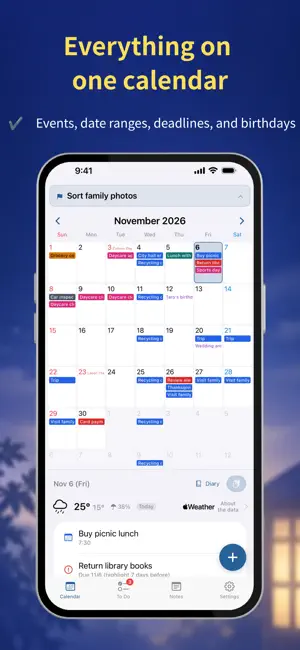


About Yorozu Planner
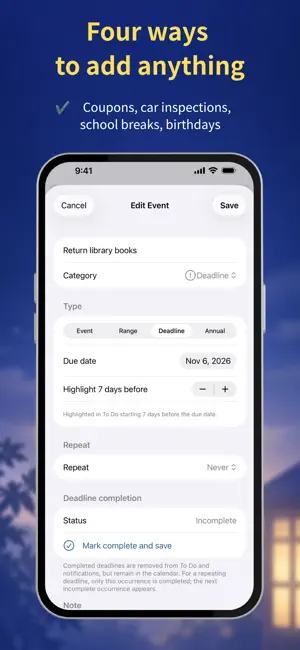
Events, deadlines, birthdays, family to-dos, and household transfers. All in one app. "When does this coupon expire?" "Did we settle last month's reimbursements?" This app helps you catch those things in time. Four tabs: Calendar, To Do, Notes, and Settings. FOUR WAYS TO ADD THINGS - Event: a date, with an optional time - Range: several days, like a school break - Deadline: coupons, applications, car inspections - Annual: birthdays and anniversaries Event names appear on the calendar in category colors. Make your own categories. Repeat events and deadlines weekly or monthly. DEADLINES THAT SHOW UP EARLY Choose how many days before a deadline to start highlighting it. Urgent, at the top of To Do, lists overdue, today's, and highlighted items with symbols and text as well as color. Swipe right to mark one complete. Deadlines and birthdays can notify you at a time you choose. LISTS FOR TWO Keep Family to-dos, Shopping, and your own lists in To Do. Type one line and tap Add; tap the circle when it's done. TRANSFERS AND REIMBURSEMENTS In To Do > Transfers & Reimbursements, work out what each partner moves to a shared household account every month. Enter take-home pay and deductions such as allowance or mortgage, and see each transfer with a breakdown. Each partner picks a rule: the remainder, everything, a fixed amount, a percentage of pay, or a share of household costs (by income or half and half). Rules can change from a chosen month; months already transferred keep their numbers. Record a reimbursement in one line, like "Groceries 3280", and settle it with the next transfer. NOTES Family notes, Goals & KPIs (track numbers like savings toward a target), and a bucket list kept with the dates you did things. Yearly and monthly goals also appear above the calendar. KPIs in "times" have "+1 (today)". WITH ライフプラン設計図 Supported versions of ライフプラン設計図 (same developer) can send you KPIs, like the year's savings or monthly visits to your parents, and bucket list wishes. You can send a bucket list item to its Wishes. You see who can view it before tapping Add. SHARE WITH FAMILY In Settings > Share with Family, create a Family Calendar and invite people by the email they use for iCloud. Set an event's Calendar to Family to share it; personal events stay private. Lists, the household budget, notes, KPIs, and the bucket list sync on both partners' devices while a Family Calendar exists. Choose View only or Can edit for each person. Contents are encrypted in the owner's iCloud; the developer cannot see them. SYNC ACROSS IPHONE, IPAD, AND MAC Sync with iCloud (off by default) keeps events, categories, and goals the same on devices with the same Apple Account, encrypted in your iCloud. On iPad, Mac, and iPhone in landscape, the month and the selected day sit side by side. ALSO - Add events with AI: paste the instructions from Settings into your AI chat, then tap the link it returns. The app sends nothing to AI. - Japan's holidays through 2027, or U.S. federal or UK bank holidays. - Optional weather for a city in Japan. Location is not used. - English when your device's first language isn't Japanese. YOUR DATA Everything is saved on your device, and in iCloud, encrypted, only if you use Sync with iCloud or Share with Family. No account, no ads, and no access to photos, contacts, location, or calendars. PLEASE NOTE - The household budget calculates transfers and settles reimbursements. It does not track spending. - Lists, the household budget, notes, KPIs, and the bucket list sync across devices only with a Family Calendar. - Export (JSON) covers events, categories, and goals only. Import isn't supported. - The other person also needs this app with Sync with iCloud on. You can create or join one Family Calendar; it uses the owner's iCloud storage. - Sync is not a backup. Deleting something deletes it everywhere, including shared items on family members' devices. - Notification, weather, and display settings are per device.
What’s new
Version 1.2.1 · Updated November 25, 2026
- You can now receive KPIs from ライフプラン設計図, another app by the same developer, such as the year's savings or how many times to visit your parents, and wishes for your bucket list (available from the next version of ライフプラン設計図). The confirmation shows who can see them. - Swipe right on a bucket list item (or touch and hold) to send it to Wishes in ライフプラン設計図. - KPIs counted in "times" now have "+1 (today)", which records today with one tap. - Tap a KPI record to edit its value, date, or note. - The selected day's heading in the calendar now has "Meals", which opens that day's meals in 献立プランナー, another app by the same developer (available from the next version of 献立プランナー). - Fixed an issue where changing a category's color in Settings did not change the color of events in the Family Calendar. Family Calendar events now use your own category colors. - When you change the color of a category you created, family members who don't have that category see the new color too. - Category counts in Settings now include events in the Family Calendar.
App privacy
The developer, Yusuke Nakashima, reported these privacy practices to Apple.
Data Not Collected
The developer does not collect any data from this app.
Alternatives to Yorozu Planner
Looking for apps like Yorozu Planner? Here are 6 similar apps on the App Store.


| App | Rating | Price | Last updated | Compare |
|---|---|---|---|---|
| Yorozu Planner | – | Free | November 25, 2026 | |
| My Shift | – | Free | Jul 30, 2026 | Compare |
| Big Calendar: 9-Day View | – | Free | Nov 4, 2026 | Compare |
| OnePage Calendar | – | Free | Oct 30, 2026 | Compare |
| DeskCalendar | – | Free | Oct 9, 2026 | Compare |
| 毎日ルーティン | – | Free | Jul 6, 2026 | Compare |
| はじめての予定表 | – | Free | Sep 12, 2025 | Compare |
Compare Yorozu Planner with the top alternatives: ratings, updates, ASO score and keyword gaps →