

DeskPort
尔昊 毛 Productivity iPhoneiPadiPod touch
DeskPort is a paid Productivity app for iPhone and iPad by 尔昊 毛. Rated 5.0/5 from 1 ratings. Requires iOS 15.0. Updated October 19, 2026.
- Rating
- 5.0
- 1 ratings
- Price
- 4.99 USD
- on the App Store
- Size
- 14 MB
- Age 17+
- Updated
- Oct 19
- 2026 · v2.5
Screenshots

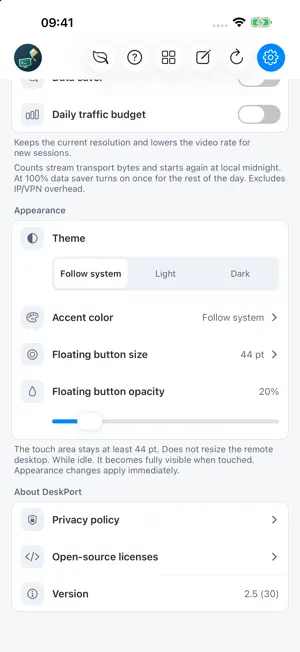

About DeskPort
Your computer, ready on your iPad or iPhone. DeskPort brings your own computer's desktop and audio to your mobile screen. Use desktop applications with touch, a keyboard or a mouse. INSTALL THE FREE DESKTOP COMPANION FIRST The app requires the free, open-source DeskPort desktop app. Download a host-capable package: https://github.com/keithxc/deskport/releases/latest Enable Sharing on your computer. For initial setup, use the same local network, allow Local Network access on iPad/iPhone, and approve the device request on the computer. Keep the computer awake while connected. Linux Flatpak is client-only and cannot share a desktop. YOUR COMPUTERS, ORGANIZED Discover computers or add an address, assign local nicknames, and save picture, audio, input and desktop preferences for each device. Compact cards keep your devices together. A WORKSPACE THAT FITS Use portrait or landscape. Capable hosts can adapt the workspace; mirror, extended and exclusive display options depend on the host OS and drivers. Save a full-screen preference per device. iPhone Duo layouts adapt navigation and content to the cover, inner screen and folded views. CONTROLS FOR DESKTOP WORK Choose direct touch or trackpad mode. Use a keyboard, pointer or on-screen modifier and navigation keys. The navigation bar provides access to devices, settings, help and Data Saver. Confirm before taking over an active session; disconnecting does not shut down your computer. Choose appearance and accent color, and use the interface in 22 languages. DeskPort desktop is required; standalone, unmodified Sunshine hosts are not supported. Features depend on the host and input devices. No DeskPort account, cloud computer, relay or VPN service is included. Access outside your local network requires a reachable private network or your own VPN. Setup and support: https://keithxc.github.io/deskport/support.html
What’s new
Version 2.5 · Updated October 19, 2026
- Updated the interface across all 22 supported languages. - Adapted navigation and content layouts for iPhone Duo cover, inner-screen and folded views. - Refined compact device cards and space for longer text. - Added a quick Data Saver control to the navigation bar.
App privacy
The developer, 尔昊 毛, reported these privacy practices to Apple.
Data Not Collected
The developer does not collect any data from this app.
Alternatives to DeskPort
Looking for apps like DeskPort? Here are 6 similar apps on the App Store. The highest rated is ReplyKit - Quick Reply (5.0/5), and 5 of the 6 are free to download.
-
 PolyMind - オープンソース AIチャット
-
 aSPICE Pro - oVirt Proxmox
4.2
aSPICE Pro - oVirt Proxmox
4.2
-
 Lumo Browser
-
 TypeWhisper App
4.0
TypeWhisper App
4.0
-
 PromptBoard
-
 ReplyKit - Quick Reply
5.0
ReplyKit - Quick Reply
5.0
| App | Rating | Price | Last updated | Compare |
|---|---|---|---|---|
| DeskPort | 5.0 / 5 (1 rating) | 4.99 USD | October 19, 2026 | |
| PolyMind - オープンソース AIチャット | – | Free | Sep 8, 2026 | Compare |
| aSPICE Pro - oVirt Proxmox | 4.2 / 5 (5) | 9.99 USD | Oct 19, 2026 | Compare |
| Lumo Browser | – | Free | Oct 26, 2026 | Compare |
| TypeWhisper App | 4.0 / 5 (4) | Free | Oct 27, 2026 | Compare |
| PromptBoard | – | Free | Mar 13, 2024 | Compare |
| ReplyKit - Quick Reply | 5.0 / 5 (17) | Free | Oct 3, 2026 | Compare |
Compare DeskPort with the top alternatives: ratings, updates, ASO score and keyword gaps →