

nook - Tech Reader
Kohei Ono News iPhoneiPadiPod touch
nook - Tech Reader is a free News app for iPhone and iPad by Kohei Ono. Requires iOS 17.0. Updated September 22, 2026.
- Price
- Free
- on the App Store
- Size
- 16 MB
- Age 12+
- Updated
- Sep 22
- 2026 · v0.2.1
Screenshots

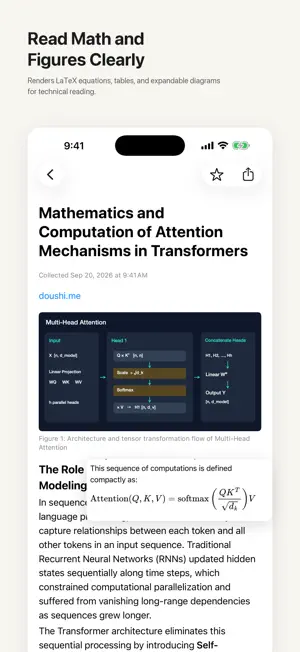
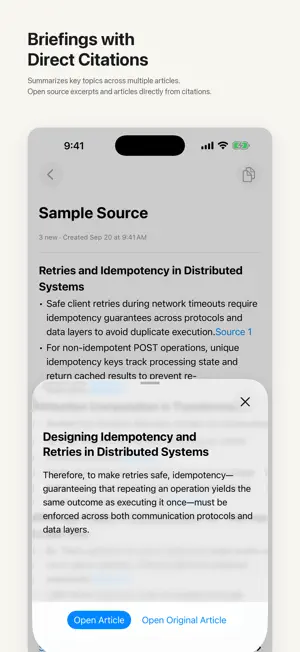
About nook - Tech Reader
Read collected technical articles and research papers cleanly on your devices. This app is a companion reader designed to work alongside the Mac version of nook. Feed registration, folder organization, article polling, and AI summarization are handled in the Mac app. Synced articles and briefings appear on your iPhone and iPad via iCloud for a quiet reading experience on the go. Using sync requires signing in with the same Apple Account on both your Mac and iOS devices. Everything syncs privately through your personal iCloud storage (private database). No proprietary account is required. ■ Built for Technical Reading - Native Markdown: Clean hierarchy, structured lists, tables, inline code, and block quotes. - LaTeX Math Rendering: Crisp rendering of mathematical formulas and equations in research papers and articles. - Expandable Image Viewer: Tap or pinch to zoom into architecture diagrams, charts, and technical figures. - In-App Video Playback: Watch demonstration and technical videos directly within articles (streamed on demand). ■ Briefings and Citations - Topic Overviews: Review key topics summarized across multiple articles in a feed or folder. - Interactive Citations: Tap citation links to jump directly to referenced excerpts and source articles. ■ Organization and Offline Access - Filter by Folders and Feeds: Filter articles by synced feeds and folders. - Fast Search: Instantly search articles by title and list preview text. - Automatic Offline Caching: Automatically caches the last 30 days of articles, images, and your favorites for offline reading on planes or subways. - Two-Way Favorite Sync: Starred articles sync across your devices. ■ Language Settings - The app UI language can be set independently under Settings to System, Japanese, or English (changing the UI language does not retranslate existing saved articles). - The language used for AI summaries, briefings, and Ask responses is determined by the settings in the Mac app. Getting Started - This app cannot register feeds, create or edit folders, poll articles, or generate AI summaries and briefings on its own. These operations are performed in the Mac app. - Data sync utilizes your personal iCloud storage. - Even without a Mac or before syncing, you can test core reading features—including article layout, math and figure rendering, image zoom, search, and favorites—using 3 built-in sample technical articles (briefings, video playback, and iCloud sync are not included in sample mode). Completely free. No in-app purchases, no subscriptions, no ads, and no user tracking.
What’s new
Version 0.2.1 · Updated September 22, 2026
Fixed an issue where the body of an open article or briefing could revert to a loading state and disappear, ensuring displayed content is retained on screen.
App privacy
The developer, Kohei Ono, reported these privacy practices to Apple.
Data Not Collected
The developer does not collect any data from this app.
Alternatives to nook - Tech Reader
Looking for apps like nook - Tech Reader? Here are 6 similar apps on the App Store. The highest rated is Sakura Reader (4.6/5), and all 6 are free to download.
-
 NEXORA News – Read Later
-
 Osushi
-
 WidgetZenn
-
 Morning AI - AIニュース
-
 Sakura Reader
4.6
Sakura Reader
4.6
-
 The Last Three Minutes
| App | Rating | Price | Last updated | Compare |
|---|---|---|---|---|
| nook - Tech Reader | – | Free | September 22, 2026 | |
| NEXORA News – Read Later | – | Free | Sep 13, 2026 | Compare |
| Osushi | – | Free | Jun 2, 2024 | Compare |
| WidgetZenn | – | Free | Oct 9, 2026 | Compare |
| Morning AI - AIニュース | – | Free | Oct 5, 2026 | Compare |
| Sakura Reader | 4.6 / 5 (5) | Free | Oct 14, 2026 | Compare |
| The Last Three Minutes | – | Free | Jul 23, 2026 | Compare |
Compare nook - Tech Reader with the top alternatives: ratings, updates, ASO score and keyword gaps →