

BibleDiary: Devotional Journal
Jun Zhi Wang Lifestyle iPhoneiPadiPod touch
BibleDiary: Devotional Journal is a free Lifestyle app for iPhone and iPad by Jun Zhi Wang. Requires iOS 15.0. Updated October 19, 2026.
- Price
- Free
- on the App Store
- Size
- 87 MB
- Age 4+
- Updated
- Oct 19
- 2026 · v1.2.0
Screenshots


About BibleDiary: Devotional Journal
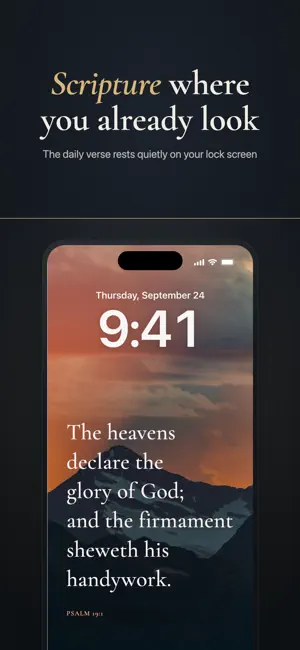
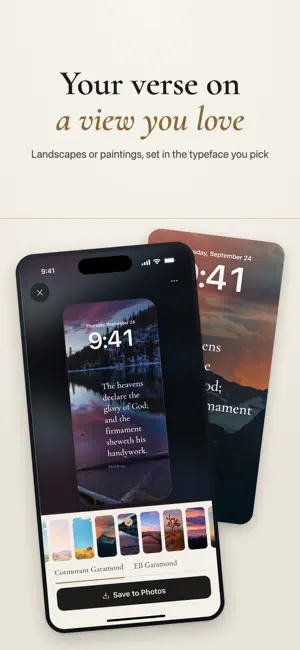
Have God’s word with you every day, write your devotional note under it, and draw closer to the Lord. BibleDiary keeps that rhythm: a verse each day, your note under it, and a look back over the weeks and the year (Year book export: Plus). Save the verse as your lock screen to read it again. Sound familiar? · You read Scripture, and by lunchtime the moment is gone · Insights, prayer requests and thanks are scattered across notes, messages and paper · You want to keep a devotional journal, but "how long should it be?" stops you, and one missed week ends it · You pick up your phone a hundred times a day, and almost none of those times are for God’s word How BibleDiary helps WRITE IT DOWN SO IT STAYS One line is a whole entry. No title to invent, no page to fill. Each entry is kept under the verse you started from. What stood out in your reading, a prayer request, someone you’re praying for, something you’re thankful for: write whatever is true, and on a tired or empty day one honest sentence counts. Add a photo or a voice note when there’s more to say; photos lose their GPS data. A guided devotion takes you from reading to writing to prayer. KEEP THE VERSE IN SIGHT Typeset the verse you wrote about as a lock screen or wallpaper in one tap. Pick from photographs and illustrations (a selection is free) or use your own photo. The Lock Screen image includes the verse; the Home Screen uses the same picture without text, dimmed when it is too bright for icons. iOS doesn’t let an app change your lock screen directly, so on iPhone BibleDiary hands you off to iOS’s system wallpaper flow to finish. TODAY’S VERSE The whole verse arrives as a notification at the time you choose, so you can read it without opening the app. There are 23 themes: follow one a verse a day and move on to the next when it ends, or take a different theme every day. The library also holds 340 hand-picked verses in 7 themes, all on your phone and offline. PRAYER REQUESTS Keep a prayer request with a verse to pray with, mark the days you prayed, add follow-up notes, and mark it answered; the earlier notes stay. Requests are encrypted on your device and excluded from cloud sync. The home-screen widget is off by default; when enabled, request titles stay hidden unless you choose to show them. Journal Lock hides prayer content from the widget. LOOK BACK AND SEE THE ROAD Browse by month, with a short review of each: each month is a row of small wallpapers, the day’s verse on the day’s picture. At year’s end, your entries, their verses and your photos become an A5 Year book, exported as a PDF. Preview the first 6 pages for free; Plus exports the whole book. THE WHOLE BIBLE, OFFLINE The Chinese Union Version (Shen edition), KJV, Reina-Valera 1909 and Bíblia Livre (BLIVRE) are built in. Select a verse to see related verses and a map of the places it names. 8 built-in reading plans: the whole Bible, the New Testament, the Gospels, Psalms, Proverbs, Genesis, John and Acts. The app is in English, Traditional Chinese, Spanish, Brazilian Portuguese, German and Korean. ONLY YOU CAN READ IT Entries are encrypted on your device with AES-256-GCM, with the key held in the iOS Keychain. Turn on the journal lock to open it with Face ID, Touch ID or your passcode. If you turn on cloud backup, entries are encrypted on your phone before upload, so our servers only ever hold ciphertext. You can permanently delete your account and cloud data inside the app. No ads, no third-party tracking. BIBLEDIARY PLUS A one-time purchase of US$2.99. No subscription, nothing renews. It unlocks: - Exporting the whole Year book as a PDF (the first 6 pages are free to preview) - Every wallpaper photograph and illustration (your own photo is always free) Everything else is free. Payment is charged to your Apple ID at confirmation of purchase. Terms of Use: https://biblediary.app/terms.html Privacy Policy: https://biblediary.app/privacy.html Support: https://biblediary.app/support.html
What’s new
Version 1.2.0 · Updated October 19, 2026
Daily devotion: read, write, pray, then set the wallpaper Related verses in the reader, and a map of the places a verse names Mark a prayer answered and keep its history; a month review in Journey Bright pictures are dimmed on the Home Screen so icons stay readable. German and Korean added
App privacy
The developer, Jun Zhi Wang, reported these privacy practices to Apple.
Data Linked to You
The following data, which may be collected and linked to your identity, may be used for the following purposes:
- Purchases: Purchase History
- Contact Info: Email Address
- Identifiers: User ID
Used for: App Functionality
Data Not Linked to You
The following data, which may be collected but is not linked to your identity, may be used for the following purposes:
- Usage Data: Product Interaction
Used for: Analytics
Alternatives to BibleDiary: Devotional Journal
Looking for apps like BibleDiary: Devotional Journal? Here are 6 similar apps on the App Store. The highest rated is Quit Cannabis - ByeBye Weed (4.9/5), and all 6 are free to download.
-
 Metanoia: Daily Devotional
-
 Knitting Patterns Stitch Chart
-
 Walk With Christ
-
 Venus FM
-
 HolyVerso
-
 Quit Cannabis - ByeBye Weed
4.9
| App | Rating | Price | Last updated | Compare |
|---|---|---|---|---|
| BibleDiary: Devotional Journal | – | Free | October 19, 2026 | |
| Metanoia: Daily Devotional | – | Free | Oct 7, 2026 | Compare |
| Knitting Patterns Stitch Chart | – | Free | Oct 12, 2026 | Compare |
| Walk With Christ | – | Free | Oct 1, 2026 | Compare |
| Venus FM | – | Free | Jun 9, 2026 | Compare |
| HolyVerso | – | Free | Jul 14, 2026 | Compare |
| Quit Cannabis - ByeBye Weed | 4.9 / 5 (7) | Free | Jun 27, 2026 | Compare |