

mikr.app
Ihor Hreskiv Utilities iPhoneiPadiPod touch
mikr.app is a free Utilities app for iPhone and iPad by Ihor Hreskiv. Requires iOS 26.0. Updated October 24, 2026.
- Price
- Free
- on the App Store
- Size
- 8 MB
- Age 4+
- Updated
- Oct 24
- 2026 · v1.1.0
Screenshots


About mikr.app
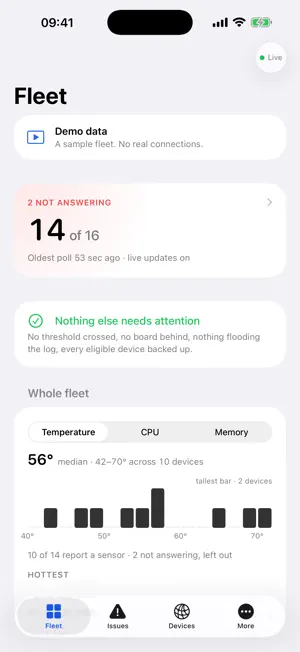
mikr.app is the iPhone client for MikroTik Manager, the self-hosted server you run on your own infrastructure to monitor RouterOS devices. It connects only to your server and shows what that server knows, live. FLEET - One line that says whether everything is answering, then only what is not - Issues across the fleet, worst first: devices down, metrics over your server's thresholds, PoE budget, RouterOS and firmware behind - Sites, backup coverage, and the device flooding the log DEVICE - CPU, memory, temperature, PoE and power, with history - The ports drawn as they sit on the box, with live traffic per port - Clients on the network, by DHCP lease and by wireless registration - VLANs, and which ports carry each one - WireGuard and IPsec tunnels, neighbours and the device's log - A banner when a published RouterOS advisory applies to the device ACTIONS (operator accounts and above) - Test the connection, check for updates, back up the config now - Upgrade RouterOS or firmware, reboot, run a saved command template - Upgrade Jobs: cancel a queue, remove or unschedule a planned upgrade - Every action goes through your server, which checks the account's role and logs it. Viewer accounts see none of them SECURITY AND ACTIVITY - Advisories affecting your devices, worst first, and devices behind on patches - The server's activity log: who did what, with failed actions on their own SIGN-IN - The same username, password and second factor as your server's web UI - Tokens kept in the iPhone Keychain, optionally behind Face ID - Several servers, switchable - Self-signed certificates accepted once, by fingerprint, then pinned Requires a MikroTik Manager server. No server yet? Open the demo from the sign-in screen: a sample fleet built into the app, with no connection to anything. MikroTik and RouterOS are trademarks of SIA Mikrotikls. This app is not affiliated with or endorsed by MikroTik.
What’s new
Version 1.1.0 · Updated October 24, 2026
You can now act on your devices from the phone, not just watch them. Actions need the operator role or higher on your server. - Device actions: test connection, check for updates, back up, run a command template, upgrade RouterOS or firmware, reboot - Upgrade Jobs under More: cancel a running upgrade, remove or unschedule planned upgrades, resume after a safety stop - Activity under More: who did what on your server - Security under More: RouterOS advisories that affect your devices, and a banner on an affected device's page - Sign-in follows a server's redirect to HTTPS - 2.5G ports no longer show in the 5G colour
App privacy
The developer, Ihor Hreskiv, reported these privacy practices to Apple.
Data Not Collected
The developer does not collect any data from this app.
Alternatives to mikr.app
Looking for apps like mikr.app? Here are 6 similar apps on the App Store. The highest rated is TriggerDeck for Zabbix (5.0/5), and all 6 are free to download.
-
 MixerBridge
-
 TriggerDeck for Zabbix
5.0
TriggerDeck for Zabbix
5.0
-
 MyTik: Network Manager
-
 VendingOS
5.0
VendingOS
5.0
-
 WiFi Vouchers for UniFi
-
 easyNag Monitoring
5.0
easyNag Monitoring
5.0
| App | Rating | Price | Last updated | Compare |
|---|---|---|---|---|
| mikr.app | – | Free | October 24, 2026 | |
| MixerBridge | – | Free | Oct 19, 2026 | Compare |
| TriggerDeck for Zabbix | 5.0 / 5 (1) | Free | May 25, 2026 | Compare |
| MyTik: Network Manager | – | Free | Jun 13, 2026 | Compare |
| VendingOS | 5.0 / 5 (1) | Free | Sep 8, 2026 | Compare |
| WiFi Vouchers for UniFi | – | Free | Oct 1, 2026 | Compare |
| easyNag Monitoring | 5.0 / 5 (4) | Free | Oct 23, 2026 | Compare |
Compare mikr.app with the top alternatives: ratings, updates, ASO score and keyword gaps →