

Family Track: Parental Control
Konstantin Korolev Utilities iPhoneiPadiPod touch
Family Track: Parental Control is a free Utilities app for iPhone and iPad by Konstantin Korolev. Requires iOS 17.0. Updated October 27, 2026.
- Price
- Free
- on the App Store
- Size
- 22 MB
- Age 4+
- Updated
- Oct 27
- 2026 · v1.0.5
Screenshots

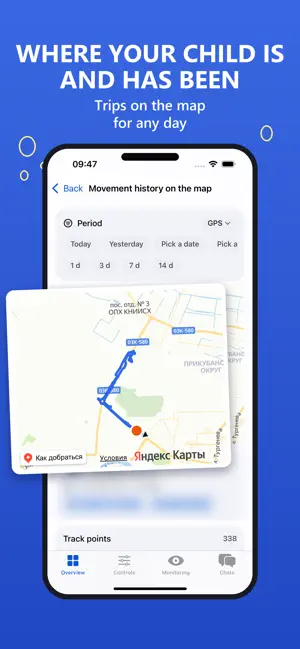


About Family Track: Parental Control
Family Track is parental control for your child's phone. All features are free: no subscription and no in-app purchases. You manage everything from your iPhone, while our inlo app runs on the child's phone. Control and safety: • Screen time: daily limits, schedules, bedtime mode, a warning to the child before the lock. • Apps and websites: allow lists, per-app limits, browser rules. • Where your child is: location on the map and movement history. • A loud signal on the child's phone - even when the sound is off. • Ambient sound and camera video on the parent's request, the child's screen live and screenshots. • Browser, YouTube and app history - without reading private chats. • Protection against uninstalling and resetting settings on the child's phone. The child earns screen time: • School lessons for grades 1-9: read a section, pass a comprehension test. • An AI tutor walks through a mistake step by step using the school textbook and never gives the answer away. • Reading aloud with speech recognition for younger children. • Exercises in front of the camera with honest rep counting. • Chores from the family task board. • A family bank of minutes: the child saves minutes and sets goals, and you stock the rewards shop. Getting started: 1. Install Family Track on your iPhone and create an account. 2. Install the inlo app on your child's phone and link it with a QR code. 3. Set limits or turn on a ready-made age preset. Note: our inlo app must be installed on the child's phone; it is available for Android and iPhone. All features work with a child's Android phone. On a child's iPhone, blocking through Screen Time, schedules, bedtime mode and minutes for lessons work, while ambient sound, camera, live screen and uninstall protection are Android only. Monitoring features (location, camera, ambient sound) work only with permissions granted on the child's phone and are intended for parents and legal guardians.
What’s new
Version 1.0.5 · Updated October 27, 2026
Child's new phone: see what is already set up and test the lock for half a minute. Child's iPhone: eye breaks and a clear note on how they work. The Overview no longer reloads entirely after notifications are checked. Fixes and improvements.
App privacy
The developer, Konstantin Korolev, reported these privacy practices to Apple.
Data Linked to You
The following data, which may be collected and linked to your identity, may be used for the following purposes:
- Contact Info: Email Address
- User Content: Photos or Videos, Customer Support, Other User Content
- Identifiers: User ID
- Other Data: Other Data Types
Used for: App Functionality
Alternatives to Family Track: Parental Control
Looking for apps like Family Track: Parental Control? Here are 6 similar apps on the App Store. The highest rated is ВоДворе (5.0/5), and all 6 are free to download.
-
 SentinelKids: Parental Control
-
 Kiddowall Child: Family GPS
-
 boundrees for Kids
-
 SafeScreen: Parental Control
-
 ВоДворе
5.0
-
 PhonePause - Parent Lock
5.0
| App | Rating | Price | Last updated | Compare |
|---|---|---|---|---|
| Family Track: Parental Control | – | Free | October 27, 2026 | |
| SentinelKids: Parental Control | – | Free | Sep 25, 2026 | Compare |
| Kiddowall Child: Family GPS | – | Free | Oct 12, 2026 | Compare |
| boundrees for Kids | – | Free | Aug 10, 2026 | Compare |
| SafeScreen: Parental Control | – | Free | Jun 9, 2026 | Compare |
| ВоДворе | 5.0 / 5 (1) | Free | Jul 18, 2026 | Compare |
| PhonePause - Parent Lock | 5.0 / 5 (1) | Free | Apr 22, 2026 | Compare |