

Shot Clock – Billiards Timer
Daniel Sorger Sports iPhoneiPadiPod touch
Shot Clock – Billiards Timer is a free Sports app for iPhone and iPad by Daniel Sorger. Requires iOS 15.0. Updated September 29, 2026.
- Price
- Free
- on the App Store
- Size
- 51 MB
- Age 4+
- Updated
- Sep 29
- 2026 · v1.0
Screenshots



About Shot Clock – Billiards Timer
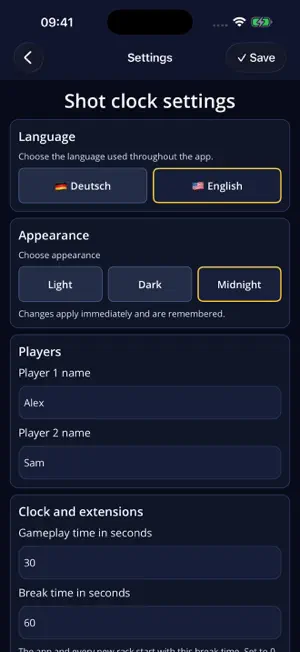
Shot Clock gives every billiards shot a clear time limit, whether you are practising or playing at the table with another player. YOUR TIME AT THE TABLE • Set your shot time and break countdown • Start, pause and resume the clock • Reset and immediately start the next shot • Choose each extension’s duration and how many each player receives • Personalise player names and restore extensions for a new rack SEE AND HEAR THE COUNTDOWN A large countdown and coloured ring show the remaining time. Signals sound at 10 seconds, during the final 5 seconds and when time expires. On iPhone and iPad, the countdown and signals continue when you switch apps or lock the screen. LIVE ACTIVITIES See the remaining time on the Lock Screen and in the Dynamic Island on compatible iPhones. From iOS 17.2, pause, resume, use either player’s extension, or reset and start the normal shot time from the Live Activity. iOS controls when the display updates; use the in-app buttons for the most immediate response. OPTIONAL VOICE CONTROL Control the clock in English or German with commands such as “Start”, “Pause”, “Resume” or “Extension Player One”. Recognition runs on the device and requires compatible local speech recognition plus microphone and speech permissions. The app must be active for voice control. Manual controls remain available without voice support. YOUR STYLE Choose English or German and a Light, Dark or Midnight appearance. Shot Clock supports iPhone and iPad in portrait and landscape. NO ACCOUNT NEEDED No account, advertising or in-app purchases. Settings stay local. The app does not save voice recordings or upload speech data to its own server. PLEASE NOTE Live Activities require iOS 16.2 or later; Dynamic Island requires a compatible iPhone. Signal sounds use media volume and the selected audio output. Audio interruptions pause the clock. Fully quitting the app stops playback; a fresh launch does not restore a running countdown. Support: [email protected]
App privacy
The developer, Daniel Sorger, reported these privacy practices to Apple.
Data Not Collected
The developer does not collect any data from this app.
Alternatives to Shot Clock – Billiards Timer
Looking for apps like Shot Clock – Billiards Timer? Here are 6 similar apps on the App Store. The highest rated is CueTrack: Pool Match Tracker (5.0/5), and all 6 are free to download.
-
 Rack and Track
-
 CueTrack: Pool Match Tracker
5.0
-
 19 Pockets: Pool Score
5.0
-
 RunOut Log - Billiard Tracker
-
 Straightpool 14.1
-
 Blackball Timer Pro
| App | Rating | Price | Last updated | Compare |
|---|---|---|---|---|
| Shot Clock – Billiards Timer | – | Free | September 29, 2026 | |
| Rack and Track | – | Free | Oct 2, 2026 | Compare |
| CueTrack: Pool Match Tracker | 5.0 / 5 (1) | Free | Aug 11, 2026 | Compare |
| 19 Pockets: Pool Score | 5.0 / 5 (2) | Free | Sep 29, 2026 | Compare |
| RunOut Log - Billiard Tracker | – | Free | May 23, 2026 | Compare |
| Straightpool 14.1 | – | Free | Apr 14, 2026 | Compare |
| Blackball Timer Pro | – | Free | Sep 28, 2026 | Compare |