

AuCut: Audio Cutter & Editor
Tiep Nguyen Utilities iPhoneiPadiPod touch
AuCut: Audio Cutter & Editor is a free Utilities app for iPhone and iPad by Tiep Nguyen. Rated 5.0/5 from 1 ratings. Requires iOS 15.0.
- Rating
- 5.0
- 1 ratings
- Price
- Free
- on the App Store
- Size
- 82 MB
- Age 4+
- Updated
- Oct 22
- 2026 · v1.0.4
Screenshots


About AuCut: Audio Cutter & Editor
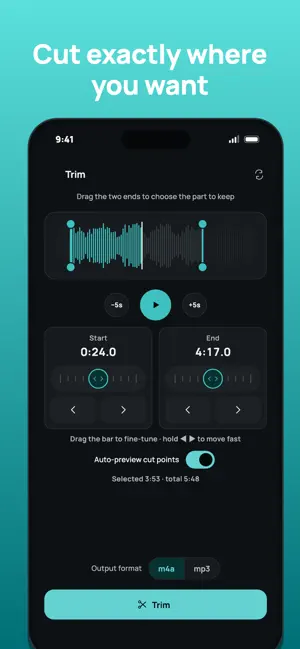
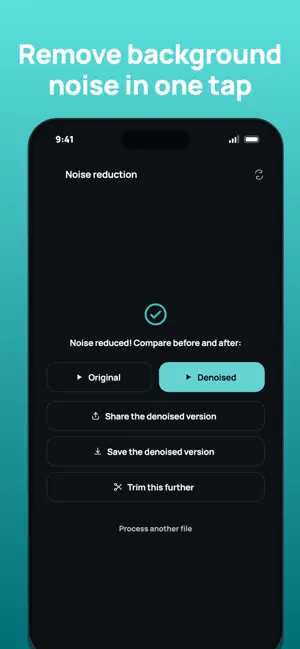
AuCut is a fast, private audio cutter and audio editor. Trim a section out of any audio file, join several clips into one track, convert between MP3, M4A and WAV, pull the audio out of a video and reduce background noise, all on your phone, with no account and no uploads. WHAT YOU CAN DO • Trim audio: drag the two ends on the waveform to keep only the part you want. Ideal for cutting a lecture, an interview, a podcast or a voice message. • Extract audio from video: turn an MP4 or MOV into an audio file in one tap. • Convert audio: switch between M4A, MP3 and WAV. • Volume and fades: boost, lower or normalize the volume and add a fade in or fade out when you trim or convert. • Change speed and pitch: speed up or slow down a recording without changing the voice, or shift the pitch on its own. • Split audio: cut a long file into equal parts or into parts of a set length, then share or save each one. • Open from other apps: share an audio file, a voice message or a video to AuCut and pick the tool to use. • Merge audio (Pro): join several audio files into one track, trim each clip first, and split a recording into parts to keep only what you need. • Noise reduction (Pro): remove background noise from a recording, then compare before and after. • Voice memo clean-up (Pro): cut the silence at the start and end and reduce noise in a single step. • Remove silence (Pro): cut out the quiet gaps in a lecture, a podcast or a voice recording automatically. • Separate video & audio (Pro): turn a video into a silent copy with the same picture quality, plus its audio file. • Batch processing (Pro): apply one tool (convert, volume, speed, remove silence, noise reduction or extract audio) to up to 20 files at once. PRECISE, NOT FIDDLY Drag the handles for a rough cut, then fine-tune with a jog bar down to a tenth of a second. Whenever you adjust a cut point, AuCut plays the audio around it, so you can hear whether it is right instead of guessing. PRIVATE BY DESIGN Everything runs on your device. Your audio and video files are never uploaded. AuCut needs no account. The free version shows ads, and the app collects anonymous usage data to improve itself. FREE TOOLS, ONE-TIME PRO Trim, Extract audio, Convert, Volume, Speed and pitch, and Split are free. Merge, Noise reduction, Remove silence, Voice memo clean-up, Separate video & audio and Batch processing are part of AuCut Pro, a one-time purchase with no subscription. SUPPORTED FORMATS Audio: MP3, M4A, WAV. Video: MP4, MOV, M4V, 3GP, AVI, MKV. Save the result as M4A or MP3 and share it anywhere. Files shared from other apps in formats such as OPUS, OGG, FLAC or AAC are converted automatically. AuCut is available in English, Vietnamese, Spanish, Portuguese, French, German, Japanese and Korean, with light and dark themes.
What’s new
Version 1.0.4 · Updated October 22, 2026
• New: Volume — boost, lower or normalize the volume, with fade in/out • New (Pro): Separate video & audio — get a silent video and its audio file • New (Pro): Batch processing — apply one tool to up to 20 files at once • Bug fixes and improvements
App privacy
The developer, Tiep Nguyen, reported these privacy practices to Apple.
Data Not Linked to You
The following data, which may be collected but is not linked to your identity, may be used for the following purposes:
- Identifiers: Device ID
- Usage Data: Advertising Data, Product Interaction
- Purchases: Purchase History
Used for: Third-Party Advertising, Analytics, App Functionality
Alternatives to AuCut: Audio Cutter & Editor
Looking for apps like AuCut: Audio Cutter & Editor? Here are 6 similar apps on the App Store. The highest rated is MP3 Cutter: Mp3 Converter (5.0/5), and all 6 are free to download.
-
 AudioTrim: Trim & Cut Audio
-
 Shobdo: Audio Cleaner
-
 MP3 Cutter: Mp3 Converter
5.0
MP3 Cutter: Mp3 Converter
5.0
-
 BoardGameRef
-
 KidZoo Camp
-
 DAH Business
| App | Rating | Price | Last updated | Compare |
|---|---|---|---|---|
| AuCut: Audio Cutter & Editor | 5.0 / 5 (1 rating) | Free | October 22, 2026 | |
| AudioTrim: Trim & Cut Audio | – | Free | Sep 23, 2026 | Compare |
| Shobdo: Audio Cleaner | – | Free | Sep 29, 2026 | Compare |
| MP3 Cutter: Mp3 Converter | 5.0 / 5 (4) | Free | Oct 7, 2026 | Compare |
| BoardGameRef | – | Free | Mar 15, 2026 | Compare |
| KidZoo Camp | – | Free | Mar 21, 2026 | Compare |
| DAH Business | – | Free | Sep 30, 2026 | Compare |