

LumaShrink: Video Compressor
振华 李 Photo & Video iPhoneiPadiPod touch
LumaShrink: Video Compressor is a free Photo & Video app for iPhone and iPad by 振华 李. Rated 5.0/5 from 1 ratings. Requires iOS 18.0.
- Rating
- 5.0
- 1 ratings
- Price
- Free
- on the App Store
- Size
- 7 MB
- Age 4+
- Updated
- Oct 26
- 2026 · v1.13
Screenshots


About LumaShrink: Video Compressor
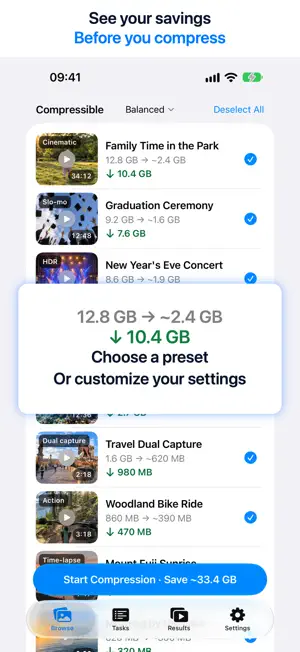
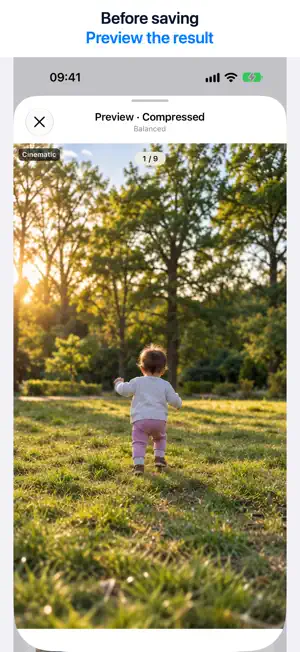
Smaller videos. Keep your Photos edits. Continue editing or revert in Photos after compression. Adjust your compression plan and see how much space you could save. Preview the result before saving it to Photos. KEEP YOUR EXISTING EDITS Preserve the current or edited capture date, time and location in Photos. Preserve adjustments, filters, rotation, frame crops and duration trims. After compression, restore the full frame or full duration in Photos. After reverting, your video stays compressed. CINEMATIC AND SLO-MO STAY EDITABLE Keep your current Cinematic focus and depth-of-field settings and Slo-mo ranges. Continue adjusting them or revert in Photos after saving. Preserve HDR appearance and characteristics. THREE PRESETS. CUSTOM CONTROL. Choose High Quality, Balanced or More Space. Or customize resolution and frame-rate caps and your quality preference. Videos are sorted by estimated space savings. PRIVATE, ON-DEVICE PROCESSING Compress locally on your iPhone or iPad. No ads, no watermarks and no video uploads to developer servers. Compress in batches and in the background. TRY IT FREE. SAVE MORE WITH PRO. Browsing, all presets, Custom settings, compression and preview are free. Save one video to Photos for free. Further saves require Pro, available as an annual subscription or a one-time Lifetime purchase. We’ll keep improving LumaShrink and expanding support for videos in Photos. BEFORE YOU START • After saving, keep the source or move it to Recently Deleted. To free space immediately, permanently delete the source there in Photos. • On iOS 27 or later, video titles are displayed and preserved. Videos without titles use filenames. Privacy Policy: https://lumashrink.zhenhuastudio.com/privacy/ Terms of Use (EULA): https://www.apple.com/legal/internet-services/itunes/dev/stdeula/
What’s new
Version 1.13 · Updated October 26, 2026
Added Brazilian Portuguese language support.
App privacy
The developer, 振华 李, reported these privacy practices to Apple.
Data Not Collected
The developer does not collect any data from this app.
Alternatives to LumaShrink: Video Compressor
Looking for apps like LumaShrink: Video Compressor? Here are 6 similar apps on the App Store. The highest rated is Video Compressor - HQ Compress (4.7/5), and all 6 are free to download.
-
 ShrinkitApp
-
 Riela: AI Photo Enhancer
-
 HD Status: Post Without Blur
3.6
HD Status: Post Without Blur
3.6
-
 Video Compressor - HQ Compress
4.7
Video Compressor - HQ Compress
4.7
-
 AirVid-AI Video Enhancer 4K
4.4
AirVid-AI Video Enhancer 4K
4.4
-
 Image Sync
1.8
Image Sync
1.8
| App | Rating | Price | Last updated | Compare |
|---|---|---|---|---|
| LumaShrink: Video Compressor | 5.0 / 5 (1 rating) | Free | October 26, 2026 | |
| ShrinkitApp | – | Free | Jun 6, 2026 | Compare |
| Riela: AI Photo Enhancer | – | Free | Oct 13, 2026 | Compare |
| HD Status: Post Without Blur | 3.6 / 5 (5) | Free | Oct 16, 2026 | Compare |
| Video Compressor - HQ Compress | 4.7 / 5 (2,173) | Free | Oct 20, 2026 | Compare |
| AirVid-AI Video Enhancer 4K | 4.4 / 5 (594) | Free | Sep 17, 2026 | Compare |
| Image Sync | 1.8 / 5 (200) | Free | May 21, 2026 | Compare |