

AirSwing: Golf Swing Tracker
Yihan Yang Sports iPhoneiPadiPod touchApple Watch
AirSwing: Golf Swing Tracker is a free Sports app for iPhone and iPad by Yihan Yang. Requires iOS 17.0. Updated October 19, 2026.
- Price
- Free
- on the App Store
- Size
- 20 MB
- Age 4+
- Updated
- Oct 19
- 2026 · v1.4
Screenshots

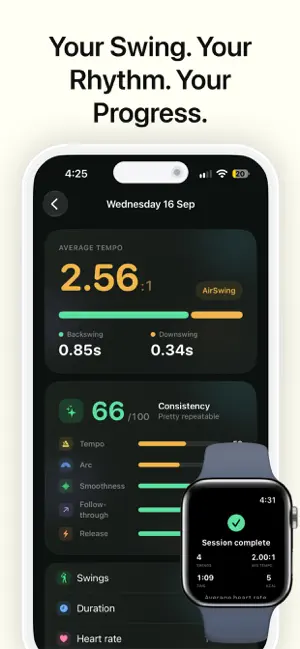


About AirSwing: Golf Swing Tracker
Find your rhythm. See your swing. Make practice count. AirSwing brings Apple Watch swing tracking and iPhone video review together, helping you understand your tempo and take a closer look at your practice. TRACK YOUR SWING TEMPO Record your swings with Apple Watch and review your backswing and downswing timing. Get a clearer picture of your rhythm throughout each session. REVISIT YOUR PRACTICE Review your session history and individual swing details on iPhone. Keep your practice records together and explore how your tempo varies from swing to swing. CAPTURE YOUR SWINGS WITH AIRSWING PLUS Record your practice on iPhone and let AirSwing automatically create clips from detected swings. Spend less time searching through long recordings and more time reviewing your technique. TAKE A CLOSER LOOK Replay your swing clips in slow motion to see details that are easy to miss at full speed. SAVE AND SHARE Share swing clips with your coach or friends, or keep them to revisit your practice later. AIRSWING PLUS Unlock video recording, automatic swing clips, slow-motion replay and sharing. Try AirSwing Plus free for 7 days, then choose a one-time purchase for lifetime access. No subscription or automatic renewal. An AirSwing account is required to start the trial. DEVICE REQUIREMENTS A compatible Apple Watch paired with your iPhone is required for swing tracking. Video recording and clip review use your iPhone.
What’s new
Version 1.4 · Updated October 19, 2026
1. Improved swing detection: Better recognition of smaller, gentler swings, with fewer missed recordings. 2. More complete scoring: Refined assessments of swing amplitude consistency, transition flow, motion smoothness, and finish stability, alongside Tempo. Existing session statistics remain available. 3. Clearer Metrics explanations: User-friendly descriptions of what each score means and how to interpret it, with improved multilingual support. 4. Updated video recording guide: Plus users should start a session on their watch before tapping the video recording button on their iPhone. 5. Foundation for future improvements: De-identified motion features help inform future detection improvements.
App privacy
The developer, Yihan Yang, reported these privacy practices to Apple.
Data Linked to You
The following data, which may be collected and linked to your identity, may be used for the following purposes:
- Health & Fitness: Fitness, Health
- Identifiers: User ID
- Body: Hands
- Other Data: Other Data Types
- Purchases: Purchase History
- Contact Info: Email Address, Name, Phone Number
- User Content: Photos or Videos, Other User Content
Used for: Analytics, Product Personalization, App Functionality