

Leafbook: Plant ID & Care
Ali Berk Alparslan Lifestyle iPhoneiPadiPod touch
Leafbook: Plant ID & Care is a free Lifestyle app for iPhone and iPad by Ali Berk Alparslan. Requires iOS 18.0. Updated October 14, 2026.
- Price
- Free
- on the App Store
- Size
- 27 MB
- Age 4+
- Updated
- Oct 14
- 2026 · v1.2.1
Screenshots


About Leafbook: Plant ID & Care
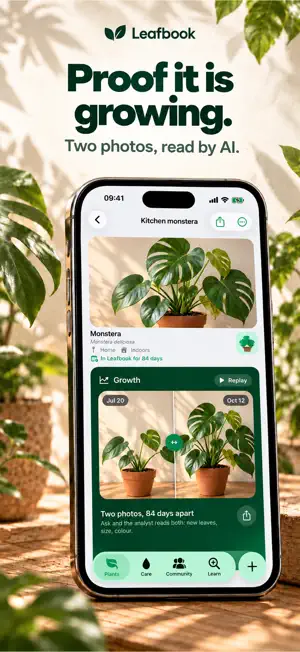
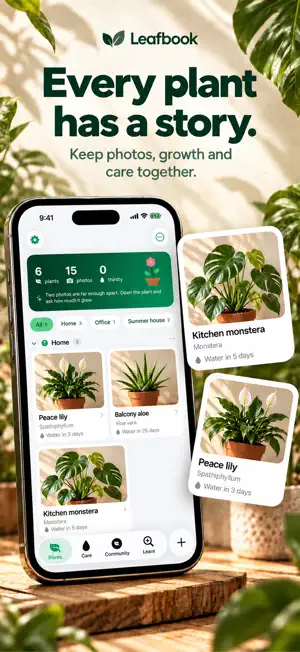
Leafbook knows when your plant needs water, because it knows where your plant lives. Most houseplants die of overwatering, and the worst part is that too much water looks exactly like thirst: the lower leaves yellow, the plant droops, and people water it again. A fixed calendar makes that worse. Leafbook asks where the plant stands and works the interval out from there, then tells you why it changed. WATERING THAT FITS YOUR HOME • Say where a plant stands: indoors, on a balcony, on a terrace, in the garden, or planted in open ground • Say how much light it gets, and the interval follows: a dark corner stretches it, a sunny window shortens it • The season is part of the sum. A plant in January does not drink at the July rate, and the app stops asking as if it did • Every plant page has a "why every N days?" that shows the arithmetic, line by line • The reminder has two buttons: watered, or the soil is still damp. The second one holds the watering and stretches the schedule, so the app learns your home A SHELF, NOT A LIST • Plants belong to a place you name: home, the summer house, your parents' • The shelf groups and filters by it, and a plant moves with a long press WHEN SOMETHING LOOKS WRONG • Leafbook measures the colour of the leaves in your photos and warns you when they drift towards yellow, usually before you notice • Three questions about the soil name the cause: too much water, too little, not enough light, dry air or pests • You get a 14 day rescue plan with dated steps, read again for your species, where it stands and the month it is OTHER PEOPLE'S PLANTS • Show one of yours, leave a charm on somebody else's, ask what the brown tips mean • Plants only. Every photo is checked before it goes up, and anything that is not a plant is refused • An account is for the community and nothing else. Your plants, photos and notes stay on your phone either way IDENTIFY AND LEARN • Point the camera at a plant and get a species suggestion with a watering schedule to match • A searchable catalog of 146 houseplants with light, humidity, pet safety and practical tips WATCH IT GROW • The ghost camera floats your last photo over the viewfinder so every shot lines up • Ask and both photos are read side by side: new leaves, size, colour, and how much it actually grew • Before and after slider, timelapse replay, and share cards for one plant or the whole collection Your plants sync through your own iCloud. No ads. LEAFBOOK PRO The free plan keeps 2 plants, 1 identification, 1 rescue plan and 1 growth reading. Pro removes the limits and adds watering reminders. Monthly, yearly with a 7 day free trial, or a one-time lifetime purchase. Payment is charged to your Apple account and a subscription renews unless cancelled at least 24 hours before the period ends. You can manage it in Settings. Terms of Use: https://www.apple.com/legal/internet-services/itunes/dev/stdeula/ Privacy: https://bamstudio.dev/privacy/leafbook/
What’s new
Version 1.2.1 · Updated October 14, 2026
A fix for plant identification. When the AI could not be reached, the app quietly showed its own guess from the leaf colour instead, with a confidence beside it and nothing saying the AI never answered. Now it tries again, and if it still cannot reach the AI the card says so and offers one more try. That try is free.
App privacy
The developer, Ali Berk Alparslan, reported these privacy practices to Apple.
Data Linked to You
The following data, which may be collected and linked to your identity, may be used for the following purposes:
- Usage Data: Product Interaction
- Contact Info: Email Address, Name
- User Content: Other User Content
- Identifiers: User ID
Used for: Analytics, App Functionality
Data Not Linked to You
The following data, which may be collected but is not linked to your identity, may be used for the following purposes:
- Purchases: Purchase History
- User Content: Photos or Videos
- Identifiers: Device ID
Used for: App Functionality