

Bytesweep - Storage Cleaner
Sheik S Faheen Ahmed Utilities iPhoneiPadiPod touch
Bytesweep - Storage Cleaner is a free Utilities app for iPhone and iPad by Sheik S Faheen Ahmed. Rated 3.0/5 from 1 ratings. Requires iOS 17.0.
- Rating
- 3.0
- 1 ratings
- Price
- Free
- on the App Store
- Size
- 12 MB
- Age 4+
- Updated
- Oct 20
- 2026 · v1.3.0
Screenshots



About Bytesweep - Storage Cleaner
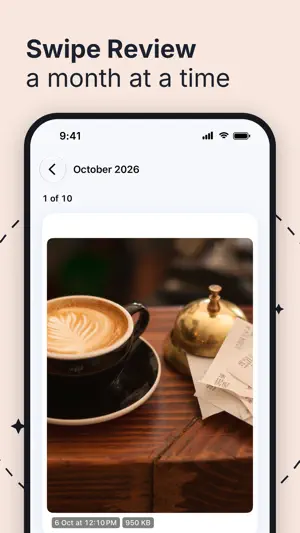
Free up space on your iPhone without losing a single photo you care about. Find similar shots and duplicates, shrink big videos, swipe through old months, and review everything before it goes. SELECT, REVIEW, DELETE Every screen works the same way. Tap what you want gone, then Review shows it all together with its size. Nothing is deleted until you confirm there, and iOS keeps it in Recently Deleted for 30 days. SIMILAR PHOTOS AND DUPLICATES • Similar photos: near-identical shots grouped by day, so you keep the best one. Of equally sharp shots, the one with everyone's eyes open is kept • Duplicate photos: keep the highest quality, the newest or the oldest • Choose how strict the look-alike matching is: Strict, Normal or Loose • Burst photos, screenshots, screen recordings, blurry photos and what other apps saved • Filter any list by size and age to find the big, old things first SHRINK VIDEOS AND PHOTOS Keep the moment and get the space back. Bytesweep makes a smaller copy of a large video (HEVC, same resolution or down to 1080p) or a large photo (Smaller, Balanced or Sharper), checks it, and puts the original in Review for you to delete. Shrunk items say how much they saved, for example 52 MB to 32 MB. Shrink one, or shrink the whole list. Keep a Live Photo as a still, with its date and place. SWIPE REVIEW Pick a month and go through it one photo or video at a time. Swipe left to let it go, right to keep it, and undo any decision. Favorites and protected albums are left out. Ask Siri: "Start Swipe Review in Bytesweep". FIND AND SORT • Ask Your Photos: find a photo by describing it, read on this iPhone • Photo Intelligence: receipts, documents, food, pets and more, grouped. Turn document photos into one searchable PDF • Library by album, Places on a map, and a Selfies grid • Privacy scan: see which photos carry a location or device details, and share copies without them PRIVATE VAULT Hide photos and videos in an encrypted vault on this iPhone, opened with Face ID, Touch ID or your passcode. Each item is sealed and checked before its original goes. The vault stays on this iPhone and is not in backups; the app says so before anything goes in. CONTACTS, CALENDAR AND REMINDERS Merge contacts saved twice, clear entries with no name or way to reach anyone, and remove old events, duplicate events and finished reminders. Nothing changes until you confirm. Calendars and reminders have no Recently Deleted, so removing there is permanent. STORAGE AT A GLANCE A storage ring on Home, a growth chart, reports you can export, a cleanup history, Home and Lock Screen widgets, a Control Center button and 10 Siri and Shortcuts actions. Also: a QR and barcode scanner, a document scanner and text recognition. Works on iPhone Duo. THE HONEST PART If your photos are optimized for iCloud, a 12 MB photo might take 200 KB on this iPhone. Deleting it frees 200 KB here and removes it from every device. Bytesweep shows you this before you delete. No app on iOS can clear other apps' caches, "System Data" or what Messages and Safari store. Bytesweep shows where that space is. PRICE Scanning, browsing, selecting and swiping are always free. Every feature works free within your first 1 GB and 30 items, whichever comes first: deleting, shrinking, the vault, and cleaning contacts, calendars and reminders. After that, one purchase removes the cap: Bytesweep Pro. Pay once. No subscription, no renewal. Restore it on any iPhone signed in to the same Apple Account. PRIVACY Everything happens on your iPhone. No account, no analytics, no server and no network requests. Nothing leaves the device unless you share or export it.
What’s new
Version 1.3.0 · Updated October 20, 2026
Bytesweep is now free to start. • Every feature works free within your first 1 GB and 30 items: deleting, shrinking, the vault, contacts, calendar and reminders. • A meter on Home and in Review shows how much free cleaning is left. • After that, one purchase removes the cap. No subscription. • Small fixes. As always, everything happens on your iPhone.
App privacy
The developer, Sheik S Faheen Ahmed, reported these privacy practices to Apple.
Data Not Collected
The developer does not collect any data from this app.
Alternatives to Bytesweep - Storage Cleaner
Looking for apps like Bytesweep - Storage Cleaner? Here are 6 similar apps on the App Store. The highest rated is AI Cleaner - Clean Phone Space (4.6/5), and all 6 are free to download.
-
 Nulvo: AI Photo Delete Cleaner
-
 InfoCard - Get More Info
-
 Clean Up AI - Cleaner Storage
-
 AIClean: Clean Up Storage
-
 swypix: Swipe Photo Cleaner
-
 AI Cleaner - Clean Phone Space
4.6
| App | Rating | Price | Last updated | Compare |
|---|---|---|---|---|
| Bytesweep - Storage Cleaner | 3.0 / 5 (1 rating) | Free | October 20, 2026 | |
| Nulvo: AI Photo Delete Cleaner | – | Free | May 12, 2026 | Compare |
| InfoCard - Get More Info | – | Free | Jun 2, 2025 | Compare |
| Clean Up AI - Cleaner Storage | – | Free | Apr 11, 2025 | Compare |
| AIClean: Clean Up Storage | – | Free | Mar 10, 2026 | Compare |
| swypix: Swipe Photo Cleaner | – | Free | Jul 19, 2026 | Compare |
| AI Cleaner - Clean Phone Space | 4.6 / 5 (5) | Free | Oct 7, 2026 | Compare |