

PicPage: PDF & Collage Maker
Sumangaury Marsoniya Photo & Video iPhoneiPadiPod touch
PicPage: PDF & Collage Maker is a free Photo & Video app for iPhone and iPad by Sumangaury Marsoniya. Requires iOS 15.1. Updated October 21, 2026.
- Price
- Free
- on the App Store
- Size
- 51 MB
- Age 4+
- Updated
- Oct 21
- 2026 · v1.2
Screenshots


About PicPage: PDF & Collage Maker
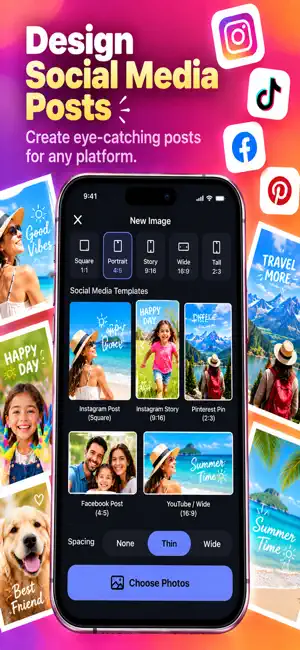
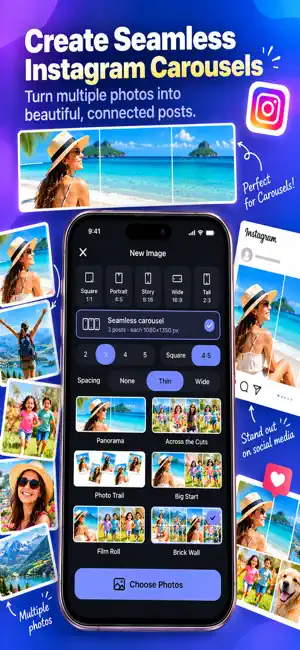
PicPage turns your photos into polished PDFs, beautiful collages and social posts — in seconds. Perfect for school projects, office documents, receipts, notes, birthdays, trips and everything in between. No sign-up. No confusing menus. Pick your photos, choose a layout, and you're done. TWO WAYS TO CREATE • PDF Document — A4 or Letter, portrait or landscape. Great for school presentations, reports, receipts and scanned notes. • Social Image — Square, Portrait, Story, Wide and Tall shapes, saved at full sharp quality and ready to post. Fix: in App Store Connect, open the version page, replace the whole Description field with the text below, and resubmit. PicPage turns your photos into polished PDFs, beautiful collages and social posts — in seconds. Perfect for school projects, office documents, receipts, notes, birthdays, trips and everything in between. No sign-up. No confusing menus. Pick your photos, choose a layout, and you're done. TWO WAYS TO CREATE • PDF Document — A4 or Letter, portrait or landscape. Great feports, receipts and scanned notes. • Social Image — Square, Portrait, Story, Wide and Tall shapes, saved at full sharp quality and ready to post. NEW: SEAMLESS CAROUSEL Design one wide picture that splits into 2 to 5 swipeable slides. Photos can run across the cut, so your carousel swipes as one smooth, continuous story. Saved as perfectly sized slides, in order. NEW: PRINT AT HOME Turn any design into a print-ready page. Choose 1, 2, 4 or 9 copies per sheet on A4 or Letter paper — PicPage shows the real printed size and adds cut marks so trimming is easy. Great for photo prints, cards, labels and handouts. START WITH AN IDEA 26 ready-made ideas for birthdays, travel, love, food, celebrter, school and work. Each one sets the shape, layout, colorsand style for you — just add your photos. LAYOUTS FOR EVERYTHING • Grids, side by side, stacked and featured layouts for documents • Collage, masonry, scrapbook, film strip and tilted-print la • Or start with a blank page and place photos freely EDIT RIGHT ON THE PAGE • Crop, resize and rotate each photo directly on the page • Drag photos exactly where you want them • Choose from 24 backgrounds, including gradients and kraft p • Rounded or square photo corners, and adjustable spacing • Undo and redo every change SAVE AND SHARE YOUR WAY • Save to Photos • Share as Image • Share as PDF through Mail, Messages, AirDrop or any app • Print directly from your iPhone YOUR PROJECTS, SAVED Every project is kept, so you can come back, edit, duplicate or rename it anytime. PRIVATE BY DESIGN Your photos and files stay on your device. Nothing is uploaded to a server. SIMPLE ENOUGH FOR KIDS, FAST ENOUGH FOR WORK PicPage is designed to feel obvious from the first tap — no tutorial needed. GO PREMIUM Remove ads for good with a one-time purchase. No subscription, ever. PicPage was previously called "Images to PDF - Maker". Questions or feedback? Reach us from the Settings screen — we read every message.
What’s new
Version 1.2 · Updated October 21, 2026
Image to PDF is now PicPage! Same app, new name — and our biggest update yet. • NEW Seamless Carousel — design one wide picture that splits into 2–5 swipeable slides. Photos can cross the cut, so your post swipes as one smooth story. • NEW Print at Home — print any design on A4 or Letter with 1, 2, 4 or 9 copies per sheet. See the real printed size, with cut marks for easy trimming. • 26 ready-made ideas for birthdays, travel, love, food, celebrations, shops, school and more — browse them all in the new Ideas screen. • 6 new backgrounds: kraft paper, party, gold, forest, sky and rose. • Fresh Home screen with real photo previews of every layout and idea. • Faster, smoother and lots of small fixes.
App privacy
The developer, Sumangaury Marsoniya, reported these privacy practices to Apple.
Data Not Collected
The developer does not collect any data from this app.
Alternatives to PicPage: PDF & Collage Maker
Looking for apps like PicPage: PDF & Collage Maker? Here are 6 similar apps on the App Store. The highest rated is Video Resizer No Crop Compress (4.4/5), and all 6 are free to download.
-
 # Simple Photo Collage
-
 Auto Reframe: Video Crop
-
 Lenstag
3.0
-
 Video Resizer No Crop Compress
4.4
-
 Y2K Camera - CCD Film & VHS
3.0
-
 CustomStamp – Timestamp & GPS
| App | Rating | Price | Last updated | Compare |
|---|---|---|---|---|
| PicPage: PDF & Collage Maker | – | Free | October 21, 2026 | |
| # Simple Photo Collage | – | Free | Sep 16, 2026 | Compare |
| Auto Reframe: Video Crop | – | Free | Sep 8, 2026 | Compare |
| Lenstag | 3.0 / 5 (6) | Free | Sep 30, 2026 | Compare |
| Video Resizer No Crop Compress | 4.4 / 5 (15) | Free | Oct 30, 2025 | Compare |
| Y2K Camera - CCD Film & VHS | 3.0 / 5 (2) | Free | Oct 22, 2026 | Compare |
| CustomStamp – Timestamp & GPS | – | Free | Jul 10, 2026 | Compare |