

Simu — Film Recipes
Bai-Kuan Yeh Photo & Video iPhoneiPadiPod touch
Simu — Film Recipes is a free Photo & Video app for iPhone and iPad by Bai-Kuan Yeh. Requires iOS 16.0. Updated October 13, 2026.
- Price
- Free
- on the App Store
- Size
- 4 MB
- Age 4+
- Updated
- Oct 13
- 2026 · v1.1.7
Screenshots

About Simu — Film Recipes
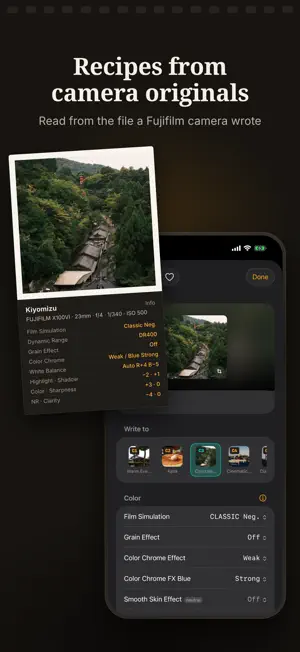
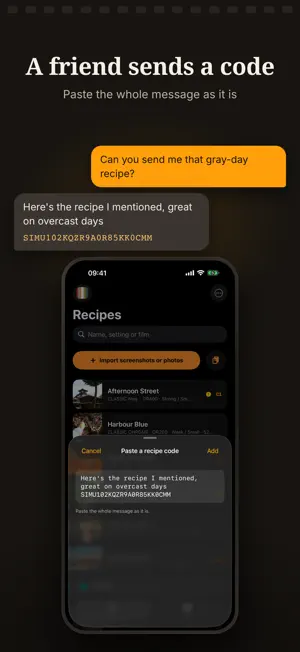
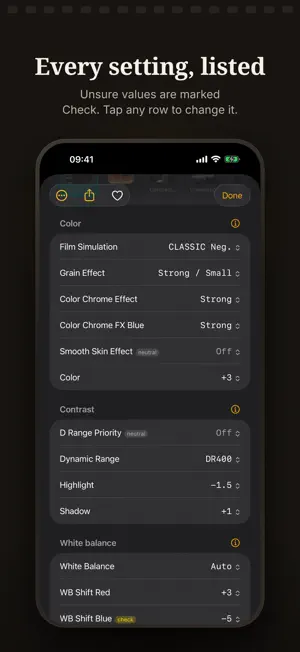
Screenshot in, C1–C7 out. Simu reads the settings of a Fujifilm recipe out of a screenshot and writes them into the camera's C1–C7 custom slots over USB. No internet. No account. No cloud AI. No subscription. FROM A SCREENSHOT Screenshots of an Instagram post, a Threads reply, a Xiaohongshu card or a web page. Up to twenty import at once, and one recipe can span two screenshots. FROM THE SHARE SHEET Take a screenshot, tap the thumbnail, then tap Share and choose Simu. Images in Photos share the same way. Images can also be dragged onto Simu or imported with a Shortcuts action. READING THE SETTINGS Recipes written in English, Japanese, Traditional Chinese or Simplified Chinese are read on the phone. A value Simu is unsure of is marked Check. A setting the recipe lists but the screenshot does not show clearly is marked Unread. The photo in the screenshot is cropped square and saved with the recipe. Recipes and kits are shown with that picture. FROM A CAMERA ORIGINAL An original JPEG or HEIF from a Fujifilm camera records the settings it was shot with, and Simu reads them from the file. A photo saved from a website or a post no longer carries the settings and is read like a screenshot. Smooth Skin Effect is not recorded in the file. The location and serial number in a photo are not used or kept. INTO C1–C7 Connect the camera over USB and pick one of C1–C7. Settings a recipe does not mention are written as the camera's neutral values. Every slot is backed up before it is overwritten, and writing starts only once the backup is saved. Any write can be put back. KITS AND SHARING A kit is a strip of film: seven frames for C1–C7, each with its recipe's picture. Tap an empty frame to choose by picture. Drag one frame onto another to swap them. A kit is written in one go, and slots it leaves out keep what the camera already has. Any recipe or kit can be shared as a short code, a link or a QR code. Codes include a checksum, so a code cut short by a messaging app is rejected. A code holds the whole recipe, with no server involved, and the format is published. SEARCH Search covers names and settings, so Classic Neg finds every recipe that uses it. Results can be narrowed by film simulation. Recipes also show up in Spotlight. WHAT THE SETTINGS MEAN What Dynamic Range, Clarity, WB Shift and the rest do, plus the range the camera accepts and rules the manual leaves out: • Clarity cannot be written while Image Quality is set to HEIF. • D Range Priority takes over Dynamic Range, Highlight and Shadow while it is on. • DR200 needs ISO 320 or higher; DR400 needs ISO 640 or higher. FREE AND PAID Reading screenshots and photos, organizing kits, sharing, and the settings reference are free. Writing to the camera is a one-time purchase that works on every device with the same Apple ID. WHAT IT NEEDS • A Fujifilm camera and a USB-C cable that carries data • CONNECTION MODE → USB RAW CONV./BACKUP RESTORE • USB POWER SUPPLY/COMM SETTING → POWER SUPPLY OFF/COMM ON Simu writes to fifteen cameras: X100VI, X100V, X-T5, X-T50, X-T4, X-T30 III, X-T30 II, X-E5, X-E4, X-M5, X-H2, X-H2S, X-S20, X-S10, GFX100RF. The X-M5, X-S20 and X-S10 have C1–C4. Everything but writing works with no camera attached. FUJIFILM, X100VI and the film simulation names are trademarks of FUJIFILM Corporation. Simu is an independent app and is not affiliated with, authorized, or endorsed by FUJIFILM Corporation.
What’s new
Version 1.1.7 · Updated October 13, 2026
• A recipe read from a camera original on PROVIA, Velvia, ASTIA or ETERNA now keeps its film simulation in its share code, its QR code and Frame a photo. • A record of each custom setting written or restored is kept for 90 days and the camera connection log for 14 days, on this iPhone only; Diagnostics can share or clear them.
App privacy
The developer, Bai-Kuan Yeh, reported these privacy practices to Apple.
Data Not Collected
The developer does not collect any data from this app.
Alternatives to Simu — Film Recipes
Looking for apps like Simu — Film Recipes? Here are 6 similar apps on the App Store. The highest rated is FujiStyle - Film Recipes Frame (4.8/5), and all 6 are free to download.
-
 Fuji Pic - Film Recipes
-
 Community for Fuji
3.0
Community for Fuji
3.0
-
 Filmsim Recipes
1.7
Filmsim Recipes
1.7
-
 Fuji Recipes - Film simulation
4.7
Fuji Recipes - Film simulation
4.7
-
 FujiStyle - Film Recipes Frame
4.8
FujiStyle - Film Recipes Frame
4.8
-
 FilmMeter
4.8
FilmMeter
4.8
| App | Rating | Price | Last updated | Compare |
|---|---|---|---|---|
| Simu — Film Recipes | – | Free | October 13, 2026 | |
| Fuji Pic - Film Recipes | – | Free | Sep 30, 2026 | Compare |
| Community for Fuji | 3.0 / 5 (2) | Free | Oct 14, 2026 | Compare |
| Filmsim Recipes | 1.7 / 5 (6) | Free | Oct 15, 2026 | Compare |
| Fuji Recipes - Film simulation | 4.7 / 5 (53) | Free | Oct 12, 2026 | Compare |
| FujiStyle - Film Recipes Frame | 4.8 / 5 (378) | Free | Sep 18, 2026 | Compare |
| FilmMeter | 4.8 / 5 (63) | Free | Oct 11, 2026 | Compare |