

My Penny
Mayooran Thavajogarasa Finance iPhoneiPadiPod touch
My Penny is a free Finance app for iPhone and iPad by Mayooran Thavajogarasa. Requires iOS 17.0. Updated September 29, 2026.
- Price
- Free
- on the App Store
- Size
- 3 MB
- Age 4+
- Updated
- Sep 29
- 2026 · v1.3
Screenshots


About My Penny
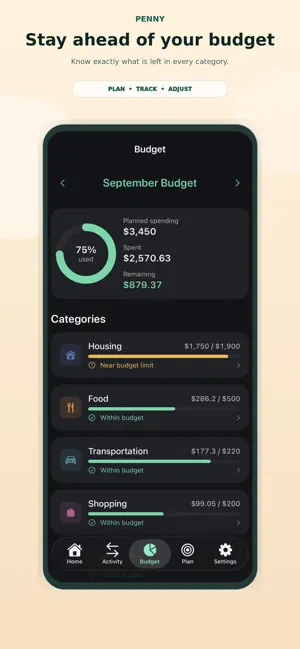
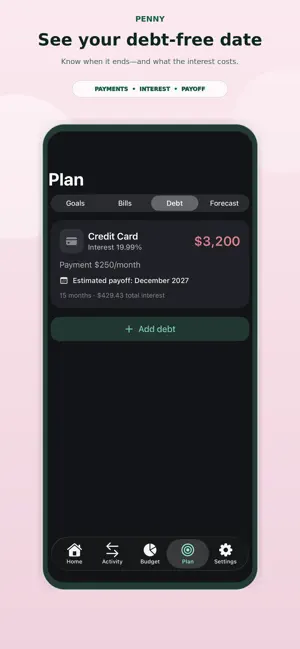
Penny is a calm, private way to see exactly what you can safely spend — without spreadsheets, bank logins, or an expensive subscription. Most budgeting apps overwhelm you with charts or ask for your bank passwords. Penny does the opposite: you enter your income, bills, and goals, and it turns everything into one clear number — your Safe to Spend for the rest of the month. Everything stays on your device. No bank connections. No ads. No tracking. SAFE TO SPEND • One clear number for what’s left to spend this month • Automatically accounts for income, bills, spending, and savings BUDGETS THAT MAKE SENSE • Simple category budgets with healthy / near-limit / over states • See planned vs. spent at a glance BILLS & REMINDERS • Track recurring bills and due dates • Optional reminders before a bill is due SAVINGS GOALS • Set goals and see how much to save each month to reach them DEBT & FORECASTS • Estimate debt payoff timelines • Peek a few months ahead with lightweight forecasts (always labeled as estimates) WIDGETS • Safe to Spend and next-bill widgets for Home and Lock Screen PRIVATE BY DESIGN • All data stored on your device • No bank logins, no analytics, no ads, no accounts PENNY PRO (optional) Unlock unlimited savings goals and Pro features. Available as an annual subscription with a free trial, or a one-time lifetime purchase. Penny is fully usable for free. Penny supports CAD, USD, GBP, EUR, and AUD. --- Penny Pro (Monthly) is an auto-renewing subscription. Payment is charged to your Apple Account at confirmation. It renews automatically unless canceled at least 24 hours before the end of the period. Manage or cancel anytime in Apple Account settings. Privacy Policy: https://mayooranthava.github.io/penny/privacy-policy.html Terms of Use (EULA): https://www.apple.com/legal/internet-services/itunes/dev/stdeula/
What’s new
Version 1.3 · Updated September 29, 2026
• Quick tour that highlights Safe to Spend, bills, and how to add a bill • Plan goal targets are included in your Safe to Spend estimate • Accent themes apply more consistently across Budget and status colors • Monthly PDF summary export (Penny Pro) • Sample data tuned so Safe to Spend starts in a clearer, positive range • Penny Pro is a one-time lifetime unlock — no subscription • Clearer legal terms and on-screen estimate disclaimers • Bug fixes and polish
App privacy
The developer, Mayooran Thavajogarasa, reported these privacy practices to Apple.
Data Not Collected
The developer does not collect any data from this app.
Alternatives to My Penny
Looking for apps like My Penny? Here are 6 similar apps on the App Store. The highest rated is Waypoint Budget Planner App (5.0/5), and all 6 are free to download.
-
 Canora: Financial Goal Planner
-
 Waypoint Budget Planner App
5.0
Waypoint Budget Planner App
5.0
-
 Budgii: Budget Planner
5.0
Budgii: Budget Planner
5.0
-
 Budgeting App - Spend Tracker
4.7
Budgeting App - Spend Tracker
4.7
-
 Piggy Bank - Mani
4.6
Piggy Bank - Mani
4.6
-
 TD Authenticate
1.2
TD Authenticate
1.2
| App | Rating | Price | Last updated | Compare |
|---|---|---|---|---|
| My Penny | – | Free | September 29, 2026 | |
| Canora: Financial Goal Planner | – | Free | Oct 19, 2026 | Compare |
| Waypoint Budget Planner App | 5.0 / 5 (3) | Free | Oct 20, 2026 | Compare |
| Budgii: Budget Planner | 5.0 / 5 (1) | Free | Oct 10, 2025 | Compare |
| Budgeting App - Spend Tracker | 4.7 / 5 (88) | Free | Oct 18, 2026 | Compare |
| Piggy Bank - Mani | 4.6 / 5 (409) | Free | May 2, 2025 | Compare |
| TD Authenticate | 1.2 / 5 (26) | Free | Jan 14, 2026 | Compare |
Compare My Penny with the top alternatives: ratings, updates, ASO score and keyword gaps →