

MIDIPen
Rocamr Labs, LLC Music iPad
MIDIPen is a free Music app for iPad by Rocamr Labs, LLC. Requires iOS 17.5. Updated September 24, 2026.
- Price
- Free
- on the App Store
- Size
- 5 MB
- Age 4+
- Updated
- Sep 24
- 2026 · v1.0
Screenshots

About MIDIPen
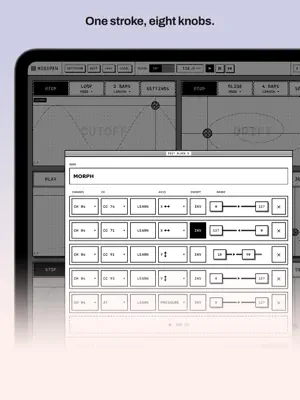
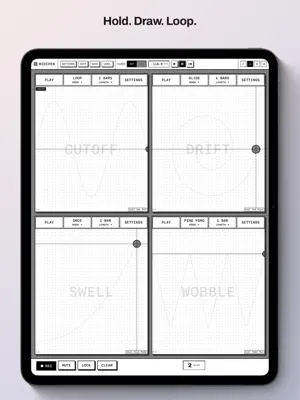
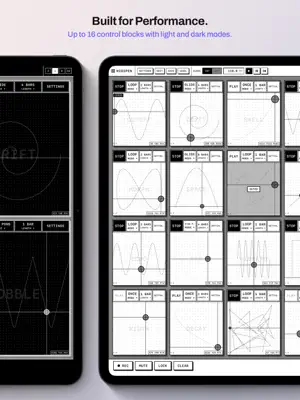
MIDIPen turns your iPad into a drawing surface for MIDI. Put a pencil (or a finger) on a block and its X position, Y position and pressure become MIDI control changes, sent live to any synth, DAW or hardware that speaks MIDI. Lift the pen and the block holds its last value. Draw a shape and it becomes a loop. BLOCKS ARE THE INSTRUMENT The screen is a grid of blocks. Each block is a small XY-plus-pressure pad with its own MIDI mappings. Name it "CUTOFF", point it at CC 74 on channel 1, and you have a filter knob you can draw with. Show two, four, eight or sixteen blocks at once. ONE BLOCK, MANY CONTROLLERS A block is a macro. Add up to eight mappings per block, each with its own channel, CC number (or channel aftertouch), axis, range and invert switch. One stroke can open a filter, close another and push reverb send at the same time. RECORD A GESTURE, PLAY IT BACK IN TIME Hold REC, draw on any blocks you like, let go. Each block captured during the hold plays back on the clock, quantized to a length of one to eight bars. Four play modes: ONCE plays through and holds the last value, LOOP repeats, PING PONG runs forward then backward, GLIDE crossfades the loop seam so nothing jumps. IN TIME WITH EVERYTHING An internal clock with a tempo panel (40–240 BPM), or lock to external MIDI clock. Start, stop and continue from your DAW or hardware sequencer restart every loop together. MIDI LEARN Tap LEARN on any mapping, wiggle a knob on your controller or DAW, and MIDIPen picks up the channel and CC number for you. BUILT FOR PERFORMANCE Bottom-bar tools (REC, MUTE, LOCK, CLEAR) are hold-and-tap so nothing fires by accident. LOCK freezes a finished curve so a stray palm can't smear it. MUTE silences a block instantly. Hide the block controls and the pads fill the whole screen. PREVENT SLEEP keeps the iPad awake for a whole set. Apple Pencil Pro users get a squeeze menu right under the pen. Save and load named setups. CONNECTS TO EVERYTHING MIDIPen appears as a MIDI source ("MIDIPen") and destination ("MIDIPen In") to every other app on the iPad, and sends to every connected MIDI destination: USB interfaces, Bluetooth MIDI, Network MIDI, and other apps like AUM, Drambo, Loopy Pro or your synth apps. No audio engine, no sounds of its own. It drives the instruments you already have. A LOOK FROM THE FIRST MACINTOSH Pure black and white. Hairlines, striped title bars, dithered shadows. No gradients, no color, no distractions. Light and dark mode. FREE, WITH ONE UPGRADE MIDIPen is free with the two-block layout. A single $9.99 purchase unlocks the four, eight and sixteen block layouts: up to sixteen blocks drawing at once. One purchase, no subscription. REQUIREMENTS iPad with iPadOS 17.5 or later. A MIDI destination to control: a synth app on the same iPad, or hardware via a USB or Bluetooth MIDI interface. Apple Pencil is recommended for pressure; a finger works for X and Y.
App privacy
The developer, Rocamr Labs, LLC, reported these privacy practices to Apple.
Data Not Collected
The developer does not collect any data from this app.
Alternatives to MIDIPen
Looking for apps like MIDIPen? Here are 6 similar apps on the App Store. The highest rated is RasterFX: Multi-Effects (5.0/5), and all 6 are free to download.
-
 Arch Carrier Instrument Lab
-
 AmenBeats
3.0
-
 SEPBLOOM LABS
-
 RasterFX: Multi-Effects
5.0
-
 Tonkro
-
 AGRESSIVA
5.0
| App | Rating | Price | Last updated | Compare |
|---|---|---|---|---|
| MIDIPen | – | Free | September 24, 2026 | |
| Arch Carrier Instrument Lab | – | Free | Sep 15, 2026 | Compare |
| AmenBeats | 3.0 / 5 (1) | Free | Oct 1, 2026 | Compare |
| SEPBLOOM LABS | – | Free | Sep 24, 2026 | Compare |
| RasterFX: Multi-Effects | 5.0 / 5 (1) | Free | Sep 10, 2026 | Compare |
| Tonkro | – | Free | Oct 7, 2026 | Compare |
| AGRESSIVA | 5.0 / 5 (1) | Free | Oct 13, 2026 | Compare |
Compare MIDIPen with the top alternatives: ratings, updates, ASO score and keyword gaps →