

PCBPad
Lorenzo Dard Developer Tools iPad
PCBPad is a free Developer Tools app for iPad by Lorenzo Dard. Requires iOS 18.0. Updated October 30, 2026.
- Price
- Free
- on the App Store
- Size
- 174 MB
- Age 4+
- Updated
- Oct 30
- 2026 · v1.7.1
Screenshots

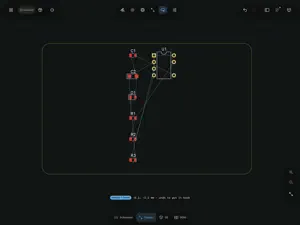
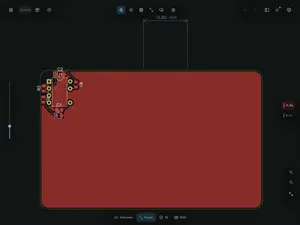
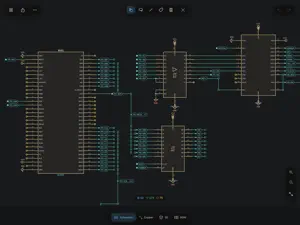
About PCBPad
PCBPad is a circuit board editor built for Apple Pencil. You route copper by drawing it: the stroke you make becomes a clean track, and the board makes room for it. It runs natively on iPad and Mac, works fully offline, and needs no account. ROUTE WITH APPLE PENCIL • Draw from pad to pad: the stroke becomes a copper track with 45° corners, snapped to the grid, and it ends up where your hand went. • Tracks in the way move aside (push and shove). Copper that cannot move is routed around. • The clean-up is checked against pads, holes and keepouts. If the track still touches one, the app tells you which. • One stroke draws a differential pair. A serpentine adds the length a pair is missing. • No Apple Pencil? One finger draws and two fingers navigate. On Mac, drag to draw. • Two-finger tap undoes, three-finger tap redoes, hold one finger for the radial menu. PRIVATE BY DESIGN • No account, no login, no server, no analytics, no ads. • Your boards stay on your device, or wherever you keep them in the Files app. PCBPad never uploads them. OPENS AND SAVES KICAD FILES • PCBPad opens and saves .kicad_pcb and .kicad_sch files directly. There is no import step and no conversion. • Only the bytes you change are rewritten. The file goes back to KiCad as it was, plus your edits. • Tested on real projects, including the KiCad 10 file format. START A BOARD HERE • Draw the board outline, then correct it with numbers. Constrain a sketch, or import an outline from DXF. • 1,901 footprints and 15,123 symbols from the official libraries, bundled and available offline. • Tap two pads to declare a net. The ratsnest shows what is left to connect. • Copper planes with a real fill, via stitching, keepouts, blind and buried vias. • Text, logos and dimensions on the silkscreen. • A footprint editor for the part that no library has. SCHEMATIC • Place parts, wire them, move them: wires stay attached. • Multi-unit parts, hierarchical sheets, and a symbol editor. • Compare the schematic with the board and apply the differences after a preview. CHECK BEFORE YOU ORDER • Design rules written as formulas: clearance, track width, annular ring, hole-to-hole, unconnected nets. • Limits taken from the published capabilities of three board fabricators, with the source and the date they were read. • See what changed between two versions of the same board. SEE IT, THEN MAKE IT • A 3D view of the board, with component bodies sized from their package names. • Gerber X2 with a job file, Excellon drill, bill of materials and pick-and-place, in one ZIP. • The package is read back and shown layer by layer before you send it. • STEP and STL for your enclosure, and panels of several boards. In English and Italian. Requires iPadOS 18 or later, or a Mac with Apple silicon. KiCad is a trademark of the Linux Foundation. PCBPad is an independent app. It is not made by, endorsed by or affiliated with the KiCad project. Questions and bug reports: [email protected]
What’s new
Version 1.7.1 · Updated October 30, 2026
• Simulate: a new tab that runs your board's circuit. Tell it where power comes in and see the current through every LED and the power in every resistor, right on the board. • JLCPCB-ready BOM and pick-and-place files. • The trace width slider shows the current a trace can carry. • Set a part's value and fields as you place it. • Many fixes and improvements.
App privacy
The developer, Lorenzo Dard, reported these privacy practices to Apple.
Data Not Collected
The developer does not collect any data from this app.
Alternatives to PCBPad
Looking for apps like PCBPad? Here are 6 similar apps on the App Store. The highest rated is RemoteIDE : Code From Anywhere (5.0/5), and all 6 are free to download.
-
 Kubriko Showcase
-
 DiagramAI
-
 RemoteIDE : Code From Anywhere
5.0
-
 MASCHINE
-
 AgentShell
5.0
-
 MCU BLE Terminal
| App | Rating | Price | Last updated | Compare |
|---|---|---|---|---|
| PCBPad | – | Free | October 30, 2026 | |
| Kubriko Showcase | – | Free | Sep 30, 2026 | Compare |
| DiagramAI | – | Free | Aug 26, 2026 | Compare |
| RemoteIDE : Code From Anywhere | 5.0 / 5 (2) | Free | Apr 21, 2026 | Compare |
| MASCHINE | – | Free | Aug 26, 2026 | Compare |
| AgentShell | 5.0 / 5 (1) | Free | Feb 19, 2026 | Compare |
| MCU BLE Terminal | – | Free | Mar 27, 2026 | Compare |
Compare PCBPad with the top alternatives: ratings, updates, ASO score and keyword gaps →