

ALBERT | AI Note
agorum Software GmbH Productivity iPhoneiPadiPod touch
ALBERT | AI Note is a free Productivity app for iPhone and iPad by agorum Software GmbH. Requires iOS 17.0. Updated October 26, 2026.
- Price
- Free
- on the App Store
- Size
- 15 MB
- Age 4+
- Updated
- Oct 26
- 2026 · v1.1.0
Screenshots


About ALBERT | AI Note
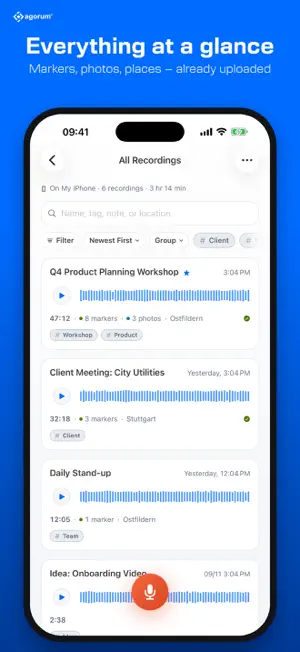
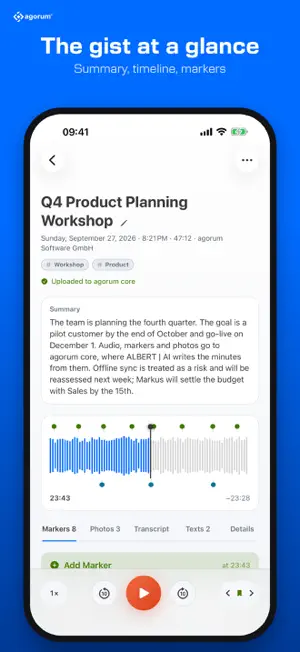
ALBERT | AI Note captures what is said, shown and decided in a meeting – and turns it into something you can work with. RECORD WHAT MATTERS Meetings, client calls, interviews or a quick idea on the go: one tap and you are recording. A running recording is saved continuously, so it survives even if the app is closed unexpectedly. MARKERS IN ONE TAP Something important? Tap "Add Marker". Later you jump straight to that moment instead of listening to the whole hour again. Markers can be named and annotated. PHOTOS IN EXACTLY THE RIGHT PLACE Snap the flipchart, the whiteboard or the sticky notes on the wall while you record. Every picture lands on the timeline to the second – right where it was being discussed. ON-DEVICE TRANSCRIPTION The transcript is created on your iPhone; no audio is sent to a service. During playback the current sentence is highlighted, and search finds every word. SUMMARIES AND YOUR OWN WRITE-UPS After recording you get a short summary. Ask for more in your own words – "List every task with the person responsible" or "Which decisions were made?". The writing is done by Apple Intelligence or by a language model you download once – Gemma by Google or Qwen – which then works without the internet. START FROM ANYWHERE Start and stop recordings and set markers from Control Center, the Lock Screen, the Action button, the Home Screen widget or with Siri. While recording, the Live Activity on the Lock Screen and in the Dynamic Island shows what is running – with buttons for pause, marker and stop. AUTOMATICALLY WHERE YOU WORK Set up a destination and finished recordings go there automatically with everything that belongs to them – audio, markers as chapters, photos, transcript and summaries. You pick the target folder right in the app for every destination: • agorum core – sign in through your system's own login page • Microsoft 365 – OneDrive, SharePoint and Teams with one sign-in • Google Drive and Dropbox • Nextcloud – sign in in the browser, without your main password • ownCloud, Seafile, sciebo and your own WebDAV servers • NAS by Synology, QNAP and TrueNAS • Hosted in Europe: Hetzner Storage Share, IONOS and STRATO HiDrive, Telekom MagentaCLOUD, GMX, WEB.DE, mailbox.org, luckycloud, Infomaniak kDrive, wölkli • pCloud, Koofr, OpenDrive and Fastmail • Document management via CMIS, such as Alfresco or Nuxeo • S3-compatible storage such as Amazon S3, Wasabi or MinIO • Your own endpoint, for example for n8n, Make or Zapier If something changes later, the file at the destination is updated rather than duplicated. ANALYSIS WITH ALBERT | AI With agorum core pro, ALBERT | AI evaluates the recording using a customizable AI template – for example as minutes with tasks and the photos in the right places, at a click or automatically. agorum core pro is an AI business platform by agorum Software GmbH, available for purchase. ALSO • Folders, tags, favorites and search • Trim and continue recordings • Import audio from other apps, such as voice memos or files • Export as audio (m4a or WAV) or as a complete package (ZIP) with chapters, photos and all data • Store on your iPhone or in iCloud Drive YOUR DATA STAYS YOURS No account required, no tracking, no ads. Recordings stay on your device – or go exactly where you send them. PLEASE NOTE The app is available in English and German, and transcribes meetings held in either language. iOS 26 is required for transcription and summaries. Apple Intelligence is available on devices that support it; a downloaded language model needs one to three gigabytes of storage, depending on the model. Transferring to agorum core requires the ALBERT | AI Note plugin on the agorum core system.
What’s new
Version 1.1.0 · Updated October 26, 2026
• Texts as PDF: view and share any text as a PDF – with the agorum logo, headings in agorum blue and the photos in the right places. • Include photos: if you like, the AI places the recording's photos where they belong in the text. • The app remembers your own instructions and offers them again for the next text. Press and hold to pin or remove one. • While a text is being written, the app shows the progress, and the text appears as it is written. • In the complete package, every text is also included as a PDF in the “texts” folder. • New in Settings: “Show Location in PDF”. General settings can now also be reached from a recording's menu.
App privacy
The developer, agorum Software GmbH, reported these privacy practices to Apple.
Data Not Collected
The developer does not collect any data from this app.
Alternatives to ALBERT | AI Note
Looking for apps like ALBERT | AI Note? Here are 6 similar apps on the App Store. The highest rated is next ai (2.0/5), and all 6 are free to download.


| App | Rating | Price | Last updated | Compare |
|---|---|---|---|---|
| ALBERT | AI Note | – | Free | October 26, 2026 | |
| NachweisApp | – | Free | Aug 6, 2026 | Compare |
| Lemminger & Lemminger | – | Free | Aug 10, 2026 | Compare |
| Klartext | – | Free | Oct 8, 2026 | Compare |
| next ai | 2.0 / 5 (1) | Free | Jun 5, 2026 | Compare |
| Roehrmoos | – | Free | Sep 26, 2025 | Compare |
| ERPNext Workflow | – | Free | Sep 9, 2026 | Compare |
Compare ALBERT | AI Note with the top alternatives: ratings, updates, ASO score and keyword gaps →