

Wake Math — Math Alarm
Kushal Srinivas Utilities iPhoneiPadiPod touch
Wake Math — Math Alarm is a free Utilities app for iPhone and iPad by Kushal Srinivas. Requires iOS 26.1. Updated September 30, 2026.
- Price
- Free
- on the App Store
- Size
- 3 MB
- Age 4+
- Updated
- Sep 30
- 2026 · v1.0
Screenshots


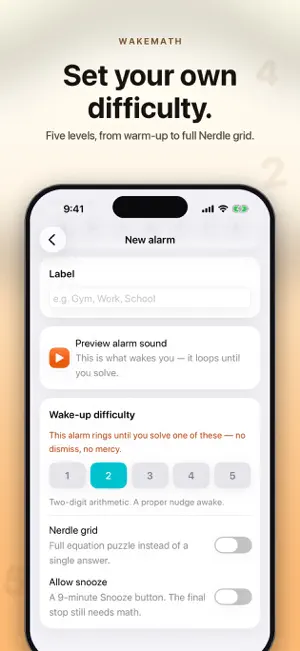
About Wake Math — Math Alarm
An alarm clock you cannot swipe away. When WakeMath rings, a math puzzle appears instead of a snooze button. The alarm keeps going until you solve it. By the time you are done, you are actually awake. HOW IT WORKS 1. Set an alarm and pick a difficulty from 1 to 5. 2. It rings. A puzzle appears. 3. Solve it. The alarm stops. You are up. There is no swipe-to-dismiss. Closing the app, locking your phone or restarting it brings the same challenge straight back. FIVE DIFFICULTY LEVELS 1. Single-digit warm-up. Gentle even half-asleep. 2. Two-digit arithmetic. A proper nudge awake. 3. Division and missing terms. Brain officially on. 4. Algebra and mental chains. No autopilot. 5. Full Nerdle grid. Maximum friction, maximum awake. Every alarm gets its own level, so a weekday 6am can be brutal while a weekend alarm stays kind. NERDLE MODE Turn any alarm into an eight-tile equation puzzle. Build a valid equation in six tries and get per-tile feedback on every guess: right symbol in the right place, right symbol in the wrong place, or not in the equation at all. It is the hardest way to wake up and the most effective. DAILY CHALLENGE AND STREAKS One puzzle a day, the same one for everyone, seeded by the date. Solve it to extend your streak. Want to warm up first? Practice puzzles are always available and count toward your totals but never toward your streak. TRACK EVERY MORNING Total solves, best streak and fastest solve time, plus a day-by-day history of how each morning actually went. BUILT TO BE FAIR - Wrong answers never punish you. Try as many times as you need, with a hint after two misses. - Snooze is optional and off by default. Switch it on and you get a nine-minute snooze, but the final stop still needs math. - Nothing ever pretends to be locked. If a permission is missing, the app says so plainly instead of faking it. - Alarms survive a restart. If your phone reboots mid-alarm, the challenge picks up exactly where it left off. COMPLETELY OFFLINE No account. No sign-up. No internet connection, ever. Your alarms, streaks and history stay on your device and go nowhere else. There is no analytics, no tracking and no ads. BEFORE YOU START WakeMath uses the iOS alarm system so wake-ups break through silent mode and Focus. Grant alarm permission on first launch so your alarms can actually ring. Wake up your brain before you use your phone.
App privacy
The developer, Kushal Srinivas, reported these privacy practices to Apple.
Data Not Collected
The developer does not collect any data from this app.
Alternatives to Wake Math — Math Alarm
Looking for apps like Wake Math — Math Alarm? Here are 6 similar apps on the App Store. The highest rated is ZzZlapp: Alarm Clock Missions (5.0/5), and all 6 are free to download.
-
 Puzzle Alarm: Loud alarm clock
-
 ZzZlapp: Alarm Clock Missions
5.0
ZzZlapp: Alarm Clock Missions
5.0
-
 Wakey: Loud Alarm Clock
4.6
Wakey: Loud Alarm Clock
4.6
-
 Math Alarm Clock - Wake up!
4.6
Math Alarm Clock - Wake up!
4.6
-
 ByeBed - Alarm with Missions
4.8
ByeBed - Alarm with Missions
4.8
-
 WakeNow: Loud Alarm Clock
4.9
WakeNow: Loud Alarm Clock
4.9
| App | Rating | Price | Last updated | Compare |
|---|---|---|---|---|
| Wake Math — Math Alarm | – | Free | September 30, 2026 | |
| Puzzle Alarm: Loud alarm clock | – | Free | Oct 21, 2026 | Compare |
| ZzZlapp: Alarm Clock Missions | 5.0 / 5 (1) | Free | Apr 20, 2026 | Compare |
| Wakey: Loud Alarm Clock | 4.6 / 5 (57) | Free | Jul 6, 2026 | Compare |
| Math Alarm Clock - Wake up! | 4.6 / 5 (1,334) | Free | Feb 13, 2025 | Compare |
| ByeBed - Alarm with Missions | 4.8 / 5 (45) | Free | Oct 7, 2026 | Compare |
| WakeNow: Loud Alarm Clock | 4.9 / 5 (39) | Free | Oct 15, 2026 | Compare |