

SSHBorg
Serena Traversi Utilities iPhoneiPadiPod touch
SSHBorg is a free Utilities app for iPhone and iPad by Serena Traversi. Requires iOS 16.0. Updated October 20, 2026.
- Price
- Free
- on the App Store
- Size
- 18 MB
- Age 4+
- Updated
- Oct 20
- 2026 · v1.2.0
Screenshots


About SSHBorg
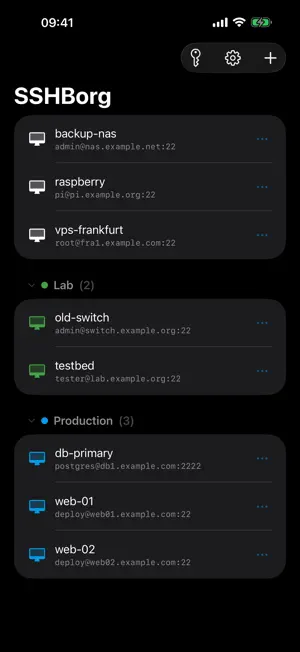
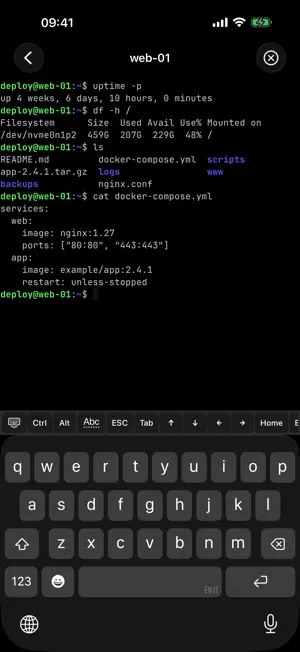
SSHBorg is a powerful SSH and SFTP client for iPhone and iPad. Manage your servers securely with key authentication, encrypted storage, and Face ID or Touch ID lock. FEATURES • Full SSH Terminal — Interactive terminal with VT100/xterm emulation, full UTF-8 support, and multiple concurrent sessions. • SFTP File Manager — Browse, upload, download, rename, and delete files and folders on your servers. • SSH Key Auth — Generate Ed25519, ECDSA, and RSA keys directly on your device, or import your own. No passwords needed. • Jump Host Support — Connect through one or more bastion hosts with transparent tunnelling. Full SSH agent forwarding. • Port Forwarding — Reach services that are only visible from the server, with local (-L) forwards. • Extra Key Bar — Ctrl, Esc, Tab, arrows and function keys above the keyboard, with layouts you can build yourself. • App Lock — Protect access to your servers with Face ID, Touch ID or your device passcode. Configurable timeout. • Backup — Export and import your hosts, groups and settings as a single file. Passwords and keys are never included. • Multilingual — Available in English, Italian, French, German, Spanish, Portuguese, Ukrainian, Russian, Chinese, and Japanese. • Dark & Light Theme — Follows the system theme or lets you choose. • Multiple Sessions — Keep several SSH and SFTP sessions open at once and switch between them instantly. GOOD TO KNOW iOS closes network connections while an app is in the background. When you come back, SSHBorg reconnects your sessions automatically. PRIVACY FIRST, BY DESIGN SSHBorg never collects your data. Everything stays on your device — your credentials, your keys, your connections. • No ads • No tracking • No cloud • Open source — GPL v3 • No tracking or advertising SDKs • Keys and passwords can be encrypted with the device's secure hardware sshborg.com
What’s new
Version 1.2.0 · Updated October 20, 2026
• More room in the terminal: the title bar hides itself and comes back when you tap the screen, so the text takes the whole height (it can be kept fixed in Settings). • A short login message is readable straight away: the session's first lines now start below the retracting title bar. • SFTP: move files and folders on the server — cut them in one folder and paste them in another. The server does the move itself, so even a very large file moves instantly and nothing is downloaded. • SFTP: while selecting files, tapping a row now ticks it instead of starting a download. • SFTP: tapping a file now opens its menu — download, open in the editor, cut, rename — instead of starting a download straight away. The download icon beside it is a button on every row. • The message a server shows before login now appears above the password request, so you can read it before typing. • The keyboard no longer stays on screen over the app lock.
App privacy
The developer, Serena Traversi, reported these privacy practices to Apple.
Data Not Collected
The developer does not collect any data from this app.
Alternatives to SSHBorg
Looking for apps like SSHBorg? Here are 6 similar apps on the App Store. The highest rated is Almaniac: A Calendar Converter (5.0/5), and all 6 are free to download.
-
 Almaniac: A Calendar Converter
5.0
-
 XFiles: SFTP, FTP & NAS Files
5.0
-
 FrankenTTS
5.0
-
 MagicPing
-
 MagicFTP: SFTP & FTP Client
5.0
-
 Sec MQTT Pub
5.0
| App | Rating | Price | Last updated | Compare |
|---|---|---|---|---|
| SSHBorg | – | Free | October 20, 2026 | |
| Almaniac: A Calendar Converter | 5.0 / 5 (2) | Free | Oct 19, 2026 | Compare |
| XFiles: SFTP, FTP & NAS Files | 5.0 / 5 (1) | Free | Oct 24, 2026 | Compare |
| FrankenTTS | 5.0 / 5 (3) | Free | Sep 5, 2026 | Compare |
| MagicPing | – | Free | Oct 6, 2026 | Compare |
| MagicFTP: SFTP & FTP Client | 5.0 / 5 (1) | Free | Jul 2, 2026 | Compare |
| Sec MQTT Pub | 5.0 / 5 (1) | Free | Jan 8, 2026 | Compare |
Compare SSHBorg with the top alternatives: ratings, updates, ASO score and keyword gaps →