

Database Viewer: SQLite & DBF
伟 王 Business iPhoneiPadiPod touch
Database Viewer: SQLite & DBF is a free Business app for iPhone and iPad by 伟 王. Requires iOS 17.0. Updated October 30, 2026.
- Price
- Free
- on the App Store
- Size
- 71 MB
- Age 4+
- Updated
- Oct 30
- 2026 · v1.2.0
Screenshots


About Database Viewer: SQLite & DBF
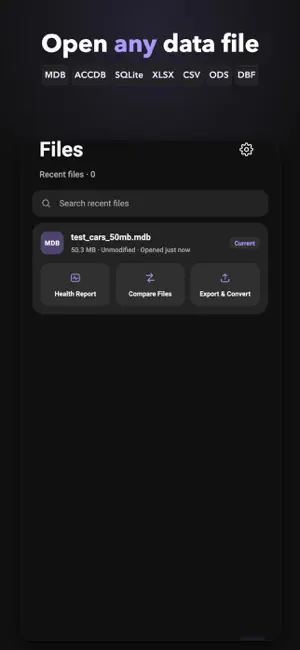
Database Viewer opens, browses, edits and converts database and data files right on your iPhone or iPad — no desktop, no account, no upload. Supported formats: • Microsoft Access: MDB and ACCDB (Jet 3/4/2007+) • SQLite databases • Excel workbooks: XLSX • OpenDocument spreadsheets: ODS • dBase files: DBF (dBase III) • CSV and TSV text tables • SQL dump scripts (SQLite dialect) Open any file, run a health check first, then browse. WHY DATABASE VIEWER Data files don't wait until you're at a desk. Sales exports, inventory lists, archived Access databases, spreadsheet attachments — they arrive on your phone, and you need answers now. Database Viewer brings a native C engine to your device so real files open fast and stay local. • Open large files with confidence - Native parsing keeps millions of rows and files of 1.5GB+ responsive, with pagination and a fullscreen browse mode. • Health check before you commit - Every file is analyzed for format, readability, encoding and damaged regions before you open it, with clear explanations and next-step suggestions when something is wrong. • Browse, search and filter - Jump between tables and inspect any row in a detail view. • Edit safely - Edits are made on a private working copy; your original is never modified. Save when you are ready and keep the original untouched. • Convert to SQLite - Turn any supported format into a modern SQLite database on your device. • Export anywhere - Write CSV, XLSX, ZIP archives, or save back in the original MDB/ACCDB format. • Run SQL queries - Execute SQL with a native engine and a clear error explanation when a query fails. • Compare two files - Diff any two databases or tables and get a row-by-row change report. • Understand your data - Column profiling surfaces outliers, trends and correlations; a chart wall visualizes distributions and totals. • Keep data local - Everything is processed on your device and never uploaded to cloud servers. No account required. QUICK ANSWERS • Need to open an MDB or ACCDB file from an old Access database? Browse every table, search across all of them at once, and inspect rows in fullscreen. • Looking for a DBF viewer for dBase III files? Open, browse and edit them, then save back in the original format. • Want to turn a CSV export or an Excel XLSX workbook into a real database? Import it, browse it and convert it to SQLite. • How do you read a SQL dump without running any server? Open the script directly, or query it through a local SQLite copy. • Searching for an offline viewer that keeps your data private? Nothing leaves your device — no account, no cloud. DATABASE VIEWER PRO Open any file and run a free health check. Pro is a single one-time purchase that unlocks: • Full table browsing • Editing in all supported formats, with safe write-back • SQL query execution • Converting any file to SQLite • Exporting to CSV, XLSX, ZIP and original formats • File diff reports • Cross-table search Order and fullscreen browsing are also part of Pro. Pay once, keep everything — no subscription, no account, no tracking. TERMS & PRIVACY Use of the app is subject to Apple's standard Licensed Application End User License Agreement: https://www.apple.com/legal/internet-services/itunes/dev/stdeula/ Privacy policy: https://lababacy.com/accessviewer/privacy/ RESTORE & SUPPORT Already purchased Pro? Tap Restore Purchases on the Pro screen and everything comes back — no repurchase, no subscription. Questions? Email [email protected] or visit https://lababacy.com/accessviewer/support/
What’s new
Version 1.2.0 · Updated October 30, 2026
Fixed a crash when opening files shared from other apps — shared files now open reliably, including right after launch. • Very large tables scroll much more smoothly, with inertia and a clear indicator while more rows load. • Numbers display cleanly: no more artifacts like 97.1400000000001. • Fixed garbled text in some Japanese (Shift-JIS) files. • Faster sorting and search in large CSV, Excel and other data files. • Table CSV export and original-format export now support more file types. • SQL queries now work with CSV, Excel, ODS, DBF and SQL dump files via an on-device SQLite copy. • Stability and error-message improvements throughout.
App privacy
The developer, 伟 王, reported these privacy practices to Apple.
Data Used to Track You
The following data may be used to track you across apps and websites owned by other companies:
- Location: Coarse Location
- Identifiers: Device ID
- Usage Data: Product Interaction, Advertising Data
Data Linked to You
The following data, which may be collected and linked to your identity, may be used for the following purposes:
- Contact Info: Email Address
Used for: App Functionality
Data Not Linked to You
The following data, which may be collected but is not linked to your identity, may be used for the following purposes:
- Location: Coarse Location
- Identifiers: Device ID
- Usage Data: Product Interaction, Advertising Data
- Diagnostics: Crash Data, Other Diagnostic Data
- Purchases: Purchase History
Used for: Third-Party Advertising, Analytics, App Functionality
Alternatives to Database Viewer: SQLite & DBF
Looking for apps like Database Viewer: SQLite & DBF? Here are 6 similar apps on the App Store. The highest rated is MDB-Viewer (3.0/5), and 5 of the 6 are free to download.


| App | Rating | Price | Last updated | Compare |
|---|---|---|---|---|
| Database Viewer: SQLite & DBF | – | Free | October 30, 2026 | |
| DBF Viewer | – | Free | Oct 23, 2026 | Compare |
| Rising Lebanon | – | Free | Jul 7, 2026 | Compare |
| Quest Universal | – | Free | Feb 28, 2024 | Compare |
| Darna - دارنا | – | Free | Oct 8, 2026 | Compare |
| WiCard | – | Free | Aug 11, 2026 | Compare |
| MDB-Viewer | 3.0 / 5 (1) | 3.99 USD | Aug 27, 2026 | Compare |