

Private Docs Vault: Photo Lock
JHIH YUN CHEN Utilities iPhoneiPadiPod touch
Private Docs Vault: Photo Lock is a free Utilities app for iPhone and iPad by JHIH YUN CHEN. Rated 5.0/5 from 1 ratings. Requires iOS 17.0.
- Rating
- 5.0
- 1 ratings
- Price
- Free
- on the App Store
- Size
- 5 MB
- Age 4+
- Updated
- Oct 10
- 2026 · v1.7
Screenshots

About Private Docs Vault: Photo Lock
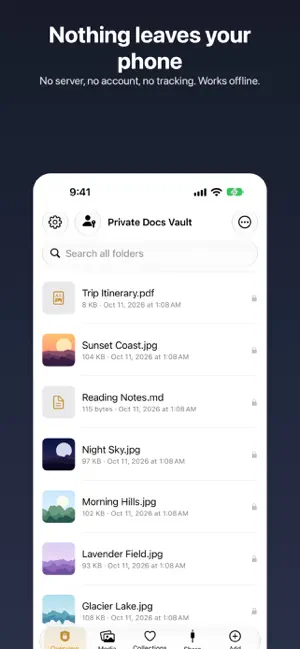
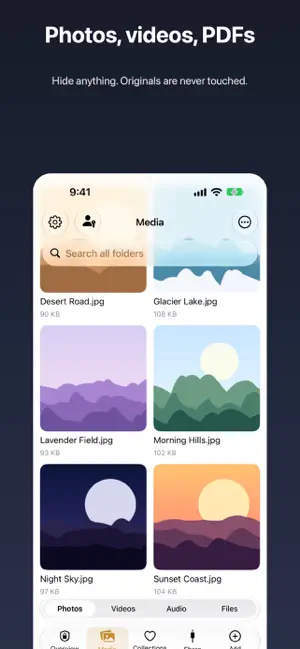
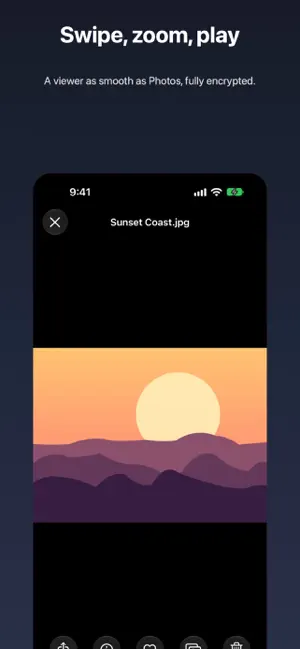
Private Docs Vault is a local encrypted vault with no backdoor. Add photos, videos, PDFs or any file and it is encrypted immediately with AES-256-GCM. It opens only after Face ID / Touch ID plus the 6-digit vault PIN you choose. Fully offline No server, no uploads, no analytics, no ads or trackers. The only network use is App Store purchase verification, handled by iOS. Real encryption, not just hiding Every file is encrypted in chunks; file names and the index are encrypted too. The file key is protected by your recovery key plus your vault PIN together; the recovery key lives in the iOS Keychain and is released only by Face ID / Touch ID, never by the device passcode. Five wrong PINs in a row destroy everything. What you get • Add from Files or Photos; originals are never modified • Live Photos stay Live Photos: touch and hold to play, and save back to Photos with the motion • Built-in camera: photos and videos encrypted directly, never touching the photo library • Video streams while decrypting, PDF text search, Markdown reader • Folders, search, sorting, favorites and recents • Multiple vaults: different PINs open different vaults, and the app never reveals how many exist • Auto-lock delay, automatic blackout during screen recording and mirroring • Password-protected AES zips that open in 7-Zip and friends • Encrypted backups to Files or iCloud Drive • Share area (for your Mac): a clearly labelled UNENCRYPTED folder you drag files in and out of with Finder over a cable • Password list: encrypted, one-tap copy • Notes, PDF merge and split, duplicates • iPad split-view layout The free plan stores 5 GB. “No Storage Limit” is the only paid item: a one-time purchase that is yours forever. It removes the cap (files stay on your device, so free space is the real limit) and includes password zips, batch export, encrypted backups, the password list, PDF merge and split, and the Share area. No subscription, no auto-renewal; restore it for free on other devices with the same Apple Account. Optional “Support the developer” tips can be bought any number of times. They are just a thank-you and unlock nothing. Terms of Use (EULA): https://www.apple.com/legal/internet-services/itunes/dev/stdeula/ Important Setup gives you a recovery key. After switching phones, restoring a backup, changing Face ID or turning off the device passcode, that key plus your vault PIN brings the vault back. Forgetting your PIN, or losing both the recovery key and the phone, makes the content unrecoverable. That is by design: there is no backdoor. Make encrypted backups regularly. Privacy policy: https://musicloveai.github.io/filevault-site/privacy.html
What’s new
Version 1.7 · Updated October 10, 2026
- Media tab works like Photos: oldest at the top, newest at the bottom, sorted by the date taken. A date pill appears while you scroll; tap it to jump to a month. Photos and videos now record when they were taken. - Info button in the viewer: size, dimensions, length, date taken, folder, and note. - Camera catches up with the Camera app: Live Photos, HEIF or JPEG, maximum resolution, 720p/1080p/4K at 24/30/60 fps, HEVC or H.264, lens shortcuts and pinch zoom, tap to focus, grid, light for video. Settings are remembered. - Passwords moved from a banner to a key icon in the top bar, next to Settings. - Grid size is remembered per tab; small grid tiles for folders and documents now show their names. - Fixed: Add from the Collections and Share tabs did nothing. It now opens the picker and adds to the top level.
App privacy
The developer, JHIH YUN CHEN, reported these privacy practices to Apple.
Data Not Collected
The developer does not collect any data from this app.
Alternatives to Private Docs Vault: Photo Lock
Looking for apps like Private Docs Vault: Photo Lock? Here are 6 similar apps on the App Store.
-
 Vault: Hide Photos & Files
-
 FayVault: Hide Photos & Videos
-
 AbsentKey: Secret Vault
-
 OneBrowse
-
 Nymbra
-
 Not A Fancy Storage
| App | Rating | Price | Last updated | Compare |
|---|---|---|---|---|
| Private Docs Vault: Photo Lock | 5.0 / 5 (1 rating) | Free | October 10, 2026 | |
| Vault: Hide Photos & Files | – | Free | Oct 12, 2026 | Compare |
| FayVault: Hide Photos & Videos | – | Free | Sep 16, 2026 | Compare |
| AbsentKey: Secret Vault | – | Free | Oct 12, 2026 | Compare |
| OneBrowse | – | Free | Sep 18, 2026 | Compare |
| Nymbra | – | Free | Jul 15, 2026 | Compare |
| Not A Fancy Storage | – | Free | Jul 7, 2026 | Compare |