

SeloPhoto: Collage Maker
Fuzhou Taijiang Kangzhixuan Technology Co., Ltd Photo & Video iPhoneiPadiPod touch
SeloPhoto: Collage Maker is a free Photo & Video app for iPhone and iPad by Fuzhou Taijiang Kangzhixuan Technology Co., Ltd. Rated 5.0/5 from 1 ratings.
- Rating
- 5.0
- 1 ratings
- Price
- Free
- on the App Store
- Size
- 10 MB
- Age 4+
- Updated
- Nov 12
- 2026 · v1.3.0
Screenshots


About SeloPhoto: Collage Maker
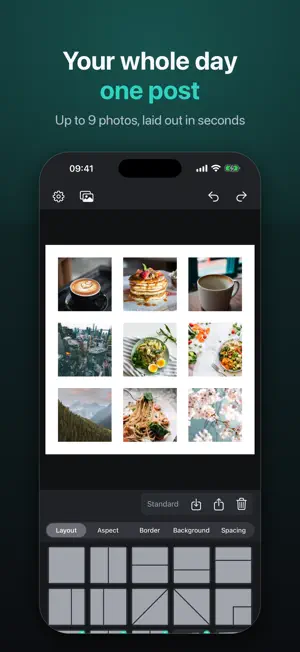
Put a whole day into one frame. Pick up to nine photos. They land in the order you tap. Choose a layout, add the white space on purpose, pick 1:1, 4:5, or 9:16, and export exactly what you see. SeloPhoto is a collage tool for iPhone — not a sticker pack, not a cloud editor. Your photos and videos stay on your device. Pick them with the system picker, or optionally allow photo-library read access so long videos import faster. The app works fully without it. WHAT YOU CAN MAKE • Grids and featured layouts for 1–9 photos • Polaroid-style bottoms, margins, and gutters you can actually see • Solid, gradient, or (with Pro) photo and custom backgrounds • Square posts, 4:5 portraits, and 9:16 Stories — same canvas you export • Live Photos and videos in your slots: trim each clip, pick its cover frame, and choose whose sound plays • Seamless blend (Pro): photos fade into each other at the seams, in any layout • Split into Grid: cut one photo or your collage into 3, 6, 9, or 12 tiles for grid posts HOW IT WORKS 1. Pick photos. They fill slots in tap order. 2. Pan, pinch, and swap until the crop feels right. 3. Share or save: JPEG, PNG, or a still GIF — or MP4 and Live Photo when your collage moves. PRIVACY Collages render on your iPhone. No account. No ads. No tracking. Reading your library is optional and only speeds up import. Saving to Photos only adds; you can also share without granting library access. SELOPHOTO PRO (ONE-TIME) Unlock every layout, seamless blend, custom backgrounds, custom export size or file size, videos up to 3 minutes (free: 5 seconds), and 1080p at 30 fps. Lifetime — not a subscription. Restore with your Apple ID anytime. SeloPhoto is made for the photos you already took today.
What’s new
Version 1.3.0 · Updated November 12, 2026
Fill hearts, stars, crowns and flowers with your photos. • New: 130+ shape layouts (Pro) — hearts, stars, crowns, flowers, arrows, animals and more • Pie slices, heart pieces, honeycombs and petals: one shape split into pieces, each holding a photo • Layouts are now grouped, so you can jump straight to the kind of shape you want • Blend (Pro) works inside shapes, so photos melt into each other where pieces meet • The layout panel grows taller while you browse, so you can see more shapes at once • Still no account, no ads, no tracking
App privacy
The developer, Fuzhou Taijiang Kangzhixuan Technology Co., Ltd, reported these privacy practices to Apple.
Data Not Linked to You
The following data, which may be collected but is not linked to your identity, may be used for the following purposes:
- Purchases: Purchase History
- User Content: Photos or Videos
Used for: App Functionality
Alternatives to SeloPhoto: Collage Maker
Looking for apps like SeloPhoto: Collage Maker? Here are 6 similar apps on the App Store. The highest rated is Memory Camera: Photo Scrapbook (5.0/5), and all 6 are free to download.
-
 NORY - Retro Film Camera
4.0
-
 MemoMark
4.0
-
 Memory Camera: Photo Scrapbook
5.0
-
 POCKLO: Photo Scrapbook
5.0
-
 Stills – Video to Photo 4K HD
4.8
-
 HuePhoto: Aesthetic Templates
5.0
| App | Rating | Price | Last updated | Compare |
|---|---|---|---|---|
| SeloPhoto: Collage Maker | 5.0 / 5 (1 rating) | Free | November 12, 2026 | |
| NORY - Retro Film Camera | 4.0 / 5 (7) | Free | Oct 28, 2026 | Compare |
| MemoMark | 4.0 / 5 (8) | Free | Nov 13, 2026 | Compare |
| Memory Camera: Photo Scrapbook | 5.0 / 5 (1) | Free | Oct 13, 2026 | Compare |
| POCKLO: Photo Scrapbook | 5.0 / 5 (1) | Free | Oct 7, 2026 | Compare |
| Stills – Video to Photo 4K HD | 4.8 / 5 (43) | Free | Oct 30, 2026 | Compare |
| HuePhoto: Aesthetic Templates | 5.0 / 5 (1) | Free | Nov 17, 2026 | Compare |