

LumaFold: Screen Light
Max Babenko Photo & Video iPhoneiPadiPod touch
LumaFold: Screen Light is a free Photo & Video app for iPhone and iPad by Max Babenko. Requires iOS 18.0. Updated October 23, 2026.
- Price
- Free
- on the App Store
- Size
- 5 MB
- Age 4+
- Updated
- Oct 23
- 2026 · v1.0.1
Screenshots

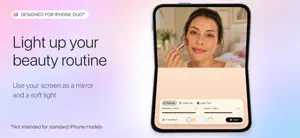

About LumaFold: Screen Light
Make your iPhone Duo screen a creative studio with adjustable screen lighting, a live makeup mirror, color animations, and personal photo displays. LumaFold lets you use two screen areas differently. Light your face while checking your makeup, pair two colors for a creative shot, or combine a favorite photo with a handwritten message. LIGHT FOR YOUR BEAUTY ROUTINE Use the live camera mirror on one side and adjustable light on the other. Change brightness, try warm or cool lighting tones, and zoom in for detail work. Explore how different lighting changes your makeup look. SCREEN LIGHT FOR PHOTOS AND VIDEO Set the color and intensity of each side independently, or link them for a matching look. Add a soft fill, create colored reflections, or experiment with light around your subject. Use the screen as a light source while another phone or camera captures your photo or video. COLOR THAT MOVES Explore animated gradients, flowing colors, and geometric effects. Adjust the motion to create a changing backdrop, a color accent for your content, or ambient light for a quiet evening. PHOTOS AND HANDWRITTEN MESSAGES Display a photo on one side and draw or write on the other. Make a personal desk display, leave a visible reminder, or create a glowing message for someone you care about. Adjust photo blur, saturation, size, and position. YOUR FAVORITE SETUPS Start with a preset or build your own combination of light, color, photos, and animation. Save setups and palettes to return to a look you like. No account is required. Photos are processed on your device, and saved setups are stored locally. FREE TO START Use the makeup mirror, basic lighting controls, preset colors, and an included animation for free. LumaFold Pro unlocks custom colors and warmth, advanced lighting controls, the full animation collection, photo light, and saved setups. Pro is available through a monthly or yearly subscription, or a one-time Lifetime purchase. Subscriptions renew automatically unless canceled at least 24 hours before the current period ends. Manage or cancel subscriptions in your Apple Account settings. Privacy Policy: https://typeswitch.net/fold-duo-iphone-duo-light-app-privacy-policy/ Terms and Conditions: https://typeswitch.net/fold-duo-iphone-duo-light-app-terms-of-use/ License Agreement: https://www.apple.com/legal/internet-services/itunes/dev/stdeula/
App privacy
The developer, Max Babenko, reported these privacy practices to Apple.
Data Not Collected
The developer does not collect any data from this app.
Alternatives to LumaFold: Screen Light
Looking for apps like LumaFold: Screen Light? Here are 6 similar apps on the App Store. The highest rated is Mat: Photo Widget Maker (5.0/5), and all 6 are free to download.
-
 Passepartout - Photo Border
-
 What Will I Look Like When OLD
3.9
What Will I Look Like When OLD
3.9
-
 TagCam - Photo Organizer
4.3
TagCam - Photo Organizer
4.3
-
 Mat: Photo Widget Maker
5.0
Mat: Photo Widget Maker
5.0
-
 Roll Camera - Fresh Film Daily
4.8
Roll Camera - Fresh Film Daily
4.8
-
 Trigraphy: Blend & Trippy Art
4.6
Trigraphy: Blend & Trippy Art
4.6
| App | Rating | Price | Last updated | Compare |
|---|---|---|---|---|
| LumaFold: Screen Light | – | Free | October 23, 2026 | |
| Passepartout - Photo Border | – | Free | Jul 17, 2026 | Compare |
| What Will I Look Like When OLD | 3.9 / 5 (16) | Free | May 19, 2025 | Compare |
| TagCam - Photo Organizer | 4.3 / 5 (30) | Free | May 16, 2025 | Compare |
| Mat: Photo Widget Maker | 5.0 / 5 (13) | Free | Oct 30, 2026 | Compare |
| Roll Camera - Fresh Film Daily | 4.8 / 5 (92) | Free | Oct 19, 2026 | Compare |
| Trigraphy: Blend & Trippy Art | 4.6 / 5 (935) | Free | Oct 11, 2026 | Compare |