

Denpa Network Check
AKHIRO TAKASHIMA Utilities iPhoneiPadiPod touchMac
Denpa Network Check is a free Utilities app for iPhone and iPad by AKHIRO TAKASHIMA. Requires iOS 18.0. Updated September 15, 2026.
- Price
- Free
- on the App Store
- Size
- 1 MB
- Age 17+
- Updated
- Sep 15
- 2026 · v1.0
Screenshots


About Denpa Network Check
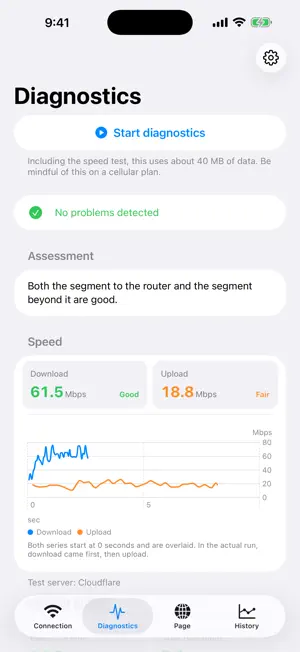
Wi-Fi feels slow, but you cannot tell why. Denpa measures what is actually happening, so you can see which side the problem is on. Denpa measures response time, packet loss, download and upload speed, and DNS lookup, and splits your connection into two segments. ■ Two segments, measured separately ・Your device → the first device that responds (your router, or the carrier gateway on a cellular connection) ・The first device → the internet Video stalls. Pages do not open. Experience alone does not tell you whether the cause is inside your home or beyond it. Measuring the two segments separately narrows it down. ■ What it measures ・Response time ・Jitter ・Packet loss ・DNS lookup time ・Download and upload speed (upload requires a server that supports it) ■ It measures only when you tap Nothing is measured until you tap Start diagnostics. There is no background monitoring. ■ Findings come with what to do Issues are listed as Error, Warning, or Information, with why they were flagged and what you can try. ■ Measure how a web page loads Your line is fast, but one page still feels slow. Enter a URL and Denpa loads that page the way a browser does, then reports the load time, the amount transferred, and the speed over that period. The cache is emptied before every run, so measuring the same page twice does not change the conditions. The page stays on screen, and tapping a link in it measures that URL. ■ Save a location, watch it change Name a location and save the result. History shows a chart and a list for each location, and compares the averages. ■ What this app cannot do ・It cannot change your router settings. It narrows down the cause. ・It cannot measure other devices. Everything shown is seen from this iPhone. ・It cannot show signal strength (the bars). Only apps individually approved by Apple can read it. ・It does not make your connection faster. It is a tool for measuring and narrowing down. ■ Privacy ・Results, location names, and notes stay on your device. ・Nothing is sent to the developer or to a third party. There is no analytics, advertising, or tracking. ・Location is never recorded or sent. It is used only to show the name of the Wi-Fi network (SSID), because iOS requires location permission to read it. ・Measuring uses real network traffic. The speed test connects to Cloudflare by default, and you can change the server in Settings. The full list of destinations is in the privacy policy. ■ Requirements iOS 18.0 or later / iPhone, portrait only / Japanese and English Free. No in-app purchases, no ads, no account.
App privacy
The developer, AKHIRO TAKASHIMA, reported these privacy practices to Apple.
Data Not Collected
The developer does not collect any data from this app.
Alternatives to Denpa Network Check
Looking for apps like Denpa Network Check? Here are 6 similar apps on the App Store.
-
 DiscoTranslation
-
 OniNetwork: Network Analyzer
-
 WiFi Heatmap & Coverage Map
-
 HalfMoon Browser
-
 WiFi Analyzer・Speed Test
-
 Net Trouble Checker: WiFi Test
| App | Rating | Price | Last updated | Compare |
|---|---|---|---|---|
| Denpa Network Check | – | Free | September 15, 2026 | |
| DiscoTranslation | – | Free | Apr 14, 2026 | Compare |
| OniNetwork: Network Analyzer | – | Free | Sep 8, 2026 | Compare |
| WiFi Heatmap & Coverage Map | – | Free | Oct 7, 2026 | Compare |
| HalfMoon Browser | – | Free | Oct 8, 2026 | Compare |
| WiFi Analyzer・Speed Test | – | Free | Aug 20, 2026 | Compare |
| Net Trouble Checker: WiFi Test | – | Free | Sep 30, 2026 | Compare |