

Renovation: DIY Step by Step
Danil Vaimer Lifestyle iPhoneiPadiPod touch
Renovation: DIY Step by Step is a free Lifestyle app for iPhone and iPad by Danil Vaimer. Requires iOS 17.0. Updated October 8, 2026.
- Price
- Free
- on the App Store
- Size
- 2 MB
- Age 4+
- Updated
- Oct 8
- 2026 · v1.0.6
Screenshots


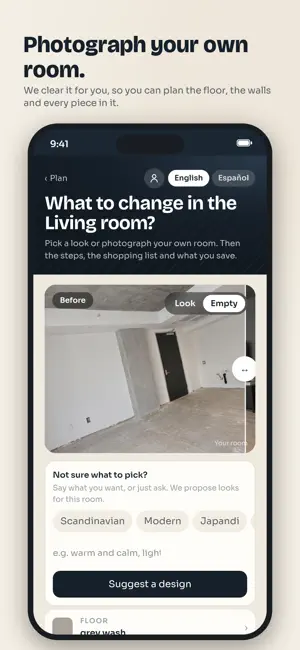
About Renovation: DIY Step by Step
Renovation shows your room new, then walks you through doing it yourself. Take a photo of the room and pick the finishes: floor, walls, tile, doors, trim, fixtures. See them on your own photo before you buy anything. Walls come in 4,792 real paint colors from Benjamin Moore, Sherwin-Williams and BEHR, and you can order a peel-and-stick sample of any of them. Like it? Press Make it real, enter the room size or scan it with the camera, and you get: • A materials list counted for your room, waste included: boxes of flooring, gallons of paint, feet of baseboard, bags of grout • Shopping lists with a link for every item at Home Depot and Amazon • A cut plan for click-lock floors: rows, first and last row width, how many boxes to open • Step-by-step guides with a diagram on every step and a checklist before anything you cannot undo • What you save compared to paying for the labor, and how many weekends the job takes The plan puts the whole home in the order pros use: demolition, walls, paint, floors, kitchen, doors and trim, room by room. An AI helper sits inside every step. Ask about the step you are on, get the math for your numbers, or send a photo of your work and hear what to fix before you go on. Some jobs need a licensed pro: electrical beyond a like-for-like swap, gas, plumbing inside walls, structural work. The app stops there, says why, and shows licensed contractors near you from the state license register. Older homes get asbestos and lead paint warnings before any sanding or demolition. Just want the look? Keep it as a design: the picture, the colors and what to buy, with no plan until you want one. Scan rooms with LiDAR on iPhone Pro and iPad Pro to get the size in seconds. Free. Built in Los Angeles. English and Spanish.
What’s new
Version 1.0.6 · Updated October 8, 2026
A calmer start: pick the room, show a photo, choose a look, then see it on your own room. Real products from our catalog shown on your photo, with a counted shopping list. Finished jobs stay checked off, and every step is clearer. Smoother scrolling: no more sideways drift. Scan your room with the camera on iPhone Pro, and try paint colors on your walls in AR. Bug fixes and small improvements.
App privacy
The developer, Danil Vaimer, reported these privacy practices to Apple.
Data Linked to You
The following data, which may be collected and linked to your identity, may be used for the following purposes:
- Identifiers: User ID
- Usage Data: Product Interaction
- Purchases: Purchase History
- Financial Info: Payment Info
- Contact Info: Email Address, Name, Phone Number
- User Content: Photos or Videos, Other User Content
- Surroundings: Environment Scanning
Used for: Analytics, App Functionality
Alternatives to Renovation: DIY Step by Step
Looking for apps like Renovation: DIY Step by Step? Here are 6 similar apps on the App Store. The highest rated is TreeHouse Home Automation (5.0/5), and all 6 are free to download.
-
 Aurelius: Stoic Quotes Daily
-
 TreeHouse Home Automation
5.0
-
 Repose: AI Interior Design
-
 SPAKL: AI DIY & Repair
5.0
-
 Craft DIY - Restore & Create
-
 Craft Mae: DIY Craft Ideas
3.0
| App | Rating | Price | Last updated | Compare |
|---|---|---|---|---|
| Renovation: DIY Step by Step | – | Free | October 8, 2026 | |
| Aurelius: Stoic Quotes Daily | – | Free | Sep 18, 2026 | Compare |
| TreeHouse Home Automation | 5.0 / 5 (1) | Free | Jul 26, 2024 | Compare |
| Repose: AI Interior Design | – | Free | Nov 3, 2026 | Compare |
| SPAKL: AI DIY & Repair | 5.0 / 5 (1) | Free | Oct 10, 2025 | Compare |
| Craft DIY - Restore & Create | – | Free | Apr 13, 2026 | Compare |
| Craft Mae: DIY Craft Ideas | 3.0 / 5 (2) | Free | Oct 17, 2026 | Compare |