

PlaceTap - Map & Nav Widgets
CHOYOWORKS Navigation iPhoneiPadiPod touch
PlaceTap - Map & Nav Widgets is a free Navigation app for iPhone and iPad by CHOYOWORKS. Requires iOS 17.0. Updated October 16, 2026.
- Price
- Free
- on the App Store
- Size
- 12 MB
- Age 4+
- Updated
- Oct 16
- 2026 · v1.0.6
Screenshots


About PlaceTap - Map & Nav Widgets
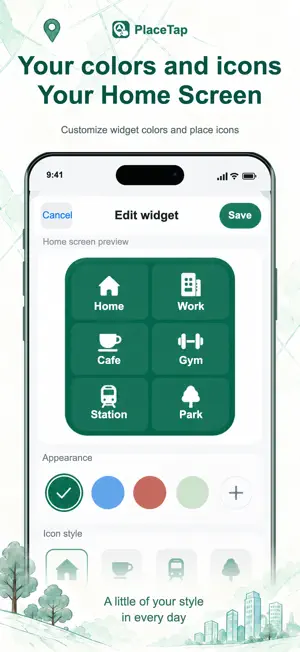
Your usual places, ready on your home screen. PlaceTap saves your destinations and lets you start Google Maps navigation from your iPhone home screen. SAVE A PLACE Paste a Google Maps share link or save your current location. START FROM YOUR HOME SCREEN Use a widget for one or several places, or a shortcut you can keep in a folder. Choose driving or walking for each widget or shortcut. MAKE IT YOURS Customize icons, labels and colors. Adjust widget transparency, text size and icon size. KEEP THINGS ORGANIZED Group your places, widgets and shortcuts so they are easy to find. On iPhone, add widgets using the Home Screen controls. For a separate place icon, use Apple's Shortcuts app to add it to the Home Screen; you can export a custom icon from PlaceTap. Saving a configuration does not add it to the Home Screen automatically. Widget appearance follows iOS display rules. No account required. No ads. Your saved places stay on your device. The free version lets you use your 3 earliest saved places and their widgets and shortcuts. Later places stay saved but are locked. Pro unlocks all places. Try Pro free for 7 days Every Pro feature is available during the trial. No payment details are required, and there is no auto-renewal. PlaceTap Pro is an optional one-time in-app purchase that removes the place limit. No subscription. Restore Pro with the same App Store account. Terms of Use (EULA): https://www.apple.com/legal/internet-services/itunes/dev/stdeula/
What’s new
Version 1.0.6 · Updated October 16, 2026
Preview places on an embedded Apple map and fine-tune the pin when saving your current location or entering coordinates. In Backup, export places and groups as a JSON file, or import one to add only what's missing without changing existing places. New “Rate on the App Store” option, more accurate current location (refined for up to 20 seconds), and remembered group filters. Places, groups, widget and shortcut configurations, settings and the trial record can now be restored from iCloud or computer backups.
App privacy
The developer, CHOYOWORKS, reported these privacy practices to Apple.
Data Not Collected
The developer does not collect any data from this app.
Alternatives to PlaceTap - Map & Nav Widgets
Looking for apps like PlaceTap - Map & Nav Widgets? Here are 6 similar apps on the App Store. The highest rated is Triplink - Editable trip plans (5.0/5), and all 6 are free to download.
-
 Tripik – Travel Planner
-
 Car GPS
1.0
-
 ForTravel
-
 Triplink - Editable trip plans
5.0
-
 Pin Points Distance Calculator
4.5
-
 Route-Finder
3.9
| App | Rating | Price | Last updated | Compare |
|---|---|---|---|---|
| PlaceTap - Map & Nav Widgets | – | Free | October 16, 2026 | |
| Tripik – Travel Planner | – | Free | Jul 10, 2026 | Compare |
| Car GPS | 1.0 / 5 (1) | Free | Jun 18, 2026 | Compare |
| ForTravel | – | Free | Feb 18, 2026 | Compare |
| Triplink - Editable trip plans | 5.0 / 5 (1) | Free | Dec 9, 2025 | Compare |
| Pin Points Distance Calculator | 4.5 / 5 (356) | Free | Oct 16, 2026 | Compare |
| Route-Finder | 3.9 / 5 (42) | Free | Feb 5, 2024 | Compare |