

Localhost Web Server & Files
Sahana A S Developer Tools iPhoneiPadiPod touch
Localhost Web Server & Files is a free Developer Tools app for iPhone and iPad by Sahana A S. Requires iOS 15.0. Updated October 20, 2026.
- Price
- Free
- on the App Store
- Size
- 49 MB
- Age 17+
- Updated
- Oct 20
- 2026 · v1.0.8
Screenshots

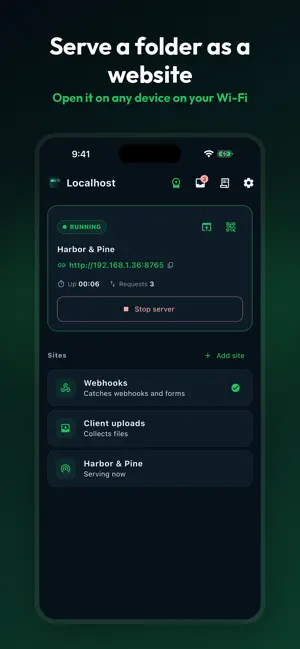

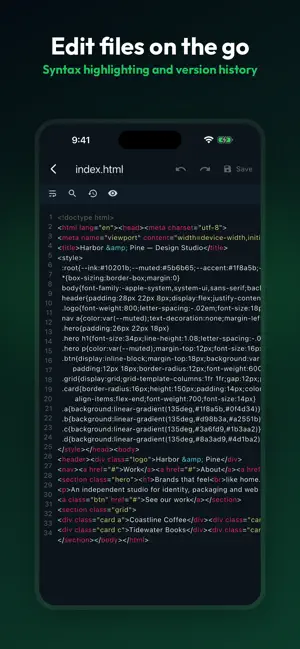
About Localhost Web Server & Files
HostPilot turns your iPhone or iPad into a small web server on your own Wi-Fi network. Point any browser on the same network at the address it gives you. FILE DROP Open HostPilot, start a File Drop, and any phone, tablet or computer on your Wi-Fi can open the page and send files straight to your device. Nothing leaves your network. No cable, no account, no cloud service in the middle. Scan the QR code to open the page instantly on another device. SERVE A FOLDER AS A SITE Import a folder of HTML, CSS and JavaScript, or write one in the built-in editor, and HostPilot serves it the way a real web server would: • index.html auto-serve and directory listing you can switch off • Live reload, so edits show up in the browser as you save • Single-page-app fallback for React, Vue and Angular builds • Range requests, so video seeks and resumes properly • Custom 404 pages, CORS headers and gzip • Correct ETag, Last-Modified and 304 handling REQUEST INSPECTOR Point a webhook or an API client at your device and watch requests arrive: method, path, headers and body, captured as they land. Useful when you are building something that has to call you back. BUILT-IN EDITOR Syntax highlighting, find and replace, and version history for every file in a site, so you can fix a line and see the result without leaving the app. ON IPAD Open HostPilot beside Safari in Split View. Both stay on screen, so you can edit a file on one side and reload the page on the other. HOW SERVING WORKS HostPilot serves while the app is on screen. When you leave the app, iOS suspends it and the server stops — HostPilot tells you it paused and brings it back with one tap when you return. Keep the app open while you are transferring files or previewing a site. HOSTPILOT PRO • Serve several sites and choose your own port • Password-protect a site with a username and password • Choose whether a site is reachable from the network or from this device only • Browser uploads into a running site • No ads SUBSCRIPTION AND PRICING • HostPilot Pro Lifetime — $19.99, one payment • HostPilot Pro Monthly — $1.99 per month, renews automatically • HostPilot Pro Annual — $9.99 per year, renews automatically • Payment is charged to your Apple Account at confirmation of purchase • A subscription renews unless it is cancelled at least 24 hours before the end of the current period • Manage or cancel anytime in your Apple Account settings Terms of Use (EULA): https://www.apple.com/legal/internet-services/itunes/dev/stdeula/ Privacy Policy: https://cosmovex.web.app/apps/hostpilot/privacy-policy Questions: [email protected]
What’s new
Version 1.0.8 · Updated October 20, 2026
• Limited-time Pro offers: when a sale is on, the lower price shows right on the upgrade screen. • Fixes and stability improvements.
App privacy
The developer, Sahana A S, reported these privacy practices to Apple.
Data Not Linked to You
The following data, which may be collected but is not linked to your identity, may be used for the following purposes:
- Usage Data: Product Interaction, Advertising Data
Used for: Analytics
Alternatives to Localhost Web Server & Files
Looking for apps like Localhost Web Server & Files? Here are 6 similar apps on the App Store. The highest rated is Expose HTTP Server (5.0/5), and all 6 are free to download.
-
 Static Server
-
 Expose HTTP Server
5.0
-
 JS Shell
-
 HTML Web Preview: JS CSS JSON
-
 ChibyooShell
-
 Zone Editor: CloudLog
| App | Rating | Price | Last updated | Compare |
|---|---|---|---|---|
| Localhost Web Server & Files | – | Free | October 20, 2026 | |
| Static Server | – | Free | Sep 16, 2026 | Compare |
| Expose HTTP Server | 5.0 / 5 (1) | Free | Sep 11, 2026 | Compare |
| JS Shell | – | Free | Apr 28, 2026 | Compare |
| HTML Web Preview: JS CSS JSON | – | Free | Oct 5, 2026 | Compare |
| ChibyooShell | – | Free | Sep 23, 2026 | Compare |
| Zone Editor: CloudLog | – | Free | Aug 25, 2026 | Compare |