

Matelo: Photo Borders
Flame Lion Ltd Photo & Video iPhoneiPadiPod touch
Matelo: Photo Borders is a free Photo & Video app for iPhone and iPad by Flame Lion Ltd. Requires iOS 18.0. Updated October 10, 2026.
- Price
- Free
- on the App Store
- Size
- 2 MB
- Age 4+
- Updated
- Oct 10
- 2026 · v1.1.0
Screenshots

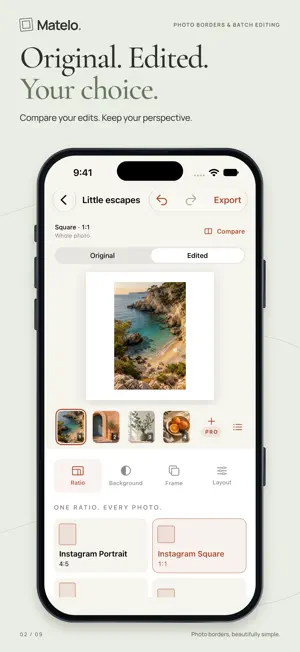


About Matelo: Photo Borders
Keep the whole moment. Matelo gives your photos room to breathe. Add clean borders, soft blur or a background color that belongs with the picture. Choose a shape, apply one look across a batch, and share new copies with every edge of the original intact. A SHAPE FOR EVERY SHARE Choose familiar names, including Instagram Square, Portrait, Landscape and Story / Reel, Pinterest Pin and YouTube Thumbnail. You also get Tall Portrait, Classic Photo, Standard Landscape and custom ratios. Matelo exports still photos; canvas shape and export resolution are separate choices. ONE LOOK. EVERY PHOTO. Style up to five photos together for free. Set a shared ratio and background, then adjust individual photos when they need a different touch. Keep the whole photo, or crop, rotate and position it. Reorder your batch and return to locally saved projects. BACKGROUNDS THAT FEEL RIGHT Add black, white or custom-color borders. Soften the background with blur, or choose Auto to match a color from each original photo. Automatic matching happens on your device and is included free. COMPARE YOUR CREATION See Original and Edited side by side when there is room, or switch between them in the same preview. Check the untouched imported photo against your current edits, including individual styles. Compare is optional and included free on iPhone and iPad. A STUDIO THAT ADAPTS On iPhone Duo with iOS 27.1 or later, partially fold your device to place the preview above or beside the controls. Your selected photo and edits stay with you as the layout changes. Opening or closing the device never turns comparison on automatically. MAKE IT YOUR OWN Preview 18 premium frames across Paper, Instant, Film, Gallery and Creative collections. Explore Double Mat, Shadow Box, Corner Mounts, Postage, Washi Tape and Split Tone, alongside paper, instant-photo and film-inspired looks. Premium frame exports and paper backgrounds require Matelo Pro. YOUR FAVORITES, REMEMBERED Set your default frame width, padding, ratio, background and export choices once. New batches start with those settings, even after you close the app. Reset to factory defaults whenever you want; existing projects keep their edits. READY TO SHARE Export JPEG, PNG or HEIF in Social size or Native detail. Choose sRGB or Display P3 for SDR, or preserve HDR highlights from HDR originals in HEIF. Save copies to Photos or share files with other apps. HDR appearance depends on the display and receiving app; large export dimensions depend on device capacity. FREE TO START Five-photo batches. All ratios. Clean borders. Solid, blur and automatic backgrounds. Compare, Duo Studio, persistent editing defaults, local projects and every export format. No watermarks. No ads. A LIFETIME OF PRO One optional purchase unlocks all 18 premium frames, paper backgrounds, saved presets and batches with no app-imposed photo-count limit. Large batches depend on available device storage and processing time; receiving apps may have their own limits. One-time purchase. No subscription. Preview premium styles before upgrading, or switch to free styles when exporting. Restore your purchase using the same Apple Account. YOUR PHOTOS STAY WITH YOU Edit on your iPhone or iPad, without creating an account. Your original library photos stay untouched. Matelo is an independent app and is not affiliated with Instagram, Meta, Pinterest or YouTube. Terms of Use: https://www.apple.com/legal/internet-services/itunes/dev/stdeula/
What’s new
Version 1.1.0 · Updated October 10, 2026
Introducing Duo Studio and Compare, both included free. • Compare your original photo with your current edits. See both side by side when space allows, or switch between Original and Edited. • On iPhone Duo with iOS 27.1 or later, partly fold your device to place the preview above or beside your editing controls. • Keep your selected photo, edits and comparison choice as you fold, rotate or resize. Your existing projects, editing defaults and Matelo Pro purchase stay with you.
App privacy
The developer, Flame Lion Ltd, reported these privacy practices to Apple.
Data Not Collected
The developer does not collect any data from this app.
Alternatives to Matelo: Photo Borders
Looking for apps like Matelo: Photo Borders? Here are 6 similar apps on the App Store. The highest rated is Squarify - Posts With No Crop (5.0/5), and all 6 are free to download.
-
 FotoCollage: Collage Maker
-
 JamPhotos: Batch Photo Editor
-
 Squarify - Posts With No Crop
5.0
Squarify - Posts With No Crop
5.0
-
 Mobile Darkroom: Film & RAW
-
 New Year Photo Frame 2024
5.0
New Year Photo Frame 2024
5.0
-
 Batch Photo Borders - Batchpad
5.0
Batch Photo Borders - Batchpad
5.0
| App | Rating | Price | Last updated | Compare |
|---|---|---|---|---|
| Matelo: Photo Borders | – | Free | October 10, 2026 | |
| FotoCollage: Collage Maker | – | Free | Sep 8, 2026 | Compare |
| JamPhotos: Batch Photo Editor | – | Free | Oct 16, 2026 | Compare |
| Squarify - Posts With No Crop | 5.0 / 5 (3) | Free | Oct 6, 2025 | Compare |
| Mobile Darkroom: Film & RAW | – | Free | Oct 12, 2026 | Compare |
| New Year Photo Frame 2024 | 5.0 / 5 (2) | Free | Oct 28, 2024 | Compare |
| Batch Photo Borders - Batchpad | 5.0 / 5 (11) | Free | Oct 29, 2026 | Compare |