

Hueby Pixel Color by Number
Whizbang Games iPhoneiPadiPod touch
Hueby Pixel Color by Number is a free Games app for iPhone and iPad by Whizbang. Requires iOS 18.0. Updated October 20, 2026.
- Price
- Free
- on the App Store
- Size
- 11 MB
- Age 4+
- Updated
- Oct 20
- 2026 · v1.5.0
Screenshots


About Hueby Pixel Color by Number
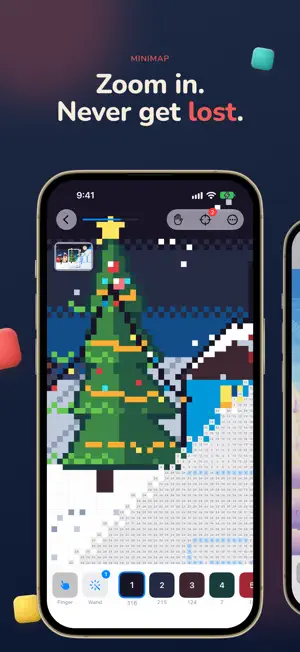
No ads, no accounts. Just color in peace. Start free, buy only the packs you want, and add the optional Studio subscription if you'd like unlimited photo imports. Turn your own photos into pixel art you color one square at a time: your pet as a game sprite, a selfie in retro 8-bit, a holiday snap in crayon colors. Or pick one of the hand-made pictures and watch it come together. IMPORT STUDIO Turn a photo into a picture you can color. Choose a Look and a frame, set the detail and the number of colors, lift the subject off its background, and add dithering if you like. You get one free import every week. The optional Studio subscription gives you unlimited imports and all 26 Studio Looks, with more added in updates: • Sprite: Hero, Boss and Sticker turn your pet or a person into a game sprite with a crisp outline • Retro: nine classic console and computer palettes, from Pocket to Super • Seasonal: Spooky, Festive and Sweetheart • Craft: Crayons, Beads and Bricks • Mood and Art: Sunset, Neon, Blueprint, Pop and more It also adds three more fill sounds: Wood, Marimba and Glass. PRIVATE BY DESIGN No accounts and no tracking. Photos are chosen through Apple's photo picker and converted on your device. Hueby sees only the image you pick, and nothing is uploaded. HAND-MADE PIXEL PACKS Retro 16-bit pictures in hand-made themed packs. The Starter pack is free; the other packs are one-time purchases, so you buy only the ones you want. A new small picture arrives free every day. PAINTING TOOLS Brush, Bucket and Wand make big areas quick: the Brush paints three squares wide, the Bucket fills a whole joined area of one number, and the Wand fills every square left of the chosen number. Each tool has a free try, and each is its own one-time purchase. They are not part of the Studio. MADE FOR CALM, CAREFUL COLORING • Tap or drag to fill squares • Squares waiting for the selected color are highlighted, so none get missed • Find Next brings the nearest unfilled square to the middle of the screen • The Minimap shows the whole picture while you zoom in close • Move the picture with the Hand button, or by touching and holding IPHONE AND IPAD Hueby runs on iPhone and iPad, and is ready for iOS 27. On iPad, Apple Pencil paints while your fingers pan and zoom, and a double-tap on Pencil selects the next unfinished color. GALLERY Finished pictures collect in your gallery, ready to share. STUDIO SUBSCRIPTION The Studio is an optional auto-renewing subscription, available as a weekly, monthly or yearly plan. The yearly plan starts with a 7-day free trial for new subscribers. When it ends, the yearly price is charged unless you cancel at least 24 hours before. Payment is charged to your Apple Account at confirmation of purchase. The subscription renews automatically unless it is cancelled at least 24 hours before the end of the current period, and your account is charged for renewal within 24 hours before the period ends. You can manage or cancel your subscription at any time in your Account Settings on the App Store. Packs and painting tools are one-time purchases and do not renew. Terms of Use: https://www.apple.com/legal/internet-services/itunes/dev/stdeula/ Privacy Policy: https://whizbangapps.github.io/Hueby/privacy
What’s new
Version 1.5.0 · Updated October 20, 2026
• Studio free trial: Hueby now reminds you 2 days before your yearly trial ends, and the plans show the trial end date and renewal price up front. • See what Reimagine can do with before-and-after examples on the Studio plans and in the Studio tab, now with bigger Choose a photo and Take a photo buttons. • Follow Hueby on Instagram and Threads from Settings. • Small fixes and improvements.
App privacy
The developer, Whizbang, reported these privacy practices to Apple.
Data Not Collected
The developer does not collect any data from this app.
Alternatives to Hueby Pixel Color by Number
Looking for apps like Hueby Pixel Color by Number? Here are 6 similar apps on the App Store. The highest rated is Color by number: Fun Pixel Art (5.0/5), and all 6 are free to download.
-
 Connect Dots Art Go
-
 PicNum: Paint by Number
3.0
PicNum: Paint by Number
3.0
-
 Numbrush - Color by Number
3.5
Numbrush - Color by Number
3.5
-
 Color by number: Fun Pixel Art
5.0
Color by number: Fun Pixel Art
5.0
-
 PixelZen: AI Color by Number
5.0
PixelZen: AI Color by Number
5.0
-
 Tilemist
| App | Rating | Price | Last updated | Compare |
|---|---|---|---|---|
| Hueby Pixel Color by Number | – | Free | October 20, 2026 | |
| Connect Dots Art Go | – | Free | May 23, 2026 | Compare |
| PicNum: Paint by Number | 3.0 / 5 (1) | Free | Oct 16, 2026 | Compare |
| Numbrush - Color by Number | 3.5 / 5 (2) | Free | Aug 27, 2026 | Compare |
| Color by number: Fun Pixel Art | 5.0 / 5 (1) | Free | May 25, 2026 | Compare |
| PixelZen: AI Color by Number | 5.0 / 5 (7) | Free | Oct 3, 2026 | Compare |
| Tilemist | – | Free | Sep 2, 2026 | Compare |