

Kana Typing
昶 黄 Education iPhoneiPadiPod touch
Kana Typing is a free Education app for iPhone and iPad by 昶 黄. Requires iOS 17.0. Updated November 6, 2026.
- Price
- Free
- on the App Store
- Size
- 4 MB
- Age 12+
- Updated
- Nov 6
- 2026 · v1.3.0
Screenshots
Save to Pinterest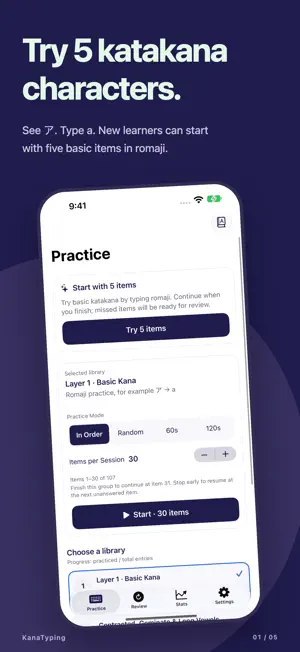


About Kana Typing
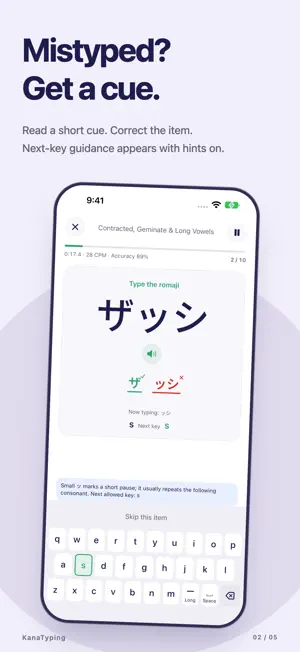
See ア. Type a. Practice katakana with romaji input, starting with five basic characters if you are new. Finish a group, then continue where you left off. FROM CHARACTERS TO WORDS Explore four built-in word banks: basic kana, combinations, loanwords, and Japanese vocabulary. Basic kana, combinations, and Japanese vocabulary use romaji answers. The loanword bank practices original English words, such as コーヒー → coffee. GET FEEDBACK AS YOU TYPE See feedback for each key and short cues after mistakes. Next-key guidance appears when hints are enabled. Choose romaji conventions and long-vowel rules to suit your practice. Pronunciation uses the system's Japanese speech resources. FOCUS ON LONG VOWELS AND SMALL ッ Choose a focused group of five questions. Before starting, see an input example that follows your settings and tap to hear its pronunciation. Repeat the group or revisit missed items. Focused practice updates item mastery and history while preserving your ordinary sequential practice position. CONTINUE OR REPEAT Sequential practice saves your place when you finish or manually end a session. Continue after the items already completed, or repeat the same group without moving your saved place. Random, timed, and mistake-review sessions are also available. Previously missed items leave the current weak-item list after three consecutive first-try successes; past records are preserved. FOLLOW YOUR PROGRESS Review accuracy, typing speed, practice trends, and kana learning states. Progress and settings stay on your device. START WITHOUT AN ACCOUNT The current version is free, with no ads, in-app purchases, or subscriptions. Word banks are bundled and core practice works offline. Speech availability depends on the voice resources installed on your device. Made for iPhone and iPad. For content corrections or help, visit the support page.
What’s new
Version 1.3.0 · Updated November 6, 2026
• New focused practice for long vowels (ー) and small ッ: five romaji questions per group. • See a real input example that follows your current settings, and tap to hear its pronunciation before starting. • Repeat the same group or revisit missed items. Focused practice updates learning history and item mastery without moving your sequential practice position or changing bank best scores. • Fixed manual pronunciation when automatic speech for new prompts is off, and corrected a long-vowel category label. • Fixed some long-vowel items ignoring the hyphen-only or repeated-vowel setting. This version remains free, with no ads, in-app purchases, or subscriptions.
App privacy
The developer, 昶 黄, reported these privacy practices to Apple.
Data Not Collected
The developer does not collect any data from this app.
Alternatives to Kana Typing
Looking for apps like Kana Typing? Here are 6 similar apps on the App Store.


| App | Rating | Price | Last updated | Compare |
|---|---|---|---|---|
| Kana Typing | – | Free | November 6, 2026 | |
| Kana Speed Drill | – | Free | Sep 1, 2026 | Compare |
| Flick Fu: Kana Typing Training | – | Free | Mar 5, 2026 | Compare |
| 漢字書き取り判定 実践編 脳を鍛える | – | Free | Aug 11, 2026 | Compare |
| らくらくベトナム語 | – | Free | Oct 5, 2026 | Compare |
| スマート敬語 | – | Free | Jul 24, 2024 | Compare |
| Roma-ji Robo. | – | Free | Jul 28, 2026 | Compare |
Compare Kana Typing with the top alternatives: ratings, updates, ASO score and keyword gaps →