

AppLimiter Screen Time Control
Pawel Garbarz Productivity iPhoneiPadiPod touch
AppLimiter Screen Time Control is a free Productivity app for iPhone and iPad by Pawel Garbarz. Requires iOS 18.0. Updated September 23, 2026.
- Price
- Free
- on the App Store
- Size
- 7 MB
- Age 4+
- Updated
- Sep 23
- 2026 · v1.1
Screenshots


About AppLimiter Screen Time Control
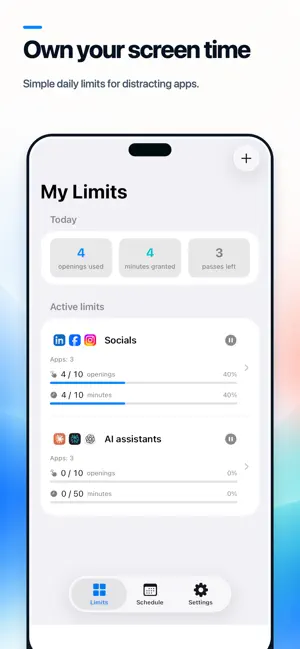
AppLimiter helps you break automatic scrolling by limiting how often distracting apps can be opened - not just how long they can be used. Use it for yourself, or protect the settings with a PIN when setting limits for your child. Traditional screen-time limits fade into the background. AppLimiter puts a deliberate pause at the door. Before access is granted, you see how many opens remain and decide whether the session is worth one. HOW IT WORKS Choose apps or categories, set a daily number of opens, and decide how long each session lasts. When a session ends, close the app or spend another opening to continue. When the budget is empty, selected apps stay blocked until the next daily reset. BUILD LIMITS THAT FIT YOUR LIFE • Daily opening budgets for individual apps or entire categories • Session lengths from 1 to 60 minutes • PIN-protected settings for parent-managed limits • Separate limits for weekdays, weekends or custom days • Cooldowns to prevent immediately reopening an app • Blocked hours for sleep, school, work, or focused time • Friction mode adds a short delay before an opening is used • Always Allowed list for essential apps • Emergency passes for moments that genuinely need one • Daily goals, streaks, and weekly progress reports FOR YOURSELF OR YOUR CHILD Use AppLimiter to build healthier habits on your own device, or enable PIN protection when setting limits for your child. Protected rules and settings cannot be changed inside AppLimiter without entering the PIN. DESIGNED TO RESIST IMPULSE AppLimiter uses Apple’s Screen Time technology to enforce limits, even when AppLimiter is not open. Self-managed limits require a deliberate typed confirmation to change, so one impulsive tap cannot undo your plan. PRIVATE BY DESIGN No account. No sign-up. No ads. No analytics. No backend servers. Your settings stay on the iPhone, and selected apps are handled through Apple’s privacy-preserving Screen Time framework. REQUIREMENTS AppLimiter requires Screen Time authorization to apply limits. You grant it once during setup and can revoke it at any time in Settings. Requires iOS 26 or later.
What’s new
Version 1.1 · Updated September 23, 2026
AppLimiter 1.1 makes your limits easier to follow—and harder to bypass. • Protect limits and settings with a secure 6-digit parental-control PIN. • Set a custom cooldown for each limit to prevent immediate reopening after a session. • Receive clearer notifications when sessions end or daily limits are reached. • Set separate sleep hours for weekdays and weekends. • Follow your iPhone’s language automatically, or choose a language manually. • Enjoy more reliable blocking screens, timers, translations, and permission handling. Thank you for using AppLimiter!
App privacy
The developer, Pawel Garbarz, reported these privacy practices to Apple.
Data Not Collected
The developer does not collect any data from this app.
Alternatives to AppLimiter Screen Time Control
Looking for apps like AppLimiter Screen Time Control? Here are 6 similar apps on the App Store. The highest rated is StoicLock: Focus & App Blocker (5.0/5), and all 6 are free to download.
-
 Screen Time Blocker - Otama
-
 Merit: Screen Time Blocker
-
 StoicLock: Focus & App Blocker
5.0
StoicLock: Focus & App Blocker
5.0
-
 Website Blocker: Focus & Block
-
 FocusRabbit: Screen Time Detox
5.0
FocusRabbit: Screen Time Detox
5.0
-
 IO-Risparmio
| App | Rating | Price | Last updated | Compare |
|---|---|---|---|---|
| AppLimiter Screen Time Control | – | Free | September 23, 2026 | |
| Screen Time Blocker - Otama | – | Free | Aug 24, 2026 | Compare |
| Merit: Screen Time Blocker | – | Free | Aug 27, 2026 | Compare |
| StoicLock: Focus & App Blocker | 5.0 / 5 (2) | Free | May 24, 2026 | Compare |
| Website Blocker: Focus & Block | – | Free | Mar 23, 2026 | Compare |
| FocusRabbit: Screen Time Detox | 5.0 / 5 (1) | Free | Oct 13, 2026 | Compare |
| IO-Risparmio | – | Free | Jun 8, 2026 | Compare |