

Ultracal: Lock Screen Calendar
Andrey Dyuzhov Productivity iPhoneiPadiPod touch
Ultracal: Lock Screen Calendar is a free Productivity app for iPhone and iPad by Andrey Dyuzhov. Requires iOS 26.0. Updated November 14, 2026.
- Price
- Free
- on the App Store
- Size
- 33 MB
- Age 4+
- Updated
- Nov 14
- 2026 · v1.0
Screenshots
Save to Pinterest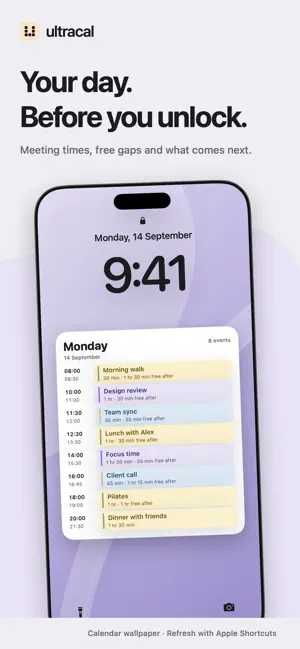


About Ultracal: Lock Screen Calendar
See your meetings on your Lock Screen. Turn your day, week or month into a calendar wallpaper, with meeting times and events in view. Add separate Home Screen widgets for your schedule, tasks and notes. YOUR SCHEDULE, TOGETHER Connect Apple Calendar or sign in to Google Calendar. Choose the calendars you want and bring them together in one view. Google access is read-only; Ultracal does not edit your calendar events. A LOCK SCREEN WITH YOUR PLANS Choose a background and a layout: a day schedule, a week or month with events, a task list or a note. Large calendar layouts are wallpaper images. Refresh them with the Ultracal shortcut, or follow the guide to set up optional morning and evening automations in Apple Shortcuts. The image keeps its previous content until a refresh succeeds. Follow setup to keep your Home background separate. WIDGETS FOR THE WAY YOU PLAN Choose small, medium or large Home Screen layouts for your next event, agenda, calendar, tasks and notes. Add compact Lock Screen widgets for your next event, an open task or your latest note. Small and large layouts are separate widgets. Choose light or dark themes for supported layouts. A CLEAR DAY STILL LOOKS AHEAD The Day schedule shows upcoming meetings with their dates when today is free. Hide event titles in supported layouts when you want a more private view. NOTES AND TASKS YOU KEEP Write and edit notes, manage a checklist, and see your completed tasks in Task activity. These are the tasks you complete in Ultracal. Capture a thought with the optional voice-note shortcut: Apple Dictation turns your words into text, and Ultracal saves the note. INCLUDED AT LAUNCH Apple Calendar, Google Calendar, multiple selected calendars, widgets, wallpapers, notes and tasks are included in the free initial release. There is no subscription or in-app purchase. Calendar access is needed to display events. Google Calendar requires Google authorization. Widget placement and refresh timing are controlled by iOS. Personal automations are optional and created by you in Shortcuts. No Ultracal account is required.
App privacy
The developer, Andrey Dyuzhov, reported these privacy practices to Apple.
Data Not Collected
The developer does not collect any data from this app.
Alternatives to Ultracal: Lock Screen Calendar
Looking for apps like Ultracal: Lock Screen Calendar? Here are 6 similar apps on the App Store. The highest rated is NowCue: Daily Planner (5.0/5), and all 6 are free to download.
-
 Stilltask: Lock Screen Tasks
-
 Context: Calendar & Planner
-
 Locumku
-
 PlainNotes Offline
-
 NowCue: Daily Planner
5.0
-
 Daily Habit Tracker: HabitFlow
| App | Rating | Price | Last updated | Compare |
|---|---|---|---|---|
| Ultracal: Lock Screen Calendar | – | Free | November 14, 2026 | |
| Stilltask: Lock Screen Tasks | – | Free | Nov 2, 2026 | Compare |
| Context: Calendar & Planner | – | Free | Nov 25, 2026 | Compare |
| Locumku | – | Free | Nov 12, 2026 | Compare |
| PlainNotes Offline | – | Free | Jun 15, 2026 | Compare |
| NowCue: Daily Planner | 5.0 / 5 (1) | Free | Jun 6, 2026 | Compare |
| Daily Habit Tracker: HabitFlow | – | Free | Oct 27, 2026 | Compare |