

Universal Scanner - PDF Scans
Himhuu Co., Ltd. Productivity iPhoneiPadiPod touch
Universal Scanner - PDF Scans is a free Productivity app for iPhone and iPad by Himhuu Co., Ltd. Requires iOS 17.0. Updated November 9, 2026.
- Price
- Free
- on the App Store
- Size
- 4 MB
- Age 4+
- Updated
- Nov 9
- 2026 · v1.3
Screenshots


About Universal Scanner - PDF Scans
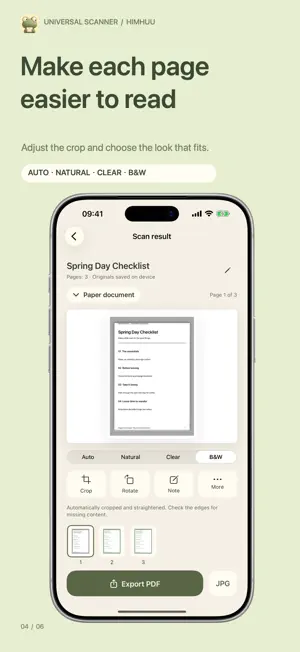
Turn paper documents, IDs and cards into scans you can review, organize and export. Universal Scanner lets you start with the camera—no document type to choose first. Capture, text recognition and image processing happen on your iPhone. CAPTURE WITH MORE CONFIDENCE Get live hints about lighting, edges and movement. When a document is centered, steady and small in the frame, automatic zoom can gently move in up to about 2× while leaving space around the document. A green check appears when framing is steady; the camera continues to focus. You can turn it off or adjust zoom yourself. Digital zoom does not add detail, so move closer when the document is too far away. The edge guide waits for consistent observations to reduce jumping. CROP AND STRAIGHTEN After capture, the app tries to find the document edges, leave a safety margin and correct flat-page perspective, adding a slim white border around the scan. Drag the four corners to refine the crop, inspect the straightened preview, or keep the full image. If a reliable edge is not found, the full photo stays intact. Your original photo is kept, and a failed edit does not replace a usable scan. ORGANIZE AND EXPORT On-device text recognition and rules help distinguish paper documents, ID cards, household registers and other cards. You can correct the document type. Add photos or more pages, reorder and rotate them, then choose Auto, Natural, Clear or Black & White. Search scans by name and export JPEG images or image-based, multipage PDFs. Unfinished pages are never silently omitted. SAVE AND ADD A NOTE Save directly to Photos from the image viewer, or save every page at once. Add a custom note to a page as a repeating diagonal watermark to state its intended use. Notes are included in saved images and exported PDFs, can be edited or removed, and leave the original intact. A note does not guarantee tamper protection or legal enforceability. YOUR CONTENT, YOUR CHOICE Scanning and text recognition do not require uploading content to Himhuu. There is no account, advertising, subscription or in-app purchase. Originals and scans are stored in the app. Saving to Photos and any iCloud Photos sync, downloads from system photo services, device backups, and sharing or feedback that you initiate are handled by the services you choose. Detection, cropping and quality checks are not always accurate. Review every page before use. Editable text, Word/DOCX export, cloud sync and curved-book-page flattening are not supported. PDFs fit pages onto A4 paper; ID cards are not printed at guaranteed actual size. Support: [email protected] Privacy: https://himhuu.com/apps/universal-scanner/privacy Terms: https://himhuu.com/apps/universal-scanner/terms
What’s new
Version 1.3 · Updated November 9, 2026
A green check appears when framing is steady, with fewer distracting changes during minor movement or brief edge-detection gaps. Continuous focus keeps adjusting for close-up captures. Improved document type detection reduces cases where paper is mistaken for a card; you can correct the type when needed. Reduced crop margins and preview borders while retaining a small safety margin.
App privacy
The developer, Himhuu Co., Ltd., reported these privacy practices to Apple.
Data Not Collected
The developer does not collect any data from this app.
Alternatives to Universal Scanner - PDF Scans
Looking for apps like Universal Scanner - PDF Scans? Here are 6 similar apps on the App Store. The highest rated is Zebra: Markdown Knowledge Base (5.0/5), and 5 of the 6 are free to download.
-
 PDFSwift
-
 FixLog
-
 Zebra: Markdown Knowledge Base
5.0
-
 Burn List: To-Do & Reminders
-
 Stilo - Typewriter Notes
5.0
-
 Orange Cat: Markdown Editor
| App | Rating | Price | Last updated | Compare |
|---|---|---|---|---|
| Universal Scanner - PDF Scans | – | Free | November 9, 2026 | |
| PDFSwift | – | Free | Nov 13, 2026 | Compare |
| FixLog | – | Free | May 30, 2026 | Compare |
| Zebra: Markdown Knowledge Base | 5.0 / 5 (1) | Free | Nov 15, 2026 | Compare |
| Burn List: To-Do & Reminders | – | Free | Nov 9, 2026 | Compare |
| Stilo - Typewriter Notes | 5.0 / 5 (1) | 0.99 USD | Nov 10, 2026 | Compare |
| Orange Cat: Markdown Editor | – | Free | Nov 6, 2026 | Compare |