

GPS Camera Pro: Map & Geotag
Shrey Pinnada Photo & Video iPhoneiPadiPod touch
GPS Camera Pro: Map & Geotag is a free Photo & Video app for iPhone and iPad by Shrey Pinnada. Requires iOS 17.0. Updated October 21, 2026.
- Price
- Free
- on the App Store
- Size
- 24 MB
- Age 4+
- Updated
- Oct 21
- 2026 · v1.1.2
Screenshots



About GPS Camera Pro: Map & Geotag
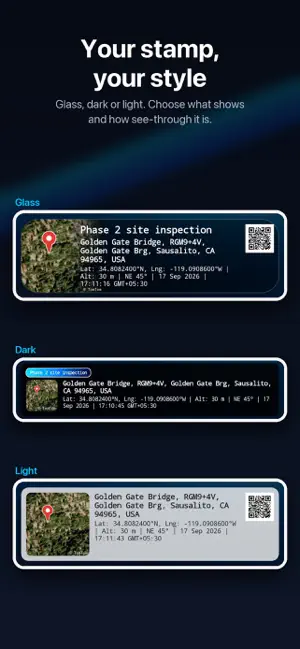
GPS Camera Pro turns every photo into proof of where and when it was taken. The street address, GPS coordinates, date and time, and a real satellite map are stamped straight onto the image the moment you press the shutter. It is built for people whose photos have to hold up: site engineers, contractors, surveyors, insurance and loan field officers, property inspectors, and anyone who has to show they were really there. LOCATION STRAIGHT FROM YOUR IPHONE On iPhone, apps cannot feed a fake location into the system. iOS provides the location itself, so a photo's coordinates come from the device, not from an app pretending. If iOS reports that the location is being simulated, the camera will not capture at all. The accuracy of the current fix is shown on screen before you shoot, so you know how good it is rather than guessing. WHAT GETS STAMPED ON YOUR PHOTO - Full street address, looked up automatically - Latitude and longitude, to seven decimal places - Satellite map of the exact spot, with a pin - Date and time, in 12 or 24 hour format, with time zone - Altitude above sea level - Compass direction you were facing, in degrees - Your project name or note, such as a site name, case number or stage - Location QR code that opens the spot in any maps app (Pro) - Your company logo (Pro) WHY A VISIBLE STAMP MATTERS Location data hidden inside a photo file can be removed in seconds, and most apps and chat services strip it when you share. A stamp on the image itself stays readable on any phone or computer, in any report, with no special software. Pair that with the coordinates, time and satellite map and you get a record that is hard to dispute. BUILT FOR FIELD WORK - Construction and site progress photos, stage by stage - Property, home and address verification visits - Loan, KYC and business verification field checks - Insurance surveys and claim documentation - Government and public works project photos - Land, farm and survey records - Delivery, installation and service proof - Real estate listings and inspections HOW IT WORKS 1. Open the app and wait for the green GPS indicator. 2. Add a project name or note if you need one. 3. Frame your shot and tap the shutter. 4. The stamped photo is saved and ready to share or attach to a report. A PROPER CAMERA - Tap to focus, with an exposure slider for bright or dark scenes - Pinch to zoom, with quick 1x and 2x buttons - Flash, front camera and selfie mirror - Works in portrait and landscape, and the stamp fits both - Live GPS accuracy indicator, so you know the fix is good before you shoot - Photos save to their own album in your photo library - Built in gallery to review, share or delete your captures MAKE THE STAMP YOUR OWN Free photos use the Standard overlay, with every detail above. Pro unlocks the Glass and Sleek templates, light or dark, where the overlay sits, how see through it is, and which details appear. Set it up once and every photo follows. FREE AND PRO The free version includes the address, coordinates, satellite map, date and time, altitude and compass. Pro removes ads, adds your project title and notes, company logo and location QR code, and lets you hide the watermark. Pro is a subscription billed through your Apple Account, and you can cancel any time in Settings. PRIVACY Your photos stay on your iPhone. We do not upload them. Location is used only while you are using the camera, to stamp your photos. See our privacy policy for full details. GOOD TO KNOW - GPS works without an internet connection. The street address and satellite map need data to load. - Location and camera access are needed to capture stamped photos. - Accuracy depends on your device and sky view. Stepping outdoors gives the best fix. Terms of Use: https://shreypinnada.github.io/gpscampro-legal/terms.html Privacy Policy: https://shreypinnada.github.io/gpscampro-legal/privacy-policy.html Download GPS Camera Pro and take photos that prove where and when.
What’s new
Version 1.1.2 · Updated October 21, 2026
• Improved reliability: the street address stays on your photos even with a weak connection • Bug fixes and performance improvements
App privacy
The developer, Shrey Pinnada, reported these privacy practices to Apple.
Data Used to Track You
The following data may be used to track you across apps and websites owned by other companies:
- Identifiers: Device ID
Data Linked to You
The following data, which may be collected and linked to your identity, may be used for the following purposes:
- Purchases: Purchase History
- Identifiers: User ID
Used for: App Functionality
Data Not Linked to You
The following data, which may be collected but is not linked to your identity, may be used for the following purposes:
- Identifiers: Device ID
- Usage Data: Product Interaction
- Location: Coarse Location
- Diagnostics: Crash Data
Used for: Third-Party Advertising, Analytics, App Functionality
Alternatives to GPS Camera Pro: Map & Geotag
Looking for apps like GPS Camera Pro: Map & Geotag? Here are 6 similar apps on the App Store. The highest rated is GPS Camera: Photo Proof (5.0/5), and all 6 are free to download.
-
 GPS Camera : Location Tracker
-
 GPS Map Camera: Ad-Free
-
 GeoStamp Cam: GPS Photo Video
-
 Timestamp Camera: GPS & Date
-
 GPS Camera: Photo Proof
5.0
GPS Camera: Photo Proof
5.0
-
 Timestamp Camera: Photo, Video
| App | Rating | Price | Last updated | Compare |
|---|---|---|---|---|
| GPS Camera Pro: Map & Geotag | – | Free | October 21, 2026 | |
| GPS Camera : Location Tracker | – | Free | Oct 28, 2026 | Compare |
| GPS Map Camera: Ad-Free | – | Free | Oct 3, 2026 | Compare |
| GeoStamp Cam: GPS Photo Video | – | Free | Oct 14, 2026 | Compare |
| Timestamp Camera: GPS & Date | – | Free | Oct 14, 2026 | Compare |
| GPS Camera: Photo Proof | 5.0 / 5 (1) | Free | Oct 11, 2026 | Compare |
| Timestamp Camera: Photo, Video | – | Free | Feb 7, 2026 | Compare |