

CapDrive
官朝 吴 Utilities iPhoneiPadiPod touch
CapDrive is a free Utilities app for iPhone and iPad by 官朝 吴. Rated 5.0/5 from 2 ratings. Requires iOS 17.0. Updated October 18, 2026.
- Rating
- 5.0
- 2 ratings
- Price
- Free
- on the App Store
- Size
- 36 MB
- Age 4+
- Updated
- Oct 18
- 2026 · v1.2.0
Screenshots


About CapDrive
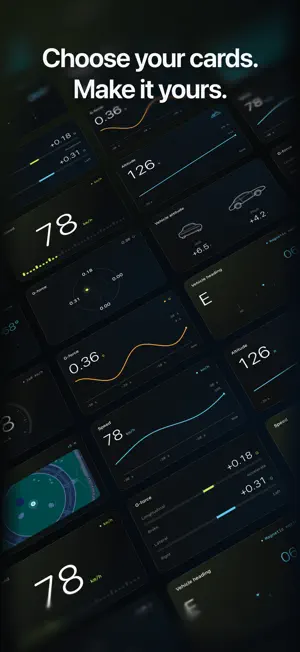
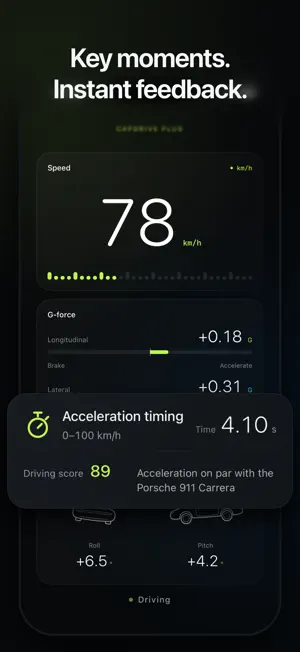
Turn your iPhone into a customizable driving dashboard. View GPS speed, G-force, vehicle attitude, heading and altitude. Arrange your instruments in portrait or landscape, record trips automatically and review routes and driving data. Trip records stay on your device and are not uploaded automatically. HUD on your windshield Switch to HUD mirror mode to reflect instrument readings onto the windshield, using your dashboard layout. Choose whether HUD automatically raises screen brightness in Settings. Visibility depends on ambient light, glass and device. Secure your phone and finish setup before driving. Find trips by date, explore every drive Browse your trip history in a calendar. Review a full-screen route map and drag the data panel to explore trip summaries, the timeline and readings after you park. Basic instruments and trip review are free. CapDrive Plus unlocks more instrument styles and detailed G-force, attitude and driving-event playback. Choose a monthly auto-renewing subscription or a one-time lifetime unlock. See in-app pricing. Purchases and restoration require internet access; restoring purchases does not restore local trip records. Secure your phone and configure the app before driving. Readings depend on the device, mounting and GPS reception; they are for reference and do not replace vehicle instruments. Background location may increase battery use. Manage or cancel your subscription in your Apple account settings. Privacy Policy: https://legal.capdrive.app Terms of Use: https://www.apple.com/legal/internet-services/itunes/dev/stdeula/
What’s new
Version 1.2.0 · Updated October 18, 2026
Fixed known issues and improved performance and stability for a better user experience.
App privacy
The developer, 官朝 吴, reported these privacy practices to Apple.
Data Used to Track You
The following data may be used to track you across apps and websites owned by other companies:
- Purchases: Purchase History
- Identifiers: User ID, Device ID
- Usage Data: Product Interaction
Data Linked to You
The following data, which may be collected and linked to your identity, may be used for the following purposes:
- Purchases: Purchase History
- Identifiers: User ID, Device ID
- Usage Data: Product Interaction
- Location: Precise Location
- Diagnostics: Other Diagnostic Data
Used for: Third-Party Advertising, Developer’s Advertising or Marketing, Analytics, App Functionality
Data Not Linked to You
The following data, which may be collected but is not linked to your identity, may be used for the following purposes:
- Other Data: Other Data Types
Used for: Analytics
Alternatives to CapDrive
Looking for apps like CapDrive? Here are 6 similar apps on the App Store. The highest rated is Freed: Photo Cleaner (5.0/5), and all 6 are free to download.
-
 Apexing - Smart Drive Recorder
-
 Caryo - Fuel & Maintenance
-
 AFOO
AFOO
-
 JZS EPager
-
 PoliteKey
-
 Freed: Photo Cleaner
5.0
Freed: Photo Cleaner
5.0
| App | Rating | Price | Last updated | Compare |
|---|---|---|---|---|
| CapDrive | 5.0 / 5 (2 ratings) | Free | October 18, 2026 | |
| Apexing - Smart Drive Recorder | – | Free | Oct 1, 2026 | Compare |
| Caryo - Fuel & Maintenance | – | Free | Sep 20, 2026 | Compare |
| AFOO | – | Free | Oct 9, 2026 | Compare |
| JZS EPager | – | Free | Sep 8, 2026 | Compare |
| PoliteKey | – | Free | Jun 22, 2026 | Compare |
| Freed: Photo Cleaner | 5.0 / 5 (1) | Free | Oct 2, 2026 | Compare |
Compare CapDrive with the top alternatives: ratings, updates, ASO score and keyword gaps →