

SayWire
Jostein Dyrseth Productivity iPhoneiPadiPod touchApple Watch
SayWire is a free Productivity app for iPhone and iPad by Jostein Dyrseth. Requires iOS 18.0. Updated October 18, 2026.
- Price
- Free
- on the App Store
- Size
- 12 MB
- Age 4+
- Updated
- Oct 18
- 2026 · v1.1.0
Screenshots
Save to Pinterest

About SayWire
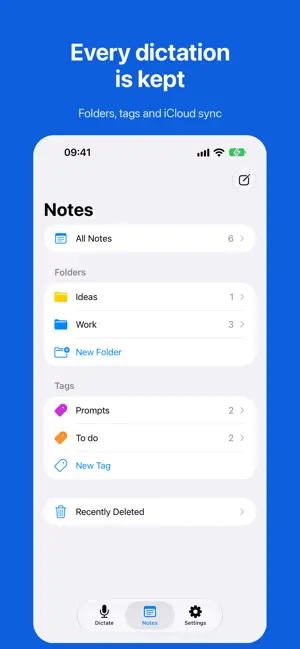
SayWire turns your Apple Watch, iPhone and iPad into a keyboard for your Mac. Speak, and the text lands on your Mac's clipboard, or straight into the app you're using, in about a second. PERFECT FOR • Prompting Claude, ChatGPT, Cursor or your terminal without sitting down • Capturing an idea while you walk, cook or pace • Anyone who thinks faster than they type HOW IT WORKS 1. Install the free SayWire app on your Mac from saywire.pages.dev 2. Scan the pairing code with your iPhone or iPad. Your Apple Watch pairs automatically through your iPhone. 3. Tap Dictate on your Watch, iPhone or iPad, or say "Send with SayWire" to Siri. Done. FAST AND PRIVATE • Local Wi‑Fi first: text goes straight from your iPhone or iPad to your Mac and never leaves your network • When you're away, it travels end-to-end encrypted through our small relay. Only your devices can read it. • No account needed, no analytics, no tracking. Speech recognition is Apple's, on your device. EVERY DICTATION IS KEPT • Everything you say is saved in Notes first, so nothing is lost when your Mac is asleep or closed • Folders, color tags, pins, search and editing, with the original dictation always kept • Syncs through your private iCloud; export as Markdown any time • Notes work on their own, even without a Mac MADE FOR APPLE WATCH • One-tap Dictate button, complication, Smart Stack and Control Center control • Action button on Apple Watch Ultra, Double Tap while the app is open • Press ⌃⌥⌘D on your Mac to start dictation on your Watch ON IPAD • Dictate with your recent dictations beside you, and Notes with folders and tags in a sidebar • Portrait or landscape, at full width FOR POWER USERS • Optional auto-paste into the active Mac app • Raycast extension and a local API on your Mac • Works alongside clipboard managers FEEDBACK • Suggest features, report bugs, vote on ideas and join the beta on the in-app feedback board (Settings > Feedback). Optional and free. PRICING Free download with a free 14-day trial of everything. After that, sending to your Mac is a one-time purchase, not a subscription. Notes stay free forever. The Mac app is free. Requires a Mac running macOS 15 or later with the free SayWire for Mac app. Terms of Use: https://www.apple.com/legal/internet-services/itunes/dev/stdeula/ Privacy Policy: https://saywire.pages.dev/privacy
What’s new
Version 1.1.0 · Updated October 18, 2026
SayWire now runs on iPad. Dictate with your recent dictations beside you, keep Notes in a sidebar, and pair the iPad with your Mac just like an iPhone. New feedback board: suggest features, report bugs, vote on ideas and join the beta from Settings > Feedback. It is optional and free. The Mac app now needs macOS 15 or later. Download the update from saywire.pages.dev.
App privacy
The developer, Jostein Dyrseth, reported these privacy practices to Apple.
Data Linked to You
The following data, which may be collected and linked to your identity, may be used for the following purposes:
- Contact Info: Name
- User Content: Photos or Videos, Customer Support, Other User Content
- Identifiers: User ID
- Diagnostics: Other Diagnostic Data
Used for: App Functionality
Alternatives to SayWire
Looking for apps like SayWire? Here are 6 similar apps on the App Store. The highest rated is tebDictate: Dictate to PC/Mac (5.0/5), and 5 of the 6 are free to download.
-
 Copy That: Voice to Desktop
-
 Daily Reset: Done & Dusted
-
 Checklist – Systems & Routines
-
 Today Planned: Right on Time
4.9
-
 tebDictate: Dictate to PC/Mac
5.0
-
 TypeWhisper App
3.4
| App | Rating | Price | Last updated | Compare |
|---|---|---|---|---|
| SayWire | – | Free | October 18, 2026 | |
| Copy That: Voice to Desktop | – | Free | Oct 5, 2026 | Compare |
| Daily Reset: Done & Dusted | – | Free | Nov 19, 2026 | Compare |
| Checklist – Systems & Routines | – | Free | Jan 20, 2026 | Compare |
| Today Planned: Right on Time | 4.9 / 5 (32) | 1.99 USD | Nov 25, 2026 | Compare |
| tebDictate: Dictate to PC/Mac | 5.0 / 5 (2) | Free | Nov 3, 2026 | Compare |
| TypeWhisper App | 3.4 / 5 (5) | Free | Nov 21, 2026 | Compare |
Compare SayWire with the top alternatives: ratings, updates, ASO score and keyword gaps →