

Eco: Budget & Spending
Fayzali Saidov Finance iPhoneiPadiPod touch
Eco: Budget & Spending is a free Finance app for iPhone and iPad by Fayzali Saidov. Requires iOS 26.0. Updated September 27, 2026.
- Price
- Free
- on the App Store
- Size
- 6 MB
- Age 4+
- Updated
- Sep 27
- 2026 · v1.0.2
Screenshots



About Eco: Budget & Spending
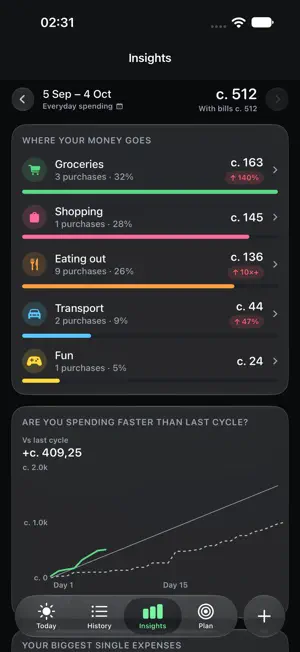
Eco does not bury you in charts and does not ask to connect your bank. It answers one question: how much can you spend today and still make it to the end of the month. ONE NUMBER THAT HEALS ITSELF Overspend on Tuesday and Wednesday's number is smaller. Come in under and it grows. Rent, savings and money you owe are held back before the number is worked out, so what is left really is yours to spend. THREE SECONDS TO LOG An amount, a category, done. There is a calculator in the amount field for the times you are splitting a bill or counting three taxis. BILLS ARE RESERVED, NOT FORGOTTEN Rent is held back from day one of the cycle, so it cannot be spent on groceries by accident. A one-off payment gets a date and a reminder. A BALANCE THAT CARRIES OVER Finish a month up or down and the next one opens there. No month-end ritual, nothing to reset. BUILT FOR HOW MONEY ACTUALLY WORKS Somoni. A salary that lands on a payday rather than the 1st. Money lent to people you know, and money borrowed from them. YOUR MONEY STAYS YOURS Eco has no server. There is nowhere for us to keep your data, because we never receive it. Every figure is worked out on the device. The only copy goes to your own iCloud. No sign-up, no analytics, no advertising, no third-party code. ECO PREMIUM Logging, your daily number, the plan and Insights are free and stay free. The subscription adds goals, debts, Siri and suggestions, a passcode on the app, iCloud backup and export to a spreadsheet. The subscription renews automatically; cancel any time in iPhone Settings. Terms of Use (EULA): https://www.apple.com/legal/internet-services/itunes/dev/stdeula/ Privacy Policy: https://eco.tj/en/privacy
What’s new
Version 1.0.2 · Updated September 27, 2026
• A new entry screen: big Expense and Income buttons, and the Add button always sits above the keyboard. The screen no longer freezes if you pull it down a little. • A clearer Savings card: see how much is put aside and what each percentage comes to. • Paid-off debts no longer disappear: they stay under “Paid off”, where you can archive or delete them. • A new income card in Plan: what you expect, what has arrived so far, and what is still to come. • In light mode the clock and battery at the top of the screen are visible again. • Fixed hints shown before a budget is set up, and smaller fixes.
App privacy
The developer, Fayzali Saidov, reported these privacy practices to Apple.
Data Not Collected
The developer does not collect any data from this app.
Alternatives to Eco: Budget & Spending
Looking for apps like Eco: Budget & Spending? Here are 6 similar apps on the App Store.
-
 mnybrn: money manager
-
 Pilo: Budget & Expense Tracker
-
 Pulsar Wallet
-
 Tengerim
-
 Fuku - money manager
-
 Kapitallo - Учёт расходов
| App | Rating | Price | Last updated | Compare |
|---|---|---|---|---|
| Eco: Budget & Spending | – | Free | September 27, 2026 | |
| mnybrn: money manager | – | Free | Oct 24, 2025 | Compare |
| Pilo: Budget & Expense Tracker | – | Free | Aug 11, 2026 | Compare |
| Pulsar Wallet | – | Free | Sep 25, 2026 | Compare |
| Tengerim | – | Free | Sep 18, 2026 | Compare |
| Fuku - money manager | – | Free | Sep 9, 2026 | Compare |
| Kapitallo - Учёт расходов | – | Free | Oct 10, 2026 | Compare |