

Senecta
Senecta Inc. Utilities iPhoneiPadiPod touch
Senecta is a free Utilities app for iPhone and iPad by Senecta Inc. Requires iOS 16.4. Updated October 22, 2026.
- Price
- Free
- on the App Store
- Size
- 44 MB
- Age 4+
- Updated
- Oct 22
- 2026 · v1.0.8
Screenshots


About Senecta
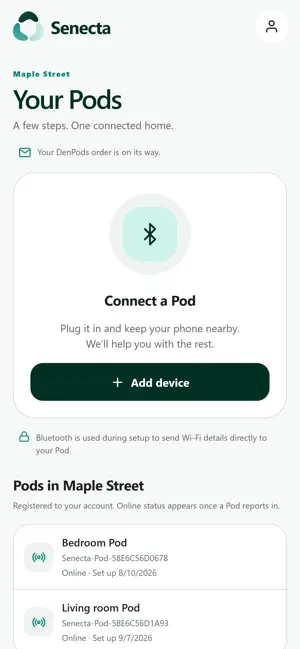
Senecta is the setup app for Senecta Pods. It does one job, and does it in a couple of minutes: get a Pod out of the box, into the right room of the right home, and connected. FOR HOME CARE AGENCIES Employees sign in on the Agency tab with the work account their agency issued. The app lists the homes their agency cares for, so a Pod can be placed in a client’s home and labelled by room without the client creating an account or touching a setting. Agencies get their accounts at senecta.ai. WHAT SETUP LOOKS LIKE - Sign in with a work email and password, or with a one-time email code for a personal account. - Plug the Pod in and let the app find it over Bluetooth. - Choose the home and the room. - Pods with built-in cellular are finished at that point: no Wi-Fi needed. For a Wi-Fi Pod, scan the QR code on the router label or paste the password from your phone’s settings. - Confirm that the Pod reports itself connected. It works like pairing a speaker. Wi-Fi credentials travel directly to the Pod over an encrypted Bluetooth session; they are not stored in the app and never reach Senecta’s servers. A Senecta Pod is required, and either a work account from an agency that uses Senecta or a personal account created with the email address the Pod was bought with. This app configures Pods. It is not an emergency service and not a medical device, it does not diagnose, treat or prevent any condition, and it does not show live monitoring data.
What’s new
Version 1.0.8 · Updated October 22, 2026
Updated Senecta app terms: everyone accepts them for themselves. The person who receives care now signs them in the app with a finger, on their own phone or on a family member’s or caregiver’s, after reading them on screen or hearing them read aloud; a legal representative can sign for them. A home’s Sensors go on once it is signed.
App privacy
The developer, Senecta Inc., reported these privacy practices to Apple.
Data Linked to You
The following data, which may be collected and linked to your identity, may be used for the following purposes:
- Purchases: Purchase History
- Contact Info: Email Address, Name
- Identifiers: User ID
Used for: App Functionality
Alternatives to Senecta
Looking for apps like Senecta? Here are 6 similar apps on the App Store. The highest rated is Pushover Notifications (4.8/5), and all 6 are free to download.
-
 BALTECH Mobile ID
-
 SpeedyBee App
3.3
SpeedyBee App
3.3
-
 Tally Counter & Habit Tracker
4.7
Tally Counter & Habit Tracker
4.7
-
 Pushover Notifications
4.8
Pushover Notifications
4.8
-
 Desktop Browser
4.4
Desktop Browser
4.4
-
 Second Phone Number: Calling
4.3
Second Phone Number: Calling
4.3
| App | Rating | Price | Last updated | Compare |
|---|---|---|---|---|
| Senecta | – | Free | October 22, 2026 | |
| BALTECH Mobile ID | – | Free | Aug 12, 2026 | Compare |
| SpeedyBee App | 3.3 / 5 (121) | Free | Oct 27, 2026 | Compare |
| Tally Counter & Habit Tracker | 4.7 / 5 (373) | Free | Oct 22, 2026 | Compare |
| Pushover Notifications | 4.8 / 5 (3,895) | Free | Sep 11, 2026 | Compare |
| Desktop Browser | 4.4 / 5 (16,060) | Free | Aug 20, 2026 | Compare |
| Second Phone Number: Calling | 4.3 / 5 (920) | Free | Oct 18, 2026 | Compare |
Compare Senecta with the top alternatives: ratings, updates, ASO score and keyword gaps →