

Cinetone
Andrii Cheberiako Photo & Video iPhoneiPadiPod touch
Cinetone is a free Photo & Video app for iPhone and iPad by Andrii Cheberiako. Rated 5.0/5 from 1 ratings. Requires iOS 26.0. Updated October 10, 2026.
- Rating
- 5.0
- 1 ratings
- Price
- Free
- on the App Store
- Size
- 9 MB
- Age 4+
- Updated
- Oct 10
- 2026 · v1.3
Screenshots


About Cinetone
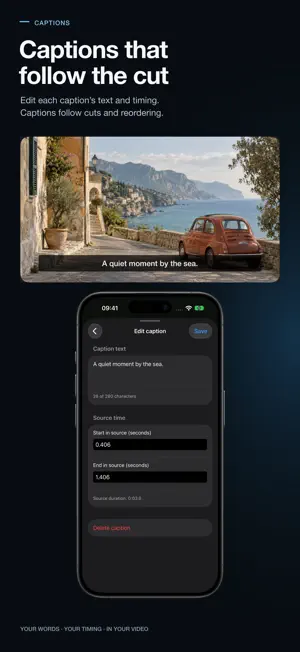
Edit the video. Shape the color. Cinetone is an iPhone video editor and cinematic color studio. Arrange multiple clips, refine each shot, build a soundtrack, add captions, and export a finished video—or create a color-only LUT for another editing workflow. EDIT ON A MULTI-CLIP TIMELINE Trim, split, move, and reorder clips. Reframe, rotate, or flip footage. See waveforms, trim added audio clips, adjust their volume individually, and keep original sound separate from added music. Editing is nondestructive: Cinetone works with its own local copies, leaving source files untouched. ADD CAPTIONS Create and edit captions for individual source clips, set their text and timing, and control whether they appear. Captions stay attached to their original clip as you trim, split, or reorder the timeline. Add them manually or generate them from speech in a selected original clip when the device, language, and Apple speech model support it. Model downloads may be required; transcription runs on device. Review captions before export. Enabled captions are burned into the video, never included in a LUT. MAKE THE COLOR YOURS Start with 20 original cinematic looks, including Golden Hour, Soft Portrait, Teal Shadow, and Rich Mono, plus three open community looks. Compare your grade with neutral Rec.709 and adjust exposure, warmth, tint, contrast, saturation, intensity, and fade. Import your own .cube LUTs from Files after choosing the matching input profile; imported LUTs output SDR Rec.709. HANDLE LOG AND HDR SOURCES Import supported Rec.709, Apple Log, Apple Log 2, and color-tagged HLG or PQ footage. HLG and PQ are converted to SDR Rec.709 for preview and video export. Cinetone does not export HDR video. EXPORT FOR YOUR NEXT STEP Export an H.264 MP4 or HEVC MP4 when supported, with SDR Rec.709 color and supported mono or stereo audio. Choose up to 1080p or 4K and up to 30 fps or the source frame cadence. Smaller sources are never upscaled. Export a 33-point or 65-point .cube LUT to carry color into a compatible workflow. Save videos to Photos with add-only access, share them, or save them in Files. SUGGESTIONS WITH YOU IN CONTROL Explore 20 looks and get on-device scene suggestions with a deterministic fallback. Where available, optional Apple Private Cloud Compute requires explicit opt-in on iOS 27 or later. Only disclosed scene metrics and look-catalog text are sent; your video, frames, and audio stay on device. Suggestions never apply a look or change your export automatically. USE SHORTCUTS, NO ACCOUNT Use Siri and Shortcuts to apply or recommend looks, explore cinematic looks, and export graded video. Find looks and imported presets with iOS Spotlight. No Cinetone account is required. Requires iOS 26 or later. iPhone only.
What’s new
Version 1.3 · Updated October 10, 2026
New in 1.3: Import tagged HLG and PQ footage and grade it in SDR Rec.709 for preview and video export. Add and edit source-linked captions, or generate them from speech on supported devices and languages. Save finished videos directly to Photos with add-only access. The interactive Cinetone tour now lets you explore editing, color, audio, captions, privacy, and export in an optional practice.
App privacy
The developer, Andrii Cheberiako, reported these privacy practices to Apple.
Data Not Collected
The developer does not collect any data from this app.
Alternatives to Cinetone
Looking for apps like Cinetone? Here are 6 similar apps on the App Store. The highest rated is Pocket Log Camera (5.0/5), and all 6 are free to download.
-
 Stilluna
-
 Develop Log: Color Grading
-
 Lightscope — Video Grading
-
 Pocket Log Camera
5.0
Pocket Log Camera
5.0
-
 Lupo - Film Emulsion Camera
5.0
Lupo - Film Emulsion Camera
5.0
-
 Filmos - Analog Camera & Video
| App | Rating | Price | Last updated | Compare |
|---|---|---|---|---|
| Cinetone | 5.0 / 5 (1 rating) | Free | October 10, 2026 | |
| Stilluna | – | Free | Apr 7, 2026 | Compare |
| Develop Log: Color Grading | – | Free | Oct 29, 2026 | Compare |
| Lightscope — Video Grading | – | Free | Aug 11, 2026 | Compare |
| Pocket Log Camera | 5.0 / 5 (1) | Free | Oct 31, 2026 | Compare |
| Lupo - Film Emulsion Camera | 5.0 / 5 (1) | Free | Sep 21, 2026 | Compare |
| Filmos - Analog Camera & Video | – | Free | Oct 19, 2026 | Compare |
Compare Cinetone with the top alternatives: ratings, updates, ASO score and keyword gaps →